
Every other proxy vendor usually brags about the stealth, speed, and the success rate. But what is actually important is the cost per valid result. The money you spend on these proxies for each page to arrive complete. Data center and residential proxies are used to hide the IP address of a user.
In this article, we will provide a comparison between datacenter and residential proxy servers. Follow six real-world cases and choose the one that fits your requirements.
Strip away branding: only one detail separates the three proxy classes — the network that owns the exit IP.
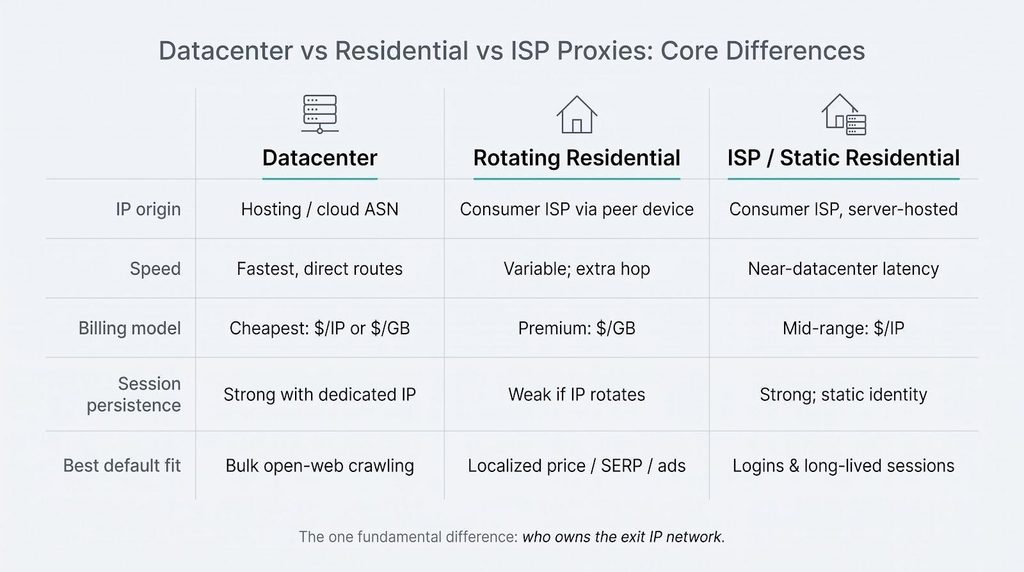
Datacenter proxies route traffic through cloud hosts such as AWS or DigitalOcean. Threat-intelligence feeds label their IP ranges as hosting, so well-protected sites can block them on sight. The upside is cost: providers advertise sub-$1-per-GB bandwidth and near-gigabit throughput on many plans (see Bright Data’s datacenter proxy introduction).
Residential proxies borrow a real consumer connection. Because the IP belongs to a home ISP, basic origin checks see a normal laptop or phone. You pay for that disguise. Vendor list prices usually run $4–$15 per GB, and success still depends on the peer device’s uptime, according to Bright Data.
ISP (static residential) proxies sit in the middle. The address is issued by a consumer ISP but hosted on professional servers, giving you datacenter-like stability plus a residential label. Pools are much smaller, generally tens of thousands of IPs instead of millions, and sold one by one rather than by bandwidth.
Picture three outfits for the same request:
Datacenter wears a business suit everyone recognises, residential slips on a tourist’s hoodie to blend in, and ISP opts for a smart-casual jacket, credible enough for VIP access and sturdy enough for hours-long sessions.
With the costumes defined, the next step is to test the options and identify which option survives real-world workloads at the lowest cost per valid page.
Vendor charts, Reddit threads, and glossy case studies all look impressive, until you identify that they measure different things. According to Proxyway’s lab, success rates swing wildly when you change the target site or payload, so a 99 percent badge on one network can mean something very different on another. Use the five checkpoints below as one neutral yardstick.
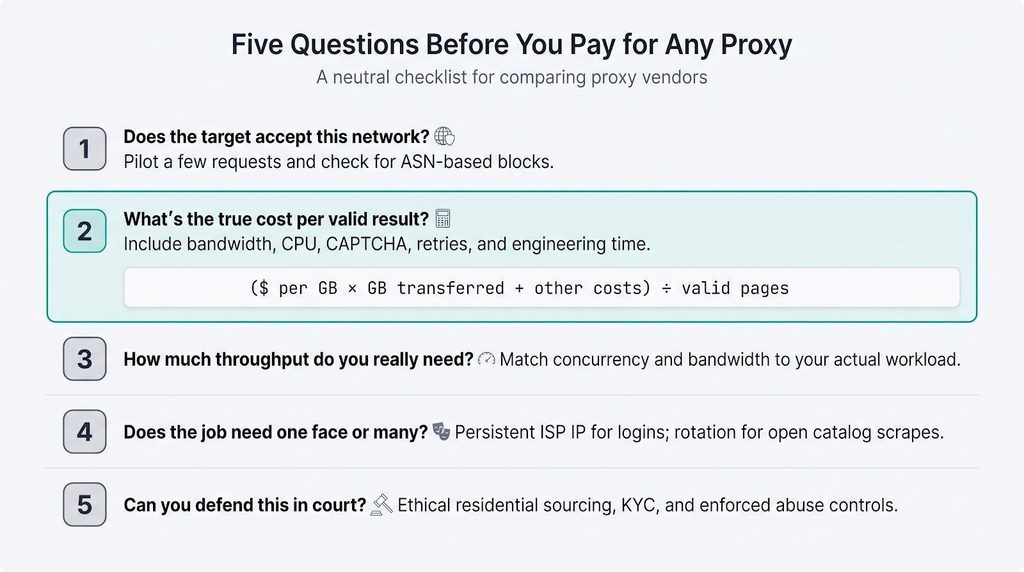
Hold vendors to these five questions, and no glossy chart can fool you. Next, we’ll park the three proxy types side by side to see where each one shines.
The table below compares speed, cost, stability, detection risk, and typical workloads in one quick scan. We will pressure-test every claim in the six use-case sections that follow.
| Attribute | Datacenter | Rotating residential | ISP / static residential |
| IP origin | Hosting or cloud ASN | Consumer ISP, peer device | Consumer ISP, server-hosted |
| Raw speed | Fastest, direct server routes | Variable; extra hop through peer | Near-datacenter latency |
| Typical billing model | Lowest sticker: $ per IP or GB | Highest sticker: $ per GB | Mid-range: $ per IP |
| Geo granularity | Country level; limited cities | Broadest city/ZIP coverage | Fewer cities; pool tens of thousands, not millions |
| Session persistence | Strong with dedicated IP | Weak if IP rotates per request | Strong by design (static) |
| Detection risk | Highest on protected sites | Lower IP risk; still fingerprinted | Lower than datacenter; some DB disagreement |
| Supply-chain risk | Clear infrastructure ownership | Highest, peer consent must be verified (911 S5 case) | Lower than rotating peers; still validate sourcing |
| Best default fit | Bulk open-web crawling | Localised price, SERP, ad checks | Login QA, long-lived sessions |
| Common weak spot | Host ASNs blocked | Bandwidth-heavy jobs | Massive identity diversity needed |
Numbers alone never tell the full story. Proxyway’s benchmarks flip the winner when you modify the target or payload, which is why the next sections pair the table with field-tested scenarios so you can match the right column to the job in front of you.
Shared or rotating datacenter plans often cost $0.60–$1.50 per GB and deliver uptime above 99 percent on reputable hosts. TorGuard’s Premium Anonymous Proxy, for example, charges $14.99 per month for access to 10-gigabit servers in 22 countries and permits up to 15 simultaneous HTTP, SOCKS5, or SSL tunnels. As their proxy vs vpn explained guide points out, a SOCKS5 proxy skips the heavyweight encryption layer of a VPN, keeping latency and per-gigabyte costs low—an edge when you need to shovel millions of pages at speed.
That high concurrency ceiling lets large crawls fan out workers without extra per-connection fees, a factor that can outweigh pennies per gigabyte when you roll the spreadsheet on cost per valid result.
News archives, public documentation, and product sitemaps are low-friction pages that welcome server-farm traffic, serve static HTML, and rarely throw a CAPTCHA. A datacenter proxy is therefore the lowest-cost starting point.
Shared or rotating datacenter plans generally cost $0.60–$1.50 per GB and deliver uptime above 99 percent on reputable hosts. At that rate, a one-million-page crawl at 500 KB each moves about 500 GB and lands near $500. Push the same job through a residential pool billed at $4–$15 per GB and the invoice leaps to $2,000–$7,500 before a single CAPTCHA is solved.
Datacenter IPs stay the bargain only while the target keeps smiling. Watch four early warning signals:
Trip any one alarm and route only that failing endpoint through an ISP or rotating residential address. Let everything else keep sprinting on cheap bandwidth. The rule is simple: stay frugal until it hurts, then switch shoes only for the muddy stretches.
Search the same flight from New York and Madrid, and you will often see two different prices. Retailers, hotels, and ticketing engines personalise offers by city, currency, and even ISP reputation. Send those requests from a hosting ASN and the site may inflate the fare or hide inventory entirely.
Geo-fidelity is therefore important. You need an IP that looks like a real shopper in the target city, complete with a consumer ASN. Shared residential pools meet that requirement: Bright Data, for example, offers country, city, ZIP, and ASN-level targeting across 195 countries.
Coverage alone is not enough. Price audits repeat every week, so the session cannot disappear mid-cart. Static ISP addresses solve this. Proxyway notes that ISP proxies can hold a static session for hours or even days because they are hosted servers, not peer devices. The steady identity lets testers recreate a loyal customer journey, apply vouchers, and check loyalty pricing without triggering fraud alarms.
Practical playbook: sample many cities with rotating residential IPs, then switch to one static ISP IP when the checkout flow needs a steady hand.
Google, Bing, and main social platforms weigh IP origin, TLS fingerprints, cookies, and even scroll speed. Hit them with a hosting-ASN block, and you trigger CAPTCHAs or cloaked results in seconds.
Most serious rank-tracking tools therefore depend on residential IPs, or better yet, a managed SERP API. A consumer ASN calms the first layer of suspicion while the provider manages browser challenges behind the scenes.
Detection now reaches beyond IPs. Cloudflare’s JA4 Signals link TLS handshakes to inter-request behaviour, letting sites track traffic across proxy exchanges if the client fingerprint stays the same. If your scraper cannot mimic a real browser, residential bandwidth turns into expensive mistakes.
Climb this ladder, and you avoid the reflexive “residential or bust” habit, paying for heavy artillery only when lighter tools jam.
Ads, affiliate funnels, and geo-targeted banners can vary by city, ISP, and even cookie state. To prove what renders from Boston to Berlin, you require a consumer IP that stays put for the entire journey.
Begin with a city-by-city sweep. Shared residential pools let you drop into dozens of metros in one run; Bright Data, for instance, offers country, city, ZIP, and ASN-level targeting across 195 locations. Each fresh consumer ASN coaxes the ad server to deliver the local creative. Pages are lightweight, so higher per-GB pricing rarely breaks the budget.
When you identify an odd redirect or a missing consent banner, switch to a static ISP IP. Proxyway notes that ISP proxies can hold a static session for hours or even days because they are hosted servers, not peer devices. One unchanging identity lets you refresh, revisit, and capture HAR files or screenshots that legal teams can replay later without worrying that the IP changed.
For Each Test, Log:
Scan wide with rotating residential IPs, then zoom in with an ISP lens when something looks off. Spend only where accuracy is at stake, not where habit dictates.
Banks, SaaS dashboards, and seller portals flag sudden location changes. Swap IPs mid-session and you trigger fraud alerts, lock accounts, and waste time on support tickets. In this arena, consistency beats scale every time.
Static ISP addresses provide you with a consumer ASN with datacenter stability. The IP never rotates unless you change it, so cookies, fingerprints, and velocity patterns stay aligned. Proxyway’s benchmark found ISP proxies 35 percent quicker than peer-based residential and 25 percent faster than rotating datacenter pools. Speed is nice, but session survival is the real prize.
Internal staging or QA environments sometimes whitelist hosting ASNs. If production explicitly allows datacenter traffic, a dedicated server IP can save money; test once in production to confirm no hidden geo or ASN checks lurk behind the login form.
Rotating residential looks appealing, but a peer can evaporate mid-checkout. That forces a new IP, new TLS fingerprint, and usually a CAPTCHA—the pattern account-protection teams flag. Stick to one static identity, finish the workflow, and your QA report lands clean, not conflicted.
Attackers Mix and Match Origins, And Your Defenders Should, Too
Malware can flock millions of home routers into botnets, card-testing crews hide behind cheap datacenter blocks, and phishing kits cherry-pick mobile IPs to escape velocity rules. Test with only one proxy flavour, and you will see just one slice of that danger landscape.
Run each layer, log the verdicts, and you will discover blind spots from every angle.
Every packet must ride on a written engagement scope:
The 911 S5 takedown showed how “residential” traffic can hide massive abuse: the U.S. Justice Department traced more than 19 million compromised IPs sold as residential proxies before dismantling the botnet in May 2024. Work only with vetted providers and make sure to exercise oversight to protect both your reputation and the unwitting device owners.
Real attackers change masks without warning. A layered proxy approach lets your blue team see those masks before customers do, then fix gaps while stakes are low.
Paying extra for a consumer IP does not ensure a free pass. Modern defences score dozens of clues before an IP even enters the debate. Cloudflare’s JA4 Signals link a TLS handshake to inter-request behaviour, then add mouse cadence, header order, and timing to build a durable threat score. Swap IPs repeatedly; if the fingerprint stays the same, the site still knows it is you.
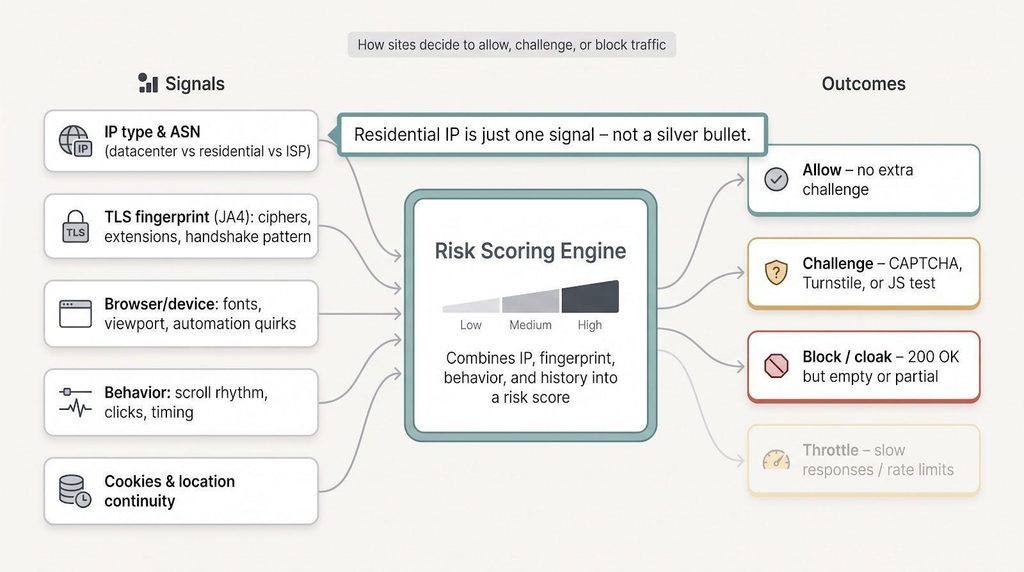
Browsers leave more breadcrumbs: headless Chrome advertises missing fonts, automation libraries fix viewport sizes, and a cookie jar that teleports 3,000 miles between requests grows instant suspicion.
What this means in practice:
Residential IPs are powerful, but they are just one element of a stealth stack that also includes fingerprints, cookies, and behaviour. Treat them as step one, not a silver bullet.
Vendor pages usually blend “static residential,” “ISP,” and “rotating residential” as if they were the same, but they are not.
Rotating residential tunnels through a live consumer device such as a phone, laptop, or IoT gadget. When that owner closes the app or loses Wi-Fi, your exit disappears, and the provider allocates a new peer.
ISP (static residential) proxies skip the peer. The IP is registered to a consumer ISP yet lives on a datacenter server, giving you consumer pedigree plus enterprise uptime. Think of it as business-class comfort at an economy seat price: same destination code, smoother ride.
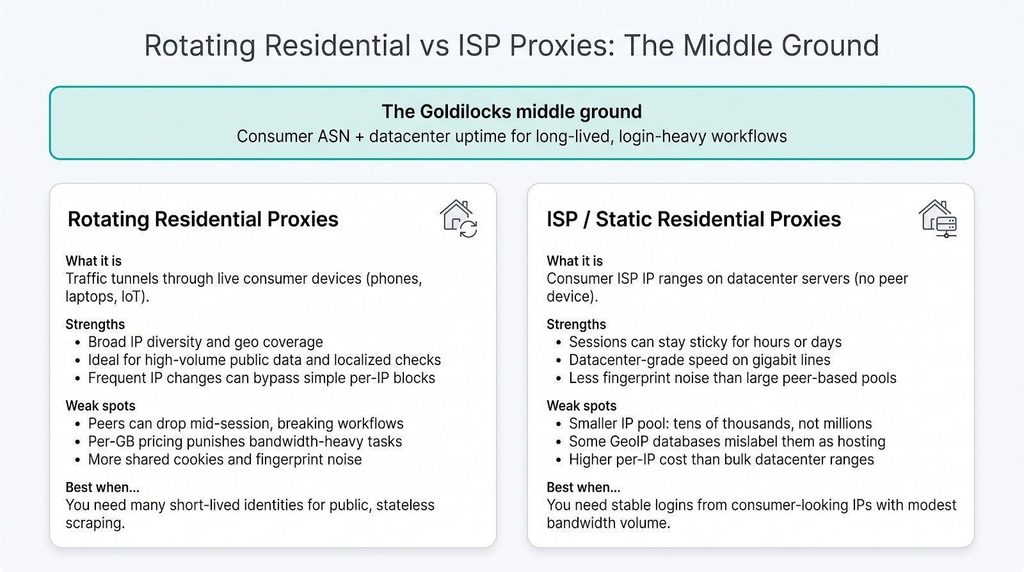
Hit those notes and ISP proxies often outscore both ends of the spectrum: cheaper than per-GB residential, safer than hosting ASNs—a Goldilocks option that fits “just right.”
Proxy tech itself is neutral; how you source IPs and use reports decides whether you gain an edge or face a subpoena.
Follow this checklist and your proxy stack remains an asset, not evidence.
Marketing pages love big numbers; due diligence keeps them honest. Run this seven-step mini-audit before you sign the purchase order.
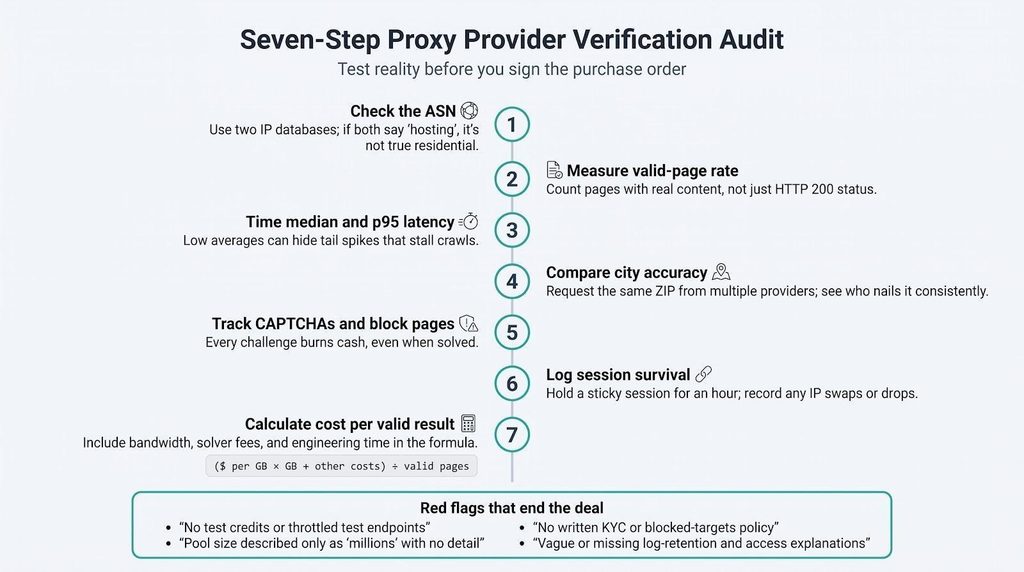
Red flags that end the deal
Spend one afternoon on this checklist, and you will dodge weeks of fire-fighting later. Due diligence is the cheapest insurance your data team can purchase.
You have all the ingredients; now choose the cheapest compliant route in five minutes.
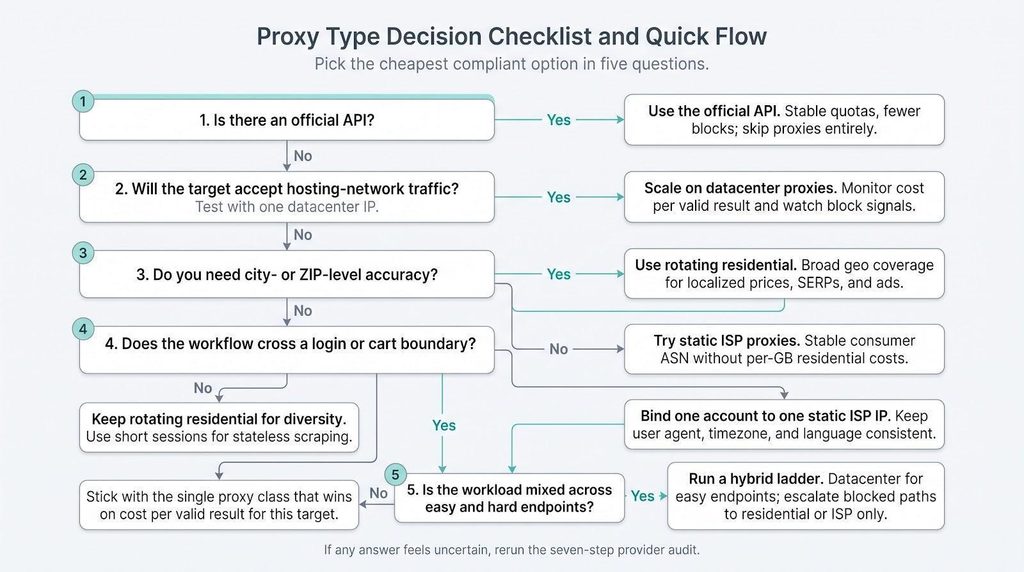
If any box feels uncertain, rerun the seven-step provider audit from the previous section.
Choosing the right proxy is less about marketing claims and more about matching cost per valid result to the task at hand. Begin with the least-expensive option that meets your technical and legal requirements, escalate only when blockers appear, and keep rigorous logs so every decision can be audited later. Follow the playbooks in this article, and you will spend less, succeed more, and stay compliant throughout your data-collection journey.
Ans: Datacenter proxies usually win raw speed because they sit on high-bandwidth servers; however, Proxyway’s benchmark found that ISP proxies outpaced rotating datacenter proxies by 25 percent in the United States, with a median response time of 0.68 s.
Ans: You pay for scarce consumer IP inventory and for the peer device’s bandwidth. The premium makes sense only when fewer blocks offset the extra dollars per gigabyte.
Ans: They share a consumer ASN, but an ISP IP lives on a datacenter server, not a home router—think residential pedigree with datacenter muscle.
Ans: Yes. TLS fingerprints, browser quirks, cookie history, and request rhythm can betray automation even when the IP looks like a home address (see the JA4 section earlier in this guide).
Ans: Only for truly stateless scraping. If a workflow spans login, cart, or multi-step forms, keep one IP for the entire session to avoid fraud flags.
Ans: A larger address space does not remove ASN labels or fingerprint clues. Treat IPv6 as capacity, not invisibility.
Ans: No. A proxy simply forwards requests; encryption depends on the protocol you use, such as HTTPS or SOCKS with TLS.
Ans: The tech is lawful, but misuse, contract breaches, and privacy violations are not—follow the legal and sourcing checklist earlier in this guide.
Ans: Scale pool size to request rate, session length, and cooldown windows; there is no universal ratio. Measure first, then add.
Ans: Provider policies vary. Some block direct Google traffic in raw pools and sell a dedicated SERP API instead—always read the terms before you burn credits.
