
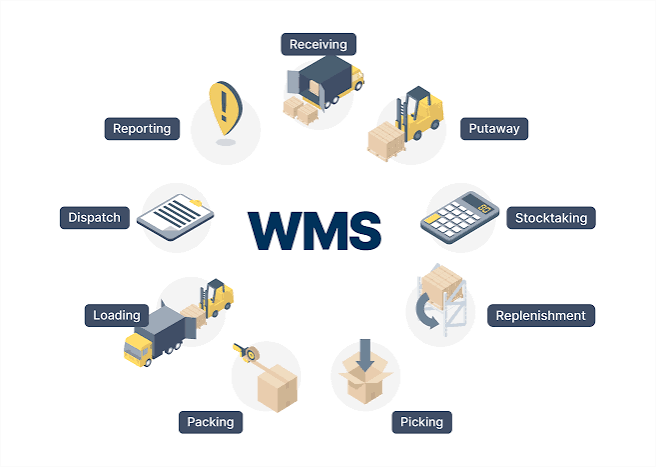
A warehouse management system (WMS) keeps your stock record accurate and passes that record to whoever moves the goods next. You can choose between an all-in-one platform that runs warehouses and transportation work together, or a specialist WMS connected to separate transport and delivery tools for most growing operations.
This guide compares the major available options and explains what a WMS should do on the floor while giving you a demo checklist for proving that the warehouse and the truck are working from the same order.
Key Takeaways
Warehouse management software regulates the physical work inside a warehouse: receiving, putaway, picking, packing, staging, and cycle counts. It tells staff where stock is, what to move next, and what has really left the building. For a deeper look at how one enterprise suite handles goods receipt, storage, and picking, see this guide to SAP warehouse management features and how it works.
A WMS rarely works alone. It generally sits beside three other systems:
| System | Typical responsibility | What it hands off |
| WMS (warehouse management system) | Receiving, putaway, picking, packing, staging, cycle counts | Load readiness, actual quantities, package IDs |
| TMS (transportation management system) | Carrier selection, route and load planning, rates, tendering | Shipment plan, pickup time, carrier or vehicle |
| Last-mile delivery tools | Dispatch, driver apps, proof of delivery, customer notifications | Delivery outcome, exceptions, signatures or photos |
| ERP or order management | Orders, pricing, invoicing, customer records | Order lines, destinations, service requirements |
Product boundaries vary. Some transportation products involve dispatch and proof of delivery, while others only plan shipments and assign them to carriers. Some warehouses keep the inventory count in the WMS, while some leave it in the ERP (enterprise resource planning system). Before you compare vendors, write down which system will own each record in your operation.
Selling channels multiply very fast. DHL’s first Business Edition of its 2025 E-Commerce Trends Report surveyed 4,050 businesses across 19 global markets and found that 63% use at least three online platforms. Each extra channel adds orders, SKU (stock keeping unit) codes,s and references that the warehouse and transport teams must match exactly.
The best WMS for your business relies on three things: how complex your warehouse is, how much of your transport you run yourself, and how many systems you’re prepared to connect and manage.
This comparative table compares five established routes to connecting warehouse and transportation work. Each entry is based on the vendor’s own documentation, so confirm the details for your configuration during a demonstration:
| Option | Best fit | How warehouse and transport connect | What to confirm |
| SAP Logistics Management | Local branches, subsidiaries and seasonal operations | Combines warehouse and transportation tools, with built-in carrier collaboration through SAP Business Network | Fits with your ERP; it was designed to work with SAP Cloud ERP Private |
| Oracle Warehouse Management with Oracle Transportation Management | Operations already using Oracle Fusion Cloud | For planned parcel shipments, the transportation system sends plans to the WMS, and on shipping,g the WMS returns actual shipment details | Which flows are pre-built and which need your integrator |
| Microsoft Dynamics 365 Supply Chain Management (Warehouse management only mode) | Businesses that want Microsoft’s WMS while keeping an external ERP or order management system | Requires integration between the external systems and Supply Chain Management | Who builds and monitors the integration; a monitoring workspace is included |
| Blue Yonder WMS with nShift | Blue Yonder WMS users that ship through many parcel carriers | A Prime Horizon Group integration adds automated outbound delivery, rules-based carrier selection, and real-time delivery updates | Which of the 1,000+ carrier connections cover your lanes |
| Siemens AX4 | Shippers that need a transport and collaboration layer over existing systems | Integrates with existing ERP, PLM, WMS, and MES environments and manages transportation across all modes | That it complements, rather than replaces, your WMS |
A few dates are worth considering. SAP announced general availability of SAP Logistics Management on February 26, 2026, and SAP was named a Leader in the 2026 Gartner Magic Quadrant for Warehouse Management Systems. nShift and Prime Horizon Group announced their Blue Yonder WMS integration on June 11, 2025.
A product chain doesn’t guarantee a bundled license. Confirm in writing which modules are included and which connections you or an integrator must develop.
Imagine a Tuesday afternoon at a regional distribution center. The dispatch board shows order 4471 as ready to ship: 18 cartons, a two-hour delivery window, and a truck assigned. The warehouse has staged only 16 cartons because a replenishment task hasn’t worked. The dispatcher doesn’t know, because the transportation software only received a “picked” status.
This is the gap an all-in-one TMS and WMS is built to close. When the exact platform records the pick, plans the route, and captures the delivery, the shortfall shows up on the dispatcher’s screen before the truck leaves. With various systems, it shows up when the customer calls.
For teams that want both functions in one place, Grasshopper Labs integrates transportation, warehouse, and inventory-and-fulfillment modules on one platform. Its homepage lists automated route planning, real-time last-mile tracking, electronic evidence of delivery, inbound and outbound shipment tracking, cycle counts, and connections to more than 100 platforms.
Connected specialist tools still make sense in several cases. If your current WMS works well and you only need better carrier coverage, adding a delivery layer may cost less than replacing it. Compare the two approaches on the work each one makes for your team:
| Consideration | Unified TMS and WMS platform | Existing WMS connected to specialists |
| Workflow fit | Confirm the vendor’s warehouse-to-transport workflow matches yours | Confirm each product fits its task and the connections cover the full workflow |
| Existing-system investment | May replace tools that already work | Can preserve the current WMS or ERP |
| Integration ownership | Fewer connections, mostly to storefronts, ERP, and carriers | Agree who maintains field mappings, update timing, and monitoring |
| Demo evidence to require | One order moving through every stage in the same session | The same order crossing each system boundary with message records visible |
A connection only works if it carries the right fields at the right time. Use this matrix as a starting template and adapt it to your operation.
| Event | Minimum fields | Who needs it | Risk if the update is missing |
| Order accepted | Order ID, line IDs, SKU, quantity, destination, service requirement, appointment window | Warehouse, transportation planning | Order planned before the warehouse can pick it |
| Stock reserved | Order ID, line ID, SKU, quantity, warehouse location, timestamp | Order management, dispatch | Same units promised to different orders |
| Load ready | Order ID, package or handling-unit IDs, actual quantities, staging location, timestamp | Dispatch, carrier | Truck scheduled against an incomplete load |
| Dispatched | Order ID, handling-unit IDs, vehicle or carrier, departure timestamp | Order management, customer service | Shipment status or customer notification stays outdated |
| Delivered or unsuccessful | Order ID, handling-unit IDs, outcome, reason code, proof where applicable, timestamp | Order management, billing, returns | Failed delivery treated as complete |
Beyond the fields, notice these four things:
Ask each shortlisted vendor to run your own order profile, not a canned demo. Agree beforehand which record should change at each step, who is responsible, and what counts as a pass.
Before the session ends, ask who maintains the integration after software updates, how pickers and drivers work when mobile signal drops, and whether you can export your details. Then request a project scope that lists every connection you’ll need to supply.
Begin with a limited pilot: one warehouse, one delivery team or carrier, and one order type. Compare the results with your current process using measures you define before you begin:
Agree how to manage missing timestamps before the pilot starts. Quietly excluding incomplete shipments makes the results look better while hiding the very handoff failures you’re trying to fix without 5 best White Label SSP software platforms. Log each failure, who resolved it, and the retest outcome before you expand.
A WMS handles work inside the warehouse, such as receiving, picking, and packing. A TMS plans and executes the movement of goods outside the warehouse, such as routes, carriers, and pickup times. The two must exchange order, quantity, and shipment information to work well together.
Not always. If you run your own deliveries and keep hitting short loads or missing delivery confirmations, one platform discards the integration layer where those errors often happen. If your current WMS works and you only need more carriers, connecting a delivery tool may be easier.
Generally, yes. Some products are designed for it; Microsoft’s Warehouse Management-only mode, for example, is meant to run alongside an external ERP or order management system. Determine which fields sync, how often, and who maintains the connection.
Use one of your own orders and include a short pick, a shifted delivery window, a failed delivery, and a deliberate integration error. Watch whether every change reaches the right person and record it before the truck leaves.
Selecting the best WMS software in 2027 comes down to one question: when something changes on the warehouse floor, does the person sending out the truck know in time? Enterprise suites, standalone WMS products, and all-in-one TMS and WMS platforms can all answer yes, but they get there with various amounts of integration work. Shortlist the options that fit your size and existing systems, test each one with your own messiest order, pick the one that maintains the stock record and the delivery record in step, and know how employee engagement software is redefining performance in IT service teams.
