

In the digital space, videos are one of the most prominent methods of communicating information online, with creators and editors spending hours on end to create the perfect clip.
But with the evolution of AI, AI video generator free, like Viddo AI, are completely transforming the process, from editing to post-production, users can now create full videos in a matter of minutes.
Let’s see how you can generate videos with the help of this AI tool and streamline and simplify your video creation workflow.
Key Takeaways
- Models supported and integrated by the platform
- The core advantages of using the software for content creation
- Easy and smooth image-to-video conversion with dynamic tools
- Steps to create your first video using the platform and its features
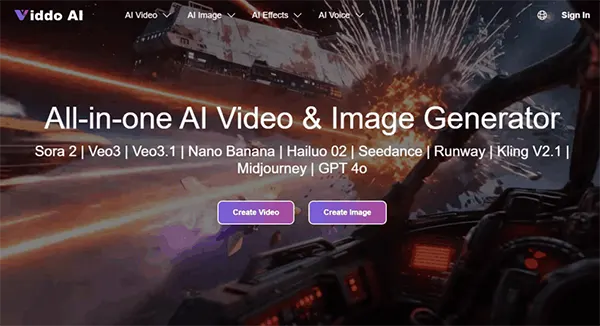
A key highlight of Viddo AI is its integrated AI-powered content creation ecosystem. This platform brings together a variety of advanced generative models and powerful features, enabling users to easily create creative video and image content within a single environment, without the need to frequently switch between different tools.
As an all-in-one AI video platform, Viddo AI integrates current mainstream image-to-video and video generation technologies and continuously incorporates new models and capabilities.
Users can easily make use of various models in this all-in-one platform, choosing the most suitable generation method based on their creative needs, thus achieving a more flexible and efficient content creation experience.
The models currently supported and integrated by the platform include:
Viddo AI uses its revolutionary intelligent video generation tools to transform static images into expressive, dynamic videos.
With advanced AI models, all aspects of generating a video – including animation, visual optimizations, and audio integration – will be handled for you automatically, providing some businesses with an effective way to create videos.
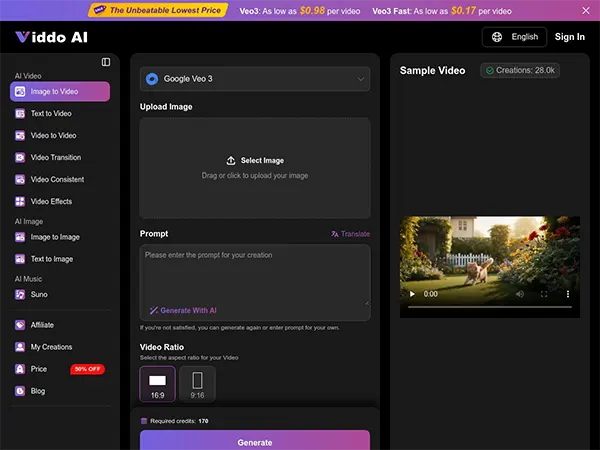
By simply uploading an image to the platform, users can have the generative AI create dynamic camera sequences, smooth transitions, and add cinematic effects to their static photos, adding a new level of visual dynamism.
You can also use the app to visualize stories, showcase products, or create content for social media.
Viddo AI automatically optimizes all image details, lighting effects, and compositions throughout the process.
This ensures that each frame has clarity and is visually appealing to create studio-quality results for its image-to-video conversions, regardless of the type of photo, e.g., a product photo, portrait, or illustration.
Fun Fact
AI video tools can now blend a person’s face on existing movie scenes, matching the lighting and motion, creating a “deepfake” effect.
Automatic ambient sound effects, background music, and AI narration can be added to a video and accurately synced based on how the visuals move.
This creates an excellent video viewing experience by providing high-quality audio to the your generated video creation with professional visuals.
AI identifies the visual environment in which the image appears, matches it with the appropriate animation style, and identifies the rhythm at which movement occurs in an animated image.
Examples of this are dramatic camera movements, smooth, dreamy pans, and subtle ways of changing the dynamics of a video to create visual interest and make the video appear natural-looking.
It is quite simple to get started with Viddo AI, as even new AI users can produce their first video in just a few minutes.
Follow the steps below to produce your first Viddo AI video quickly.
Initially, provide a description of the video you want to create, or upload an image as a reference for visual inspiration. The AI will analyze the video’s subject using these two pieces of information in order to create a content structure that properly depicts the video’s subject.
Next, choose a visual style that perfectly aligns with your video idea using the visual templates listed in the software. You can also customize the video display by choosing the aspect ratio, camera angle, presentation method, etc.
These options will assist you in further customizing visual effects for your video to enhance its creative output.
After finishing all customizations, click the “Create” button to automatically generate your video.
After generation, you can preview your video to make any minor modifications if necessary, and once satisfied, download your finished video file to share or publish.
Videos have become an essential platform for delivering information in a short amount of time, as content creation takes center stage in the digital age.
The main challenge for video producers is balancing a method of producing video efficiently and a method of producing video quality.
The creation of videos using AI-enabled production systems such as Viddo AI is changing how videos will be created. No longer will professional production teams and complex computer programs be the only way to edit videos.
Now, anyone who can use a text to video artificial intelligence tool will be able to have a video created quickly and easily.
More importantly, AI does not replace creativity. It allows us to unleash our creative juices. By automating repetitive tasks associated with the production of videos through the use of technology, the creator can put their energy into their ideas, stories, and methods of communicating those ideas through video.
Through the smart use of this technology, creating video content will become accessible to all, and the opportunities for creativity will continue to increase.
Hence, Viddo AI and other similar types of tools are not only improving the efficiency of video production, but they are also transforming how digital content is produced by enabling the faster visibility of creativity and the freer expression of creativity.
Ans: The platform integrates several AI models, including:
Ans: Yes, the platform supports image-to-video conversion by adding dynamic visual effects and animations.
Ans: You can customise videos using templates, animation options, timing adjustments, and other editing features available on the platform.
Ans: Yes, the tool allows you to add high-quality audio to your videos. You can use built-in audio templates or upload your own custom audio.
