
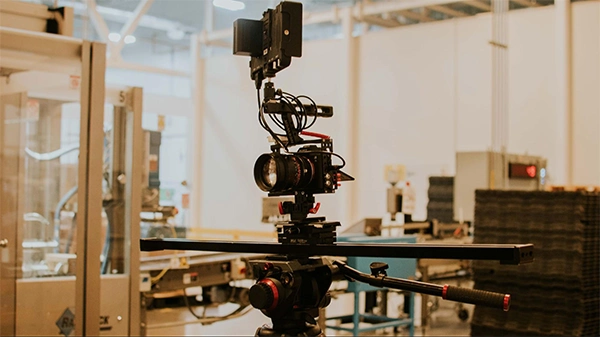
70% of B2B buyers say video quickens their purchasing decisions. That creates a challenge for industrial manufacturers whose most valuable equipment is often the hardest to film.
Suppose a foreign distributor needs a 30-sec equipment video for a trade show. The machine is installed inside a customer’s plant, covered by a confidentiality agreement, on a production line that cannot be stopped.
The marketing team has three options, and zero ideal ones. Fly a crew out and hope the customer grants access. Reuse the same outdated footage from years ago. Or settle for a static product image on a presentation slide.
This is pretty common in industrial manufacturing. Unlike consumer products, heavy equipment often operates inside restricted facilities where safety rules, production schedules, and confidentiality agreements make filming difficult or impossible. AI-generated video offers a practical way to fill some of those visual gaps, but it cannot replace authentic footage when customers need evidence of how equipment actually performs.
Filming an apparatus is not like filming a consumer product on a table. Several constraints stack up at once:
The result is that the machines most worth showing are frequently the hardest ones to film.
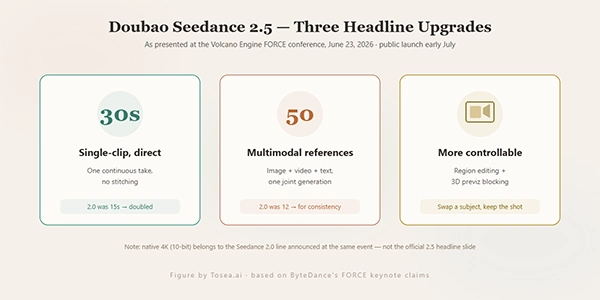
AI video quality mostly depends on the generator. ByteDance revealed Seedance 2.5 on June 23, 2026, at its Volcano Engine FORCE conference. It remains in enterprise beta. The browser platform branded Seedance 2.5 currently offers the available Seedance 2.0 family and lists 2.5 as coming soon.
The 2.5 announcement focused on a steady 30-second shot and a much larger reference allowance. There is no public specification sheet or API rate card. The available 2.0 generation already accepts text, images, video, and audio, generates synchronized sound, and keeps 4K output.
For industrial teams, the interesting beta claim is support for up to 50 references, including 3D models and style boards. That figure comes from launch coverage and should be tested when general access becomes available.
Manufacturers already hold useful reference material: a CAD model of the assembly, housing photographs from the datasheet, and renders from the proposal deck. A CAD-to-video workflow still requires review, but it gives the model more product information than a text-only request.
The public Seedance 2.0 offers clips of up to 15 seconds and accepts as many as nine images, three video clips, and three audio clips with the written instruction. It also supports 4K output.
15-seconds can cover a product-page header, a short trade-show insert, or a shot that an editor turns into a loop. The 2.5 beta would mainly add time and a larger pool of product references.
The dealer puts the improvement in instruction-following at about 20 percent over the previous release. That figure comes from the vendor rather than an independent benchmark and should be read as a claim. For a working team, the meaningful measure is distinct anyway: how many attempts it takes before a render matches the brief, because every attempt costs credits.
This is the decision that decides whether the output is useful or a liability.
Reasonable uses for generated material:
Material that should still be filmed:
The dividing line is straightforward. If a viewer could make a decision or take an action based on considering the footage shows real behaviour, it has to be real footage. A trade-show loop is decoration. A commissioning video is instruction, and generated instruction is a defect waiting to reach a customer.
When a manufacturer wants to link this process to a digital asset manager or product configurator, an AI video generation API can make model access and per-call costs easier to manage. The approval gate should stay outside the automation: a technical owner still ought to decide whether the clip is accurate enough for marketing and clearly separated from documentation.
The browser service costs credits for the models it currently offers. These prices are not a Seedance 2.5 rate card.
One-off packs start at $12.99 for 160 credits, which the provider describes as roughly eight 5-second clips at 480p, and packs remain valid for 45 days from purchase. A monthly plan begins at $29.99 for 550 credits, around 27 clips at that short length. Subscription credits are valid 30 days from each grant; credits given at signup or through daily check-ins lapse in seven days, and credits refunded after a failed render do not expire.
Longer durations and higher resolutions consume more, so the low-resolution test pass is a budget management tool. Procurement should also save the service terms that apply on the render date and confirm commercial-use, data-retention, and watermark conditions before client delivery.
Developed footage creates a documentation risk for an industrial supplier.
If a clip enters a product folder without a record of how it was made, someone downstream will eventually treat it as evidence. A sales engineer will show it as proof of cycle time. A client will point to it during a dispute about performance. The clip did not claim anything, but it was in the folder.
Record generated clips in the asset metadata. Keep them out of technical documentation and performance proof. On marketing surfaces, label concept material clearly enough that a viewer will not mistake it for a filmed installation.
The record should include the model, render date, source references, prompt version, and backing technical owner. That is enough to trace the clip without placing confidential source files in the marketing folder.
That policy gives the marketing team a usable boundary. It may generate an atmospheric product shot or concept loop. It must prepare a camera when the clip is meant to prove what the machine does.
Ans: No. AI-generated video is only suited for promotional and conceptual content.
Ans: High-quality CAD models, product renders, datasheet images, existing photographs, and short video clips typically provide better results than relying on text prompts alone.
Ans: Yes. Trade-show loops, product teasers, website hero videos, and concept visualizations are appropriate uses, provided they do not imply they show real machine performance when they do not.
