

A VPN helps keep your online activity secret, but what happens if the connection suddenly vanishes? A weak Wi-Fi signal, lagging networks, or server problems can cause the VPN connection to stop working unexpectedly.
When this occurs, your device may switch back to its normal internet connection. This can expose your real IP address and leave your online activity less secure than before. While a free VPN app is useful to help secure your online activities while using it, having another measure can come in handy for such instances.
This is where a VPN kill switch helps. It denies your internet connection if the VPN suddenly stops working, keeping your online activity private until the VPN connection is back.
VPNs have a kill switch feature that stops internet traffic in case the VPN stops working. Instead of allowing your device to continue sending data through its usual network, it pauses traffic until the VPN connection is restored or you change the relevant setting.
Think of it as a safety gate. When the VPN tunnel is open, traffic gets through it. If the tunnel closes without any information, the gate shuts too.
For example, someone using a free Australia VPN while traveling may get through an Australian server, so websites see an Australian IP address. If that VPN connection collapses, a kill switch can prevent the browser from immediately switching back to the hotel’s regular connection.
The VPN disturbance is not shown on your computer screen. The kill switch is made to handle that moment on its own.
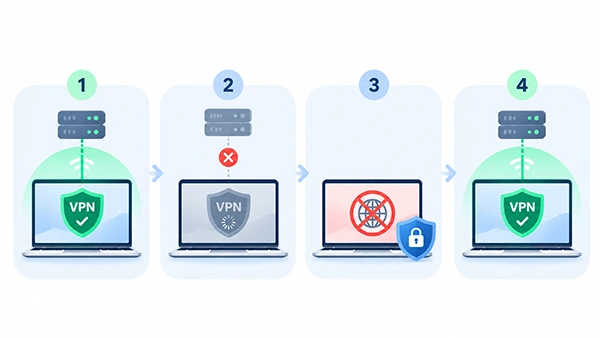
The kill switch tracks your VPN connectivity status and implements network policies in case of any failure. The exact behavior is differentiated by operating system and VPN app, but the general line is straightforward.
Step 1: Your VPN connects. Your device establishes an encrypted tunnel to a VPN server, and all traffic travels through that tunnel.
Step 2: The connection is interrupted. A network disruption, server problems, or an unstable Wi-Fi signal causes the VPN tunnel to stop working.
Step 3: The kill switch blocks traffic. The VPN app or system networking rules help prevent selected traffic—or all internet traffic—from continuing outside the VPN tunnel.
Step 4: Your connection is restored. Once the VPN reconnects, the kill switch allows traffic to resume through the protected route.
It can happen when there is a temporary network disruption, well before you have even figured out that something is wrong.
Why Is a VPN Kill Switch Important?

One of the main reasons why users go for a virtual private network is because they don’t want to show their IP address. With the connection to the VPN active, websites will at most see the address of the server.
If not given a kill switch, an unexpected disconnection may send new requests over your simple internet connection. Those requests can showcase your usual IP address to the sites or services getting them.
A kill switch lessens that risk by stopping traffic till the time the VPN route is available again. This is most prominent when you want to keep a consistent network address throughout a browsing session.
Unreliability characterizes public Wi-Fi hotspots in airports, hotels, and cafes. Busy networks, weak signals, and sign-in portals may make it tough for a VPN connection to function.
Imagine checking documents at an airport lounge while your laptop switches between access points. A kill switch can block traffic during the interruption, while HTTPS continues to protect connections to secure websites.
Telecommuters frequently switch from home networks to mobile hotspots and Wi-Fi networks. A laptop may also wake from sleep and try to resume applications before its VPN is fully connected.
If you rely on a VPN during research, cloud-based work, or file transfers, a kill switch helps prevent those activities from continuing over an unintended connection.
It is specifically helpful for tasks that run unattended. You do not need to keep watching the VPN icon to notice every short interruption.
A VPN connection may suffer when you change it from using Wi-Fi to using cellular data or move from one access point to another. Device sleep settings, server crowding, and firewall restrictions can also interrupt a connection.
A kill switch does not get rid of all these problems. It also controls what happens to traffic while the VPN reconnects or you troubleshoot the cause.
There are two most-used approaches to kill switch protection.
A system kill switch helps prevent any internet data from passing through the system if the connection to the network is lost. It is useful when you want all supported applications to stop sending traffic until the VPN is restored.
This approach gives broad coverage, although it may temporarily interrupt messaging, video calls, and other online activities.
Kill Switch on Application Level refers to restricting specific applications. For example, you might want a particular browser or download app to stop using the internet if the VPN is not connected.
Other apps may continue using the normal connection, depending on the settings. This provides flexibility, but it also means you must understand which apps are safeguarded.
However, not all VPNs support both methods, and their operating systems can manage them differently.
Step 1: Open your VPN app and go to Settings, VPN Settings, Privacy, or Security.
Step 2: Switch on Kill Switch and know if it is filtering all traffic or selected applications only.
Step 3: Connect to a VPN server and make sure the connection is active before browsing.
Step 1: Log in to the VPN and keep an eye on its server IP address on an IP-checking site.
Step 2: Open a harmless webpage to observe whether new requests work well during a connection failure.
Step 3: Follow your provider’s recommended test. Some VPNs treat a manual disconnect, which is different from a failed connection, so that button may not trigger the kill switch.
Step 4: Check the result. Covered traffic should stop when the VPN unexpectedly doesn’t work and start once the protected route returns.
Test only when you are not transferring important files.
A kill switch is used to solve a particular problem of internet traffic that leaves the tunnel of the virtual private network after a disconnection.
It does not hide information you willingly share with websites. If you log into an account, that service can still get connected activity with your account. Cookies and browser identifiers may also recognize a returning visitor.
A kill switch cannot remove malware, stop fake messages, or protect data that was transferred before you enabled the VPN. It also does not repair unstable Wi-Fi or improve a slow VPN server.
For better day-to-day privacy, combine it with software updates, strong passwords, HTTPS sites, and proper browser configurations.
In case one depends on a VPN to keep their identity secure, keeping the status of the kill switch will be logical.
The trade-off is that an interruption may stop a call, download, or webpage. If this happens frequently, try a different server, update your VPN app, or investigate your network connection.
The kill switch of the virtual private network blocks the traffic when the connection breaks down unexpectedly to lessen the risk of showcasing your original IP address.
It is especially useful on unstable networks, during longer sessions, and whenever a continuous VPN route matters. Enable it, make sure which traffic it covers, and test it by the help of your provider’s instructions. A few minutes of setup can make your daily browsing more predictable.
Ans: Normally, a kill switch does not significantly affect connection speed while the VPN is working. Its main job is to monitor connection status and enforce traffic-blocking rules when necessary. VPN speed is more often affected by server distance, congestion, and protocol choice.
Ans: It can. If a Wi-Fi interruption causes the VPN tunnel to fail, an enabled kill switch may block traffic while the device reconnects. The precise behavior depends on the VPN app, operating system, and network configuration.
Ans: It can be useful on phones because they frequently switch between Wi-Fi and cellular networks. Such changes may interrupt the VPN tunnel, making automatic traffic protection valuable during travel or everyday movement.
Ans: Yes. The VPN can still encrypt traffic while connected. A kill switch adds protection for unexpected disconnections by controlling whether traffic can continue over your regular internet connection.
