
Facebook is no longer just a place for text posts and photos. Video has become a major part of how people discover, consume, and share content. In fact, Meta says that at least 97% of surveyed users in India watch videos on its platforms every day.
And frequently, you come across a reel on FB that you’d rather keep on your device, whether it’s a useful tutorial, a funny Reel, a memorable Story, or a video you want to watch offline.
But there’s no way to converting Facebook video to MP4.
That’s where online Facebook video downloaders come to the rescue. With SaveFBS, you can copy a Facebook video link, paste it into your browser, choose an available quality, and save the video in the MP4 format without installing additional software.
MP4 is the most versatile video format that you can find everywhere. It plays on any device — iPhone, Android, Windows, Mac — without any issues. When you download a reel on FB in the MP4 format, you can watch it offline, share it, or save it forever even if the original post gets deleted.
Many iPhone users also struggle to save YouTube videos on their devices. There are three easy ways to download YouTube videos for iPhone users.
SaveFBS.com is a free online Facebook to MP4 converter that you can use directly in your browser. No sign-up, no app download, no watermark. It supports:
It’s one of the quickest ways to convert Facebook video into the MP4 format, online and free.
FUN FACT
SaveFBS boasts an average link-to-download processing timeframe of under 5 seconds per request.
Step 1 — Copy the Facebook video URL
Open Facebook and find the video you want to download. Click the three dots (⋯) on the post and select “Copy link”. On mobile, tap “Share” → “Copy Link”.
Step 2 — Head to SaveFBS.com
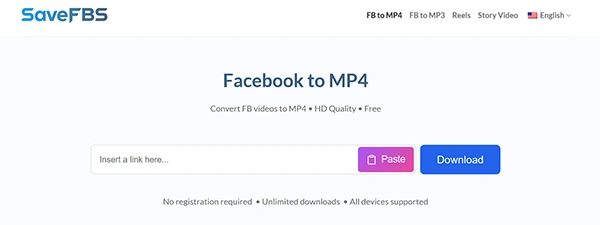
Open your browser and visit savefbs.com. You’ll see a simple input box right on the homepage.
Step 3 — Paste the URL
Paste the reel URL that you found on FB into the search box and click
the Download button.
Step 4 — Select your quality
SaveFBS will show you video save quality options — usually SD and HD. For the best result, choose HD MP4 or 1080p if available.
Step 5 — Download the video
Click the download button next to your preferred quality. The Facebook video MP4 format save will start automatically. That’s it!
Desire to see videos in HD quality? Always select the HD option when available. SaveFBS supports Facebook to MP4 HD downloads.
Downloading on mobile? SaveFBS works on both Android and iPhone browsers — no app required.
Private videos? For private Facebook videos, make sure you’re logged into Facebook in the same browser first, then try the download.
Want to download a Facebook Story? Yes, it works for those too. Just copy the story link and paste it the same way.
Yes, absolutely. SaveFBS.com is a free Facebook to MP4 converter with no hidden fees, no watermarks, and no account required. You can convert the reel you found on FB into the MP4 format online as many times as you want.
If you’ve ever desired to save a Facebook video as MP4, SaveFBS.com is genuinely one of the simplest tools out there. Just copy the link, paste it in, pick your quality, and download. The whole process takes under 30 seconds.
Next time you find a video worth keeping, you know what to do — head to savefbs.com and grab it in the MP4 format.
Ans: Copy the reel link you found on FB, open SaveFBS, paste the URL into the downloader, and click Download. Select the available video quality and save the resulting MP4 file to your device.
Ans: Yes. SaveFBS supports Facebook Reels and allows supported Reels to be downloaded in the MP4 format. You simply need to copy the Reel’s link and paste it into the downloader.
Ans: Yes. SaveFBS works through a web browser and states that its downloader supports iPhone, Android, Windows, Mac, and other devices. No separate app installation is required.
