
“What gets measured gets managed.” — Peter Drucker (Management Expert)
In biomechanics and sports science, better movement data is desired. And the field is also booming. The Motion Analysis Software Market is projected to reach $1.2 billion by 2028. But choosing motion analysis software isn’t simply about buying the most advanced platform. A system that’s ideal for a biomechanics research lab may be impractical for field testing, while a coaching tool may lack the accuracy needed for scientific studies.
Each one is a specialized system: be it 2D video analysis apps, marker-based motion capture systems, or AI-powered markerless platforms. The right choice depends on the measurements you need, the level of accuracy your work demands, and how well the software integrates into your existing research and data workflow.
This guide helps biomechanics lab managers and performance science leaders evaluate motion analysis software from a practical, unbiased perspective. Use it as a technical buying guide for research and performance applications rather than clinical diagnosis or treatment.
The main groups have clear strengths and limits.
Instead of comparing feature lists across vendors, first determine which category best matches your workflow. For a vendor perspective on evaluation criteria such as validation methods, setup, data handling, and export formats, this published guide to motion analysis tools offers additional context. Treat it as vendor-authored context, not as an independent benchmark.
Start by identifying the decisions your data will support. The outputs required for athlete coaching, gait research, injury-risk assessment, or biomechanics studies can differ dramatically, making this the most important step in the selection process.
Outputs also determine the file formats you should require. C3D is a public-domain format widely supported across major motion capture vendors and used in biomechanics and gait labs since the mid-1980s. It moves cleanly into analysis tools such as Visual3D and OpenSim. Qualisys Track Manager can export to C3D, TSV, AVI, FBX, MATLAB, TRC, STO, and JSON. Theia3D supports exports to C3D, FBX, and JSON, and can provide raw and smoothed poses for tools such as Visual3D, Vicon Nexus, and QTM.
FUN FACT
In video analytics pipelines, cameras typically operate at 30 fps (an inter-frame interval of ~33.3 ms).
Accuracy claims mean little without context. Read validation by three dimensions: the task measured, the joint and plane reported, and the agreement metric used, such as correlation, RMSE, or bias against a reference system.
Recent literature supports markerless capture for specific tasks, but not for every movement. A 2025 ergonomics study reported that markerless back-angle measurements correlated at roughly r = 0.95 with both marker-based and IMU systems, and L5 to S1 force estimates also correlated strongly. A 2025 systematic review in Sensors included 20 quantitative studies comparing markerless and marker-based methods for industrial ergonomics. These findings are useful, but they should not be generalized for all joints, planes, speeds, or environments.
Before buying, run a short in-house validation:
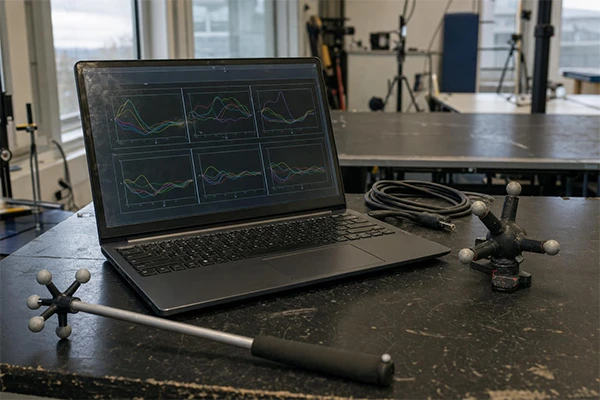
Hardware requirements influence more than installation costs. They also affect testing speed, staffing needs, participant comfort, and the consistency of data collection over time.
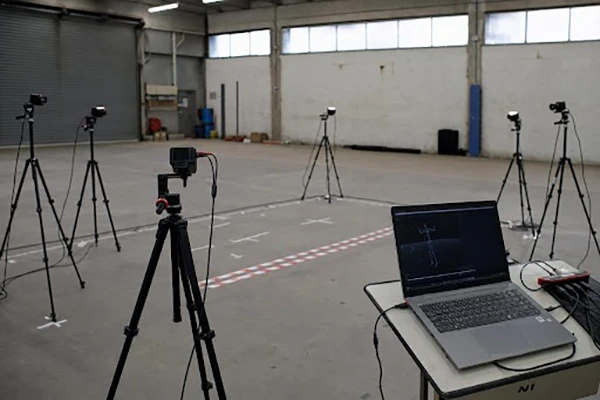
A representative multi-camera markerless setup from Theia3D calls for eight synchronized cameras to record high-quality video. Theia3D also recommends that subjects appear at least 400 pixels tall in frame for reliable detections. For integrated setups, Theia3D recommends GenLocked synchronization of peripheral devices such as force plates. Smartphone capture lowers the hardware barrier, but it may depend on cloud processing and tighter limits on capture volume, lighting, or movement complexity.
Speaking of cameras, do read an interesting article on the difference between film preservation and film restoration.
Big data is augmenting decision-making across sectors. But deployment isn’t just an IT consideration. It determines where sensitive movement data is processed, who can access it, and how easily your organization can meet internal security and compliance requirements.
Theia3D states that its software runs locally without internet connectivity and does not transmit video or analysis data to external providers. That can support strict data-sovereignty workflows. By contrast, OpenCap uses an iOS capture app, a web app for data collection and visualization, and cloud computing for biomechanical analysis. Local processing can simplify security approvals and data control, while cloud processing can support remote collaboration and scalable compute. Match the model to your policies and to your team’s capacity to maintain hardware, storage, and backups.
Motion capture is only the first step in the workflow. The real value comes from how efficiently your data moves into biomechanical modeling, statistical analysis, visualization, and reporting tools.
No single tool fits every lab. A research lab validating kinetics needs strong kinematic accuracy and clean C3D export into Visual3D or OpenSim. A sports performance group may prioritize fast, marker-free field setup. An engineering or industrial lab may weigh frame rate and synchronization. Education programs often favor accessible tools and simple workflows.
Run a 2-4 week pilot with 3-5 representative tasks. Capture against your reference system, define acceptance thresholds in advance, and confirm that exports integrate cleanly into your analysis stack. For example, set thresholds for sagittal joint angle RMSE and correlation for spatiotemporal metrics. Deployment choices, such as a fully local pipeline with Theia3D or a cloud pipeline with OpenCap, should be tested in your planned workflow.
Software licenses represent only part of the investment. Long-term operating costs include:
These often have a greater impact on overall return on investment.
Ans: Choose by task and workflow. Marker-based systems suit tightly controlled, high-precision research protocols. Markerless systems may reduce preparation time for sport and field settings, but should be validated against your reference measures before adoption.
Ans: This guide does not address clinical diagnosis or treatment. For research and performance contexts, document non-clinical use, consent, storage, processing location, and export needs before approving a platform.
Ans: For biomechanics research, C3D remains the most widely adopted exchange format because it integrates with platforms such as Visual3D, OpenSim, and MATLAB.
