
Most people try an AI music tool once, get a generic-sounding result and assume the problem is in the tech. Usually, it is not.
The real issue is the prompt. A vague description produces a vague song. A specific, well-structured prompt produces something you actually want to listen to. This guide walks through exactly how to write better prompts using AI Song — a free AI Music Maker that supports 30+ genres and outputs studio-quality, royalty-free tracks.
Key Takeaways
- Understanding how the tool reads your input
- Starting with mood, not genre
- Using the custom mode for serious results
- Writing lyrics that the AI can work with
Before writing a single word, it helps to know what the generator is actually responding to.
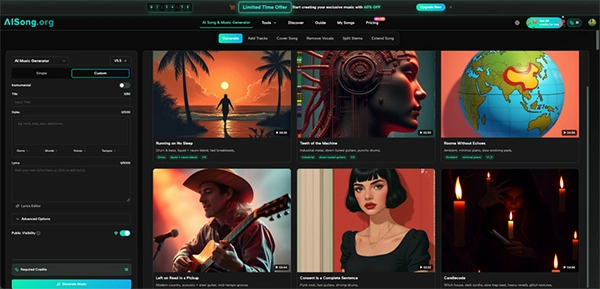
AI Song offers two modes: Simple and Custom. In Simple mode, you describe the song you want in a single text box — up to 500 characters.
In Custom mode, you get dedicated fields for Title, Styles (up to 1,000 characters), and Lyrics (up to 5,000 characters), plus dropdown filters for Genre, Moods, Voices, and Tempos.
The generator doesn’t interpret your prompt the way a person reads a sentence. It recognises keywords, emotional clues,structural clues. So word choice is very important —and order to some extent. Specificity is always rewarded.
Most beginners open with genre: “Make a pop song.” That’s a starting point, but it doesn’t give the AI much to work with.
Mood is actually the more powerful anchor. Compare these two prompts:
The second iteration gives the generator emotional guidance, which influences tempo, melody, and even the timbre of the voice.
Genre + mood + concrete always leads to more usable results.
If Simple mode feels like a sketch, Custom mode is the actual canvas.
The AI Song Generator separates your input into distinct layers —
This is where genre, instrumentation, and mood tags go. Don’t write sentences here. Use comma-separated descriptors:
Short tags process more cleanly than full sentences in this field.
The Lyrics field supports up to 5,000 characters, and you can either write your own or use the built-in Lyrics Editor to generate them.
If you write your own, structure matters: label sections clearly with markers like [Verse], [Chorus], and [Bridge]. This helps the AI Music Generator understand where the song should shift emotionally and dynamically.
The Genre, Moods, Voices, and Tempos dropdowns are underused by most beginners.
Selecting “Tempo: Slow” and “Mood: Melancholic” in combination with your style tags reinforces the direction and reduces the chance of a mismatch between what you wrote and what gets generated.
Lyrics are not just words — they’re structural cues. When writing for an AI Song Maker, a few rules apply:
Keep lines consistent in syllable count. The AI maps lyrics to melody, and if one line has 6 syllables and the next has 14, the result can feel choppy. Aim for rough consistency within each section.
Repeat the emotional core in the chorus. A chorus that directly echoes the verse theme gives the generator a clear signal about where the emotional peak should land.
Avoid abstract filler lines. Lines like “feeling everything so deep inside” are common in generated lyrics and tend to produce generic melodies.
The more concrete and imagistic the language, the more distinctive the output. “Driving home on the 405, rain on the glass” is more useful than “lost in the moment of our past.”
One thing that catches beginners off guard: the same prompt can produce very different results depending on whether Instrumental mode is toggled on or off.
With Instrumental enabled, the generator focuses entirely on arrangement, texture, and atmosphere — there are no vocal melody obligations. This means style tags like “orchestral, cinematic, building tension, string section” perform exceptionally well here.
In this case, providing a rough lyrical structure — even just a few placeholder lines — gives the system more to anchor the melody to.
A first-generation result is rarely the final one.
The better workflow is to treat the first output as a reference, identify what worked (tempo, overall mood, instrumentation) and what didn’t (vocal style, energy in the chorus), then refine the prompt accordingly.
AI Song also includes an Extend Song feature, which lets you take a generated track and add to it — new verses, extended bridges, or a longer outro.
The Vocal Remover tool is another resource worth knowing about.
Before generating, run through this list:
Filling in all seven points before hitting Generate Music will make a noticeable difference in the consistency of results.
A well-written prompt respects what the AI Music system is optimized to understand: mood, structure, instrumentation, and intent.
Give it those signals clearly, and the results follow.
Great AI music begins with great prompts. The more specific you are about the style, mood, instruments and structure you want, the better your tracks will sound with less guesswork. With a bit of practice, writing good AI music prompts becomes a simple way to unlock it.
Ans: A strong prompt usually includes four key parts: the role (who the AI should act as), the task (what you want it to do), any requirements (specific details or constraints), and the instructions.
Ans: One of the most common errors is creating prompts that are too vague or ambiguous.
Ans: Here’s a counterintuitive trick: the fewer prompts you send, the better your AI-generated code gets.
Ans: This means that you may have to confirm your age by going through an age assurance process.
