Setting up a VPN encrypts your internet connection and hides your original IP address. Encryption alone can not protect every part of your online activity; connection failures and incorrect settings can still expose information without letting you know.
This is why additional security settings matter. Features such as kill switches and DNS leak protection address specific connection risks.
Researchers tested 281 Android VPN applications in a 2026 NDSS study, and they found that 29 leaked user traffic, including DNS requests. These findings show why testing actual protection is important.
Understand the main VPN security features and learn how you can use them.
A VPN establishes an encrypted connection between your device and its VPN server. Websites receive the VPN server’s IP address rather than your original address.
Your internet provider can identify your VPN connection. However, accurately routed traffic prevents it from directly inspecting your browsing destinations.
A VPN can also help protect your connection on unfamiliar Wi-Fi networks. Nevertheless, the VPN operator may still acquire certain connection information.
According to the Electronic Frontier Foundation, VPNs cannot provide complete anonymity or prevent every form of tracking. Websites can still recognize your credentials through cookies and other identifiers.
Understanding these limitations helps you select features that address particular risks.
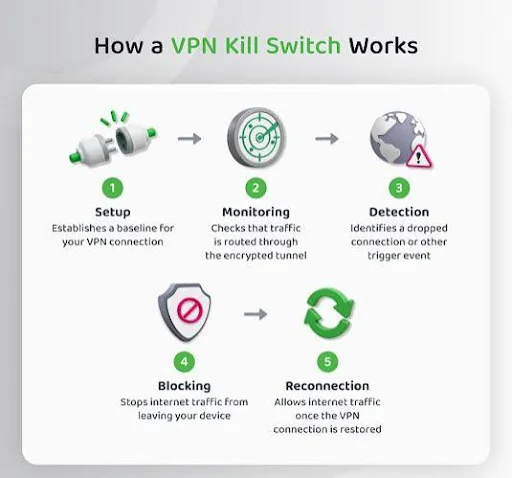
A kill switch blocks internet traffic when your VPN connection unexpectedly fails.
Imagine working on your laptop through a VPN connection. Your Wi-Fi disconnects and reconnects a few seconds later. Without a working kill switch, applications can reconnect through your regular internet connection.
Websites could then receive your authentic IP address.
A kill switch prevents this by blocking unprotected connections. Internet access restarts when the VPN connection returns.
How Can You Test a VPN Kill Switch?
You can check this feature using an easy test:
MysteriumVPN offers a built-in kill switch for Windows, macOS, Android, and iOS. It stays active automatically and cannot be turned off manually.
However, manually disconnecting the VPN does not trigger this protection. Keep this difference in mind when testing unexpected connection issues.
Before opening a website, your device requires to identify its server address. The Domain Name System translates domain names into IP addresses.
Normally, your internet provider may manage these DNS requests.
A DNS leak occurs when requests bypass your intended VPN routing. Your browsing traffic might use the VPN while DNS queries reach your internet provider directly.
This can reveal which domains your device requests.
DNS leak protection keeps these requests within the encrypted VPN tunnel. MysteriumVPN includes this feature to prevent DNS queries from leaking through your regular network connection.
How Can You Check for DNS Leaks?
Begin by connecting to your preferred VPN server. Open a reputable DNS leak testing website and run its test.
Verify the reported DNS servers. They should match the VPN’s expected DNS configuration rather than your regular internet provider.
If your provider’s DNS servers appear unexpectedly, investigate the connection settings.
You should also check your browser’s encrypted DNS settings. Some browsers use independently configured DNS services that can generate unexpected test results.
MysteriumVPN’s DNS leak troubleshooting guide describes how to review these settings across different browsers and operating systems.
A VPN replaces your visible public IP address with an address associated with its server. However, inaccurate routing can expose your original IP even when the VPN appears connected.
This is called an IP leak.
For instance, your browser might display the VPN server’s IP address while another connection reveals your actual address.
IP leak protection helps avoid such exposure by keeping your traffic on the intended VPN route.
MysteriumVPN includes IP leak protection as part of its security features.
How Can You Test for IP Leaks?
Follow these steps:
If your actual IP address appears while the VPN is active, investigate the connection before using it for sensitive activities.
You can also check for WebRTC leaks. Some browser communication features may reveal IP address data outside the route you expect.
Your VPN protocol decides how the encrypted connection operates. It affects connection security, speed, and stability.
Two generally supported VPN protocols are WireGuard and OpenVPN.
Both can offer secure connections when implemented correctly.
MysteriumVPN supports WireGuard and OpenVPN. WireGuard is its default protocol, while OpenVPN is available as an alternative on supported platforms. Its Help Center recently excluded Android from OpenVPN support.
You can compare available protocols by testing their speed and connection stability. Some networks may work better with one protocol than another.
Avoid outdated protocols such as PPTP because of known security problems.
Some websites are designed to distribute malware or steal personal data. Others may attempt to redirect visitors to dangerous pages.
A malware blocker helps prevent connections to known harmful websites.
It verifies website requests against a list of malicious or suspicious addresses. If a domain matches the list, the connection can be blocked before the website loads.
This can decrease exposure to known phishing websites and malware distribution pages.
How Does VPN Malware Blocking Work?
A DNS-based malware blocker usually follows three steps:
MysteriumVPN offers a DNS-based malware blocker alongside its other safety features. Check your subscription and application settings for availability.
However, a malware blocker cannot verify every dangerous website. It also cannot scan your device for infected files.
Use updated antivirus software and avoid downloading files from untrusted sources.
| VPN Feature | What It Does |
| Kill Switch | Blocks internet traffic if the VPN connection drops unexpectedly. |
| DNS Leak Protection | Prevents DNS requests from bypassing the VPN tunnel. |
| IP Leak Protection | Helps prevent your original IP address from being exposed. |
| VPN Protocol | Establishes and secures the encrypted VPN connection. |
| Malware Blocker | Blocks connections to known malicious or suspicious domains. |
Every feature addresses a different part of your connection. Using them correctly provides more complete protection than relying on encryption alone.
Some VPN providers include additional tools for handling online privacy and browsing.
A no-logs policy explains what browsing history and connection information a provider does not store.
MysteriumVPN states that it does not retain browsing history, visited websites, IP addresses, or session information.
However, privacy policies vary between services. Read the actual policy to understand what data may still be collected or processed.
Residential IP addresses are assigned by internet service providers to residential connections.
Unlike conventional data centre IPs, these addresses can make VPN traffic appear to originate from a general home internet connection.
MysteriumVPN provides access to residential IP addresses through its decentralized connection.
However, using a residential IP does not automatically avoid tracking through accounts, cookies, or browser identifiers.
A VPN browser extension can route supported browser traffic through a VPN connection without covering every application on your device.
For instance, you might want VPN protection while browsing but need other desktop applications to maintain their regular internet connections.
MysteriumVPN provides browser extensions for Chrome, Brave, Opera, and Opera GX.
Remember that browser-level VPN protection does not involve traffic from applications outside that browser.
Testing your connection can reveal issues that advertised features alone cannot prove.
Follow these practical checks:
Repeat this process after major application updates or configuration changes.
The best VPN security features protect different parts of your internet connection. A kill switch reduces exposure during unexpected failure, while DNS and IP leak protection help keep your connection credentials private.
Secure VPN protocols protect data in transit. Malware blocking adds protection against known harmful domains.
However, none of these features can guarantee complete anonymity.
Review your VPN privacy features and test their behavior before trusting them with private activities. Proper configuration is more useful than a lengthy feature list. Understanding the differences between VPNs and proxy tools is also essential to avoid mistakes while using one.
Ans: A kill switch reduces exposure during unexpected failure and protects your data by cutting the internet connection in both directions.
Ans: A VPN encrypts your internet connection and hides your original IP address, which makes you hard to trace on internet while allowing you to get connected from servers from different countries.
Ans: DNS (Domain Name System) verifies the user’s IP address before entering any website, and when trying to get access to a webpage, DNS can leak some data and reveal your authentic IP address.