Translating a PowerPoint presentation sounds simple until you get to know that the slides are not the complete story. A PowerPoint translator might seem like a sorted concept from the index, but deep down it holds complex concepts that might need clarity.
Speaker notes, tables, charts and slide order also need to stay in place. Also, selecting the right translation approach can help you avoid messing up a deck that looks translated but still needs a lot of fixing.
Keep reading to know more about PowerPoint Translator that leaves notes on the same slide.
Built-in translate runs inside PowerPoint. It is useful when one box on one slide is missing a word the room already uses. It is a poor controller of an 18-slide template, because selection is the unit of work. Whatever you did not choose stays in the source language, including the notes pane most presenters never stare at until they are on stage.
File-level translation lives apart from the app. You close the deck, upload the file, pick a language pair, and come back with another PowerPoint file. The primary component of work is the file. That is the only structural difference that holds significance for a template desk. Speed pitches do not belong here. The issue is whether the notes are still under the same chart after the pass.
Selection eliminates hidden panes. A title translated in place can be considered finished while the note listed beneath it still says “pause on the cost table.” The speaker then pauses on the architecture slide because that is where the leftover English note now sits in their brains. The room hears a gap. The recording includes a note that never moved with the title.
Tables and chart labels are the next mistake. Built-in paths often want a cell assigned, or they skip objects that are not ordinary text boxes. An IT deck that stores application names in a table will ship a mixed-language slide and call it bilingual. The acknowledgement test is not “some English became Spanish.” The test is whether the environment description in row 3 is still the token the runbook uses.
Implementing a file-level pass from a deck that already had three boxes rewritten in-app is the usual trap. Those three boxes represent a second source. The upload then turns into a hybrid. The template owner cannot say which English is traditional. Remove the hybrid. Go back to the clean PPTX in the template library.
Locked corporate laptops make the combo worse. A contractor who cannot install an add-in will still find Review on a managed image, switch three titles, and mail the file as “the Spanish deck.” The notes pane never got a shot. The file-level path would have encouraged them to leave the app. That extra tour is the cost of keeping one original. Skipping it is how two originals find themselves in the same SharePoint folder, both named final_ES.
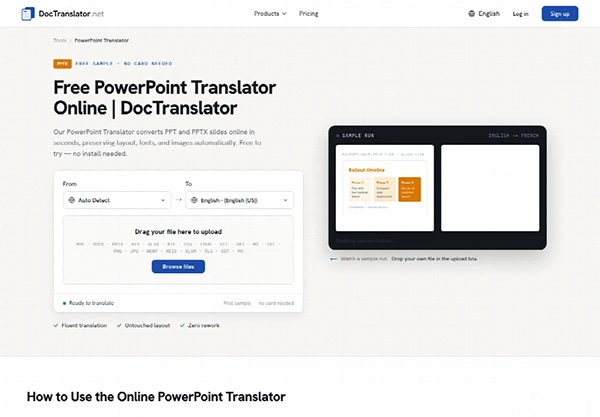
DocTranslator’s PowerPoint page is converted to PPT or PPTX. The desk sets a source language or passes detection on, picks the target, and downloads a PowerPoint file. Speaker notes, tables, and slide order stay pinned to the sentences they are related to. That is the product justification to use the path. It is not a reliable translation, and it is not a live caption layer for the room.
Visible slides in the viewer are the page totals. An 18-slide template is 18 pages on the way in and should be 18 on the way out. If the download has 19, someone dropped a slide or the wrong file was released. The extra slide is a miss, not extra monetary value. A digital page costs 1 credit; the Standard floor still works if the file stays under 30MB and under 30 pages, so an 18-slide live PPTX is 20 credits, not 18. That number appears on the change ticket. It does not indicate whether the notes held.
Image-heavy architecture slides can move a file toward the 30MB line even when the slide count is modest. If the library file is greater than 28MB, compress the screenshots in the parent before anyone uses a language pass. A child that tips into Large is a special plan problem. Do not flatten the deck to a photographed PDF to “make it thinner.” That removes this path and turns letters into a picture.
Write one note on the intake card: the correct sentence under the cost table, plus the slide number. After download, start the notes pane on that slide. The sentence must still be there, in the new language or as a locked token if you assigned it not to drift. If the sentence has moved to the next slide, the file did not store the map. That file does not go to the workshop collection.
Order is much simpler to check than style. The template’s slide 7 is the security group. After the pass, slide 7 must consequently be the security group. A “clearer” sequence introduced by a rewrite is a different deck. File-level work is enabled to change words. It is not allowed to tweak the runbook order the on-call team already established.
Also, learn how to convert a PowerPoint Presentation to PDF.
Pick one chart title before anyone uses either tool. Search that title after each journey. The built-in path often passes the title and violates its note. The file path should pass both, or it should be excluded. The table is the scoreboard for that one title, not a tour of its unique features.
| Check | Built-in translate | File-level PPTX pass |
| Chart title on slide 6 | Passes if that box was selected | Must stay on slide 6 |
| Note under the same chart | Often still English | Must stay under that chart |
| Table token in row 3 | Easy to skip | Must remain the runbook token |
| Canonical English file | Becomes a hybrid if mixed | Library PPTX stays the parent |
If any row on the file-level side falls short, scrap the download. A second machine pass from the already-translated copy is not a substitution. It suggests a third set of nouns. The template owner then spends the next morning debating which English the vendor should have used, which is a pointless hour the workshop did not budget.
Most presenters never open notes until they are using the screen. That is why built-in work looks completed in thumbnail view. The test protocol on the IT desk is to highlight the notes pane on the witness slide before anyone translates the file bilingual. If the pane is still the old language, the path is not finished yet. Selecting the title again will not alter the note. You are still in the incorrect unit of work.
After a file-level download, search the perceiver title. The hit must land on the written slide number. Four other titles can be excellent and the pack still fails if this one has been removed. That single skip keeps a vendor workshop from using the wrong architecture slide.
The rule is short enough to put on the template’s first slide in the verbaliser notes, in the source language, for the people who generate the file.
On the file path, the clicks are upload, language set, download. DocTranslator does not install a plug-in inside PowerPoint. That is a bonus for a locked-down laptop that cannot add add-ins, and a downside for anyone who wanted an in-app button. The desk that permits the notes to travel should handle the extra trip through the browser. The desk that only wanted one title translated should not take that trip.
A slide that is a photograph of a whiteboard is not active text. Built-in translate cannot define the letters. A file-level pass will still represent the visible slide as a page, but the letters are an image. Keep that slide off both paths, or update it with a live table before anyone talks about language. A sworn or officially signed filing is likewise off both paths. If counsel wants a named human, neither the in-app box nor the download will cater to them.
Live captions during the forum discussion are a third path. A file released yesterday does not subtitle the speaker today. Do not sell the workshop a live layer because a Spanish PPTX already has been developed.
The library preserved the clean English PPTX. Regional or vendor replicas are children of that file. Built-in edits on a child do not get copied back into the collection. If a token in the runbook changes, switch the library first, then translate PowerPoint slides again from that parent. Children do not turn into parents.
DocTranslator is the file-level variant on that list. It is useful when the notes have to go with the slides. It is unused when one box needs a single word. If the witness note is still under the witness chart, the workshop can operate the download. If the note has moved, the library file is still the only deck the on-call team can protect.
Also, explore free presentation templates that work for any industry.
In the end, the right translation approach depends on what you need to change. Built-in translation serves better for a word or a small bunch of text. On the other hand, file-level translation is a much better process for an entire presentation.
Whether you choose the path, keeping one clean original file and evaluating the notes, slides, and key terms afterwards can prevent a lot of extra work.
Ans: Not necessarily. It needs to be checked because speaker notes are usually in the original language, while selected text is translated.
Ans: Look into speaker notes, slide order, chart titles, tables and other important terminology. Ensure everything seems connected to the slide.
Ans: A clean source helps to avoid translated text creating unstable terminology in the new session.