
Old videos have a special ability to keep those precious moments that can hardly be captured through pictures. A family reunion, childhood memories, or any footage from history can still have great significance after many years.
Black-and-white videos can help us capture all these moments; however, the absence of colour can sometimes make them less vivid. The idea of colorizing such videos seems like a great solution to that problem.
Nowadays, rather than trying to add colours manually, you can use modern AI techniques to analyse the video and the colours of the objects, clothes, characters, and the background.
Adding color to a video is more complicated than changing the appearance of a single image. Every frame needs to contain consistent colors, or objects may change shades as the video plays.
Traditional colorization often involves manually identifying areas and applying colors across individual frames. This requires considerable editing experience and can take hours or even days for longer footage.
AI-based colorization approaches the task differently. Rather than requiring customers to define every object manually, AI can analyze visual patterns across frames. It can identify people, buildings, vegetation, clothing, and other elements, then estimate colors based on the visual information available.
Lighting also matters. A face in direct sunlight should not receive the same treatment as one standing in a shadow. AI tools attempt to account for these differences while managing color consistency throughout the whole footage.
Professional editing software provides a traditional approach to colorizing monochrome footage. Programs such as Adobe Premiere Pro and After Effects offer detailed control over video colors and visual effects.
You need to import a monochrome video into your software and add it to the timeline. Use masks, color effects, and adjustment layers to isolate different parts of each frame. You can then apply colors to specific areas, such as skin, clothing, buildings, or scenery.
For longer footage, track masks and keyframes as objects move through the scene. Review the footage repeatedly and adjust colors whenever lighting or object positions change.
This method provides excellent creative control because you decide exactly how each element should look.
However, it requires editing knowledge and can become extremely time-consuming when the footage have hundreds or thousands of frames. Traditional editing is therefore better suited to professionals or projects where precise artistic control matters more than speed.
With the help of AI technology, it is now easy to colorize black and white videos without doing manual coloring for each frame. Instead of treating each frame as an independent image, AI-powered systems can analyze the footage and estimate colors while considering movement and surrounding visual information.
The typical workflow for colorizing video using AI includes the analysis of the grayscale frames. The system identifies visual elements and predicts appropriate colors based on patterns learned from existing visual data. It then applies those predictions across the video while attempting to maintain consistency between neighboring frames.
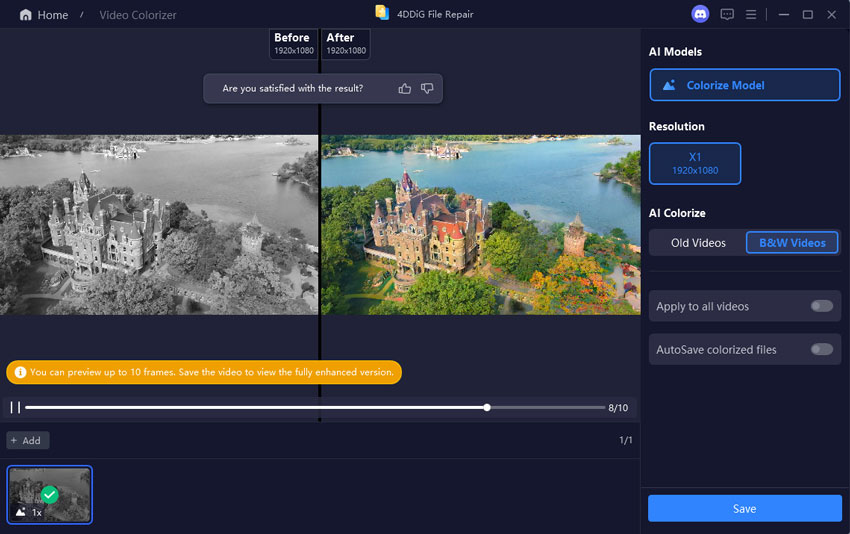
4DDiG Video Enhancer combines video restoration capabilities with AI-powered enhancement features, making it useful for users who want to improve older footage without relying entirely on complex professional editing software. An AI video enhancement tool can help improve visual quality while working with footage that may also have common problems caused by age or storage.
For newcomers, it is much faster compared to manual corrections. It can also be useful for restoring family archives, old recordings, documentaries, and historical footage. To begin, open 4DDiG Video Enhancer and select the available video enhancement or restoration feature. Add the black-and-white video you want to improve and allow the software to analyze the footage.
Depending on the available options, select the enhancement settings that match your source video. Start the processing and wait for the analysis to finish. Preview the result carefully before exporting it to ensure that the colors and overall image quality look natural.
It is important not to save the video by overwriting your original footage but creating a new file instead. This keeps the untouched source available if you want to try different settings later.
The quality of the original video is highly significant in achieving the desired outcome. AI can estimate missing colors, but it cannot reliably recreate visual information that is completely absent or severely damaged.
For better results:
Cleaning and improving a severely damaged recording before colorization can also produce better results. Scratches, missing frames, heavy noise, and other defects can make it harder for an AI system to identify objects accurately.
Modern AI makes it much easier to colorize black and white videos than traditional frame-by-frame editing. Professional software remains useful when you need precise artistic control, but AI can save substantial time by automatically analyzing scenes and maintaining color consistency. In order to achieve the best result, it is important to use the best quality source material and fix any issues in the video first.
Can AI automatically colorize black and white videos?
Yes. There are AI programs that can identify the colors of people, clothes, objects, and background in video frames automatically.
Is it possible to colorize old family videos using AI?
Yes. AI can colorize old videos such as old family films, documentaries, etc.
Is professional video editing software a good choice for colorizing videos?
Professional software offers better creative options, but colorizing a video manually is a very time-consuming process and requires some skills in editing videos.
Should I restore the video if it is damaged?
If possible, you should do that since removing scratches, noise, frame loss, and other damage will help in processing the video.
