
Software security does not start after the moment the installer reaches an employee’s computer. But before this incident takes place, someone has already selected the product, collected information about the vendor, found a website and decided that the download source is actually reliable.
When the same decision is left to an employee, the process can easily get unproductive. A much better approach is to define where software needs to come from; approved sources should be used; packages need to be verified, and updates are delivered on time.
Keep reading to learn how IT teams can verify vendors, domains and update sources.
When a new application is being assessed, teams often begin with the file itself: Is this installer safe?
That is a useful speculation, but it is not the first one.
Before discussing the package, IT should know who is responsible for the product.
That usually means mentioning the organization that develops or publishes the software, its primary web property, its support documentation and the shipping methods it officially regulates.
This matters because filenames, logos and page layouts are weak forms of documentary evidence. They can all be recreated.
Vendor affiliation provides the context needed to evaluate what comes next.
For a small utility, this does not call for a procurement exercise. A short internal record is often acceptable:
The important part is that the organization has an answer to a standard question before anyone starts collecting files:
Where do we intend for this software to come from?
One of the easiest ways to reduce frustration is to record the vendor’s suggested web property instead of asking employees to reconnect with it every time they need an installer, assist page or documentation.
This is extremely useful for software that appears under multiple localized names or is surrounded by third-party manuals and download directories.
For example, a team catering to Traditional Chinese users might keep a Telegram 官方網站 reference alongside other verified software sources so that staff have a common starting point before carrying on to downloads or account-related pages.
That is a small operational detail, but it modifies the workflow.
The employee no longer needs to assess which search result “looks official.” The organization has already documented where the software project should begin.
Also, learn what Software Asset Management (SAM) is.
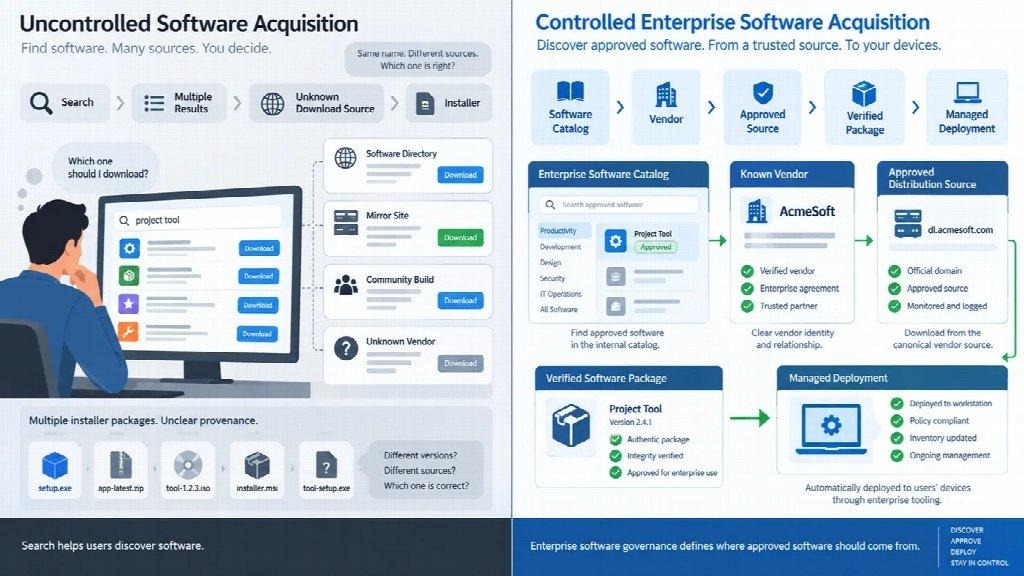
Search engines are pleasant when someone is trying to discover a product, compare alternatives or collect documentation.
They are less helpful as an organizational approval mechanism.
A search for a popular application can surface many authentic pages:
Several may be legitimate. Some may even be less challenging to use than the vendor’s own site.
But visibility in search does not signal an approved relationship with the software publisher.
That is why an assignment such as: Search for the application and install the latest version.
Is weaker than it first shows.
It passes source verification to each individual employee.
A better strategy is simply: Use the recommended software catalog and follow the documented source.
The difference is not lack of search. It is separation of duties.
Search lets people find things.
Software governance specifies what the organization accepts.
Another common falsehood is that software must always be downloaded directly from the vendor’s main website.
In practice, arrangement is often more complicated.
A vendor may invite users to:
For that reason, an internal software record should ideally differentiate between two things:
Sometimes they are the precise site.
Sometimes they are not.
In a centrally coordinated environment, the approved package may never be downloaded manually by an individual at all.
That is not a problem. In many cases, it is safer.
What matters is that the path is carefully planned and documented.
People naturally make trust judgments from visual cues.
A familiar logo, identifiable color palette or nicely executed page can make a download source feel credible.
Those signals are useful for user interfaces. They are basic security controls.
Visual design is relatively simple to copy. A controlled distribution scheme is harder to imitate.
For IT teams, more useful ideas include:
An internal document that says “download from the site with the official logo” is difficult to audit and difficult to reproduce periodically.
A documented source is much more precise.
Source verification does not exclude the need to inspect the package.
Once the software has been extracted from the expected location, the platform may provide additional statistics about what was downloaded.
Depending on the desktop system and application, that can include:
Not every application sends the same signals, and not every organization needs to examine all of them manually.
The most crucial point is the order.
A digital signature is strong evidence about a package. It is not a good substitute for knowing where the package came from.
Likewise, a familiar source does not advocate ignoring an odd publisher name or warning.
A realistic rule is:
Verify the source, then proofread the package.
Public mirrors are often thrown around as though “third party” automatically means “unsafe.”
Enterprise environments make that distinction more tricky.
Many organizations intentionally transfer applications through:
Technically, those may sit between the employee and the primary vendor.
Operationally, they may be more manageable than a direct manual download.
So the more useful query is not:
Did this file come specifically from the vendor’s server?
It is:
Is this distribution source authorized, managed and traceable?
An internal repository hold out by IT can be part of a profitable software supply process.
A random public mirror noticed through search is a different situation entirely.
The distinction is governance, not simply whether another server subsists in the path.
Many internal software catalogs are little more than lists of authorized application names.
They become much more useful when they also record where those applications are pass judgment to come from.
A gladiator entry might look like this:
| Field | Example |
| Product | Communication application |
| Vendor | Authorized publisher |
| Canonical website | Vendor-controlled web property |
| Approved distribution | Vendor site, store or managed repository |
| Supported platforms | Approved operating systems |
| Update method | Automatic, store-managed or IT-managed |
| Internal owner | IT, Security or application team |
This discourages repeated judgment calls, especially for software that exists in different languages or across many third-party websites.
A documented Telegram 官網入口, for instance, can serve as the final starting point for Traditional Chinese users instead of requiring every employee to compare unrelated search leads on their own.
The same requirement applies to engineering utilities, remote-access software, device-management tools and productivity applications.
The catalog does not need to document each item.
It needs to document the choices that employees should not be expected to improvise.
Initial installation often faces more scrutiny than later updates.
That can leave a massive gap.
Applications may be modernized through:
If IT approves the first installation but does not recall how subsequent versions arrive, only part of the software lifecycle has been outlined.
A useful software record should therefore resolve another set of questions:
Where do news items come from?
Can users bypass the legal process?
Is the update channel vendor-controlled or jointly managed?
What happens if the vendor revamps its distribution model?
For applications deployed across hundreds or thousands of device ports, those questions matter more over time than the preliminary download itself.
A new acceptance process does not remove software that was installed under older guidelines.
Organizations may still have:
This is where software inventory proves useful.
A team adopting a new transfer policy should consider whether older copies need to be identified, removed or redeployed through the current consent channel.
The objective is not to create a perfectly polished environment overnight.
It is to avoid running two parallel systems for as long as possible: one governed and one inherited.
Teams can test the quality of their process without using unfamiliar websites or malware samples.
Choose three legitimate applications that are already cleared for business use.
For each form, record:
| Check | Result |
| Vendor identified | Yes / No |
| Canonical domain documented | Yes / No |
| Approved distribution source documented | Yes / No |
| Publisher or signature information provided | Yes / No |
| Update path documented | Yes / No |
| Internal owner identified | Yes / No |
Then contrast the two workflows.
In the first, ask someone not associated with the process to find the software through a simple search.
In the second, give them the chosen vendor and distribution source.
Look at functional differences:
This is a simple exercise, but it can determine whether the organization’s trusted route is actually easier to follow than an improvised one.
If the unofficial path is faster and clearer, employees will probably use it.
That is not only a user-behavior issue. It is a process-design issue.
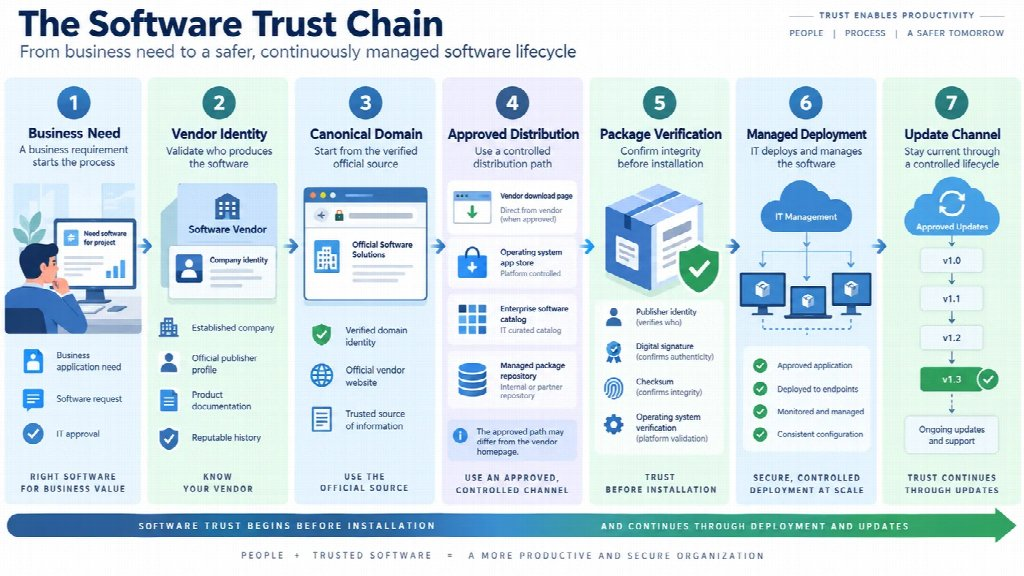
A more complete model of software development looks something like this:
Business need
→ Vendor identified
→ Canonical source documented
→ Distribution method approved
→ Package checked
→ Application deployed
→ Updates controlled
→ Unsupported copies retired
Each step answers a new question.
Together, they create a much more robust control than asking employees to judge whether a download page feels safe.
This matters even more in industrial and enterprise settings, where a utility installed for one project can remain on a workstation for years.
The longer software stays in service, the more substantial its update path and ownership become.
The visible act of downloading software is only one phase in a longer process.
Before anyone clicks the button, the organization should already know which vendor it relies upon, where that vendor is expected to operate and which forwarding routes are acceptable.
After installation, that same reasoning should endure through updates, redeployment and eventual retirement.
Good software provenance is not about making every download costly.
It is about removing redundant guesswork.
When the approved source, package path and new release method are already known, employees can move faster while IT sticks to a clearer chain of trust.
Software security does not load when the installer runs.
It begins when the organization defines where trusted software is allowed to come from.
Also, learn what makes Enterprise SaaS different from Traditional Software.
In the end, software trust is more than checking an installer after it has been downloaded. IT teams need to know which vendor is responsible for the product, which website source is okay and where future updates will come from.
Documenting everything reduces guesswork and makes things easier to manage. It also helps to prevent previous copies. Considering it as a complete cycle can create a more uniform process without making routine software deployment unnecessarily difficult.
Ans: Verifying the vendor helps to define where the software should come from and lowers the chance of employees based on unofficial sources.
Ans: Not always. A team might also use an app store, managed repository or internal software catalog.
Ans: It is a simple assessment of where approved applications come from, how these updates are provided and who owns the software internally.
