
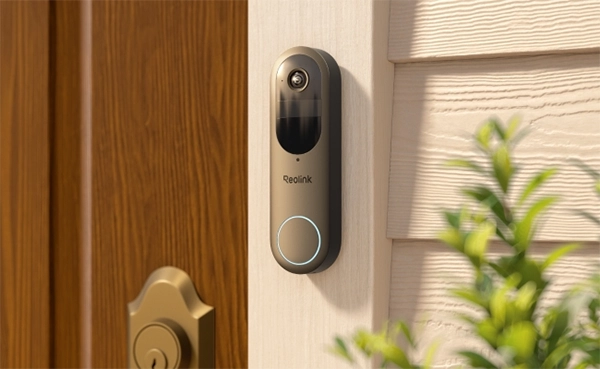
Smart Wi-Fi doorbell cameras are a great way to enhance home security while allowing you to be able to monitor your entrance from anywhere. These devices have so many features, including video recording, motion detection, two-way communication, and instant mobile notifications.
In order to be able to choose a good product, you will need to learn about the factors that you need to take into account. This article discusses how these systems work, what aspects should be considered when buying them, and the process of installing them.
A smart Wi-Fi doorbell camera keeps you updated with everything happening at the front of your door. Not only does it capture every moment, but it also shares the live feed that you can check from any location.
As soon as any movement is sensed, whether a person or an item, the doorbell smartly recognizes it and instantly alerts you via the connected device. You can communicate with the person who is standing at your door with the help of a smartphone application.
Check the video quality based on the camera’s resolution. Preferably, select one with 2K or above resolution for clear and detailed pictures. Also, the camera should have night vision to capture clear videos at night.
Wi-Fi doorbell cameras are available in wired and wireless options. The wired camera needs a constant power supply from an adapter or doorbell power source. But the wireless camera is self-powered since it has an in-built battery.
It seamlessly connects to your home Wi-Fi. Just make sure it offers dual-band Wi-Fi for better speed and reliability.
The doorbell camera should not have any subscription for live videos, real-time alerts, and other features. As long as you are using the local storage, it should not charge a recurring fee.
A Smart detection system is a necessary feature that will smartly detect people, parcels, cars, and pets. It will alert the devices accurately and in real-time.
The video doorbell camera should be compatible with smart home systems, such as Amazon Alexa and Google Assistant. This will enable the user to control the doorbell without any difficulties.
Reolink Video Doorbell (2nd Gen) is a wireless video doorbell. You have the option to use the wired mode for maximum reliability. However, you can also use the battery-powered mode for quick installation. It offers dual-band Wi-Fi for a stable connection.
It has a resolution of 2K and provides 1:1 ratio full-body coverage. Thanks to its intelligent detection capabilities, it detects people, pets, vehicles, and packages. It delivers alerts in real time on your devices. Most significantly, it supports Google Assistant and IFTTT. As such, you can use it with your smart devices, apps, or any other platform for alerts and automation.
Reolink Video Doorbell Wi-Fi is yet another intelligent doorbell needing a wired power supply. It takes high-definition videos of 2K+ quality and automatically recognizes people, cars, and pets. Instant notifications will come to your device, and you can converse with the visitor through a two-way audio system.
It supports 2.4/5 GHz dual-band Wi-Fi, which ensures fast performance and reliable connectivity. It offers real-time alerts, quick replies, flexible storage options, and lots of extraordinary features without any charges. It’s also compatible with Google Assistant and Amazon Alexa. Thus, users can use it with their smart home system and answer the door hands-free.
For this purpose, we will use the Reolink Video Doorbell as an example.
Step 1: Select the placement area on the front door at an appropriate height. The doorbell also comes with a wedge to give a slight angle.
Step 2: Attach the mounting template. With a drill machine, drill the necessary holes and screw the mounting plate. Then attach the doorbell.
Step 3: If you have a Wired Wi-Fi doorbell, you need to connect it to the existing doorbell transformer. You can connect the output terminals of the transformer or power supply to the doorbell. But if you have a battery-powered Wi-Fi doorbell, you can place it without any wiring. Just make sure it’s completely charged.
Step 1: Open the Reolink app. Tap the “+” button and scan the QR code on the back of the doorbell.
Step 2: Connect the doorbell to the Wi-Fi. Select the network and enter the password.
Step 3: Finish the initialization process by naming your doorbell and setting up a password. The installation process is completed.
Step 4: To set up Alexa, you need to connect your Reolink account to Alexa. Open the app, go to Cloud, and tap Smart Home. Log in to your Reolink account. Tap Alexa > Link Now. Enable the Reolink skill and link your Reolink account.
Step 5: Activate the Reolink smart home skill, and there you will find the doorbell switch to turn it on.
The Smart Wi-Fi doorbell connects to the internet for live streaming and remote access to it. Users can communicate with the visitor, view live streams or recordings, and remotely manage the doorbell from anywhere. It also detects objects like people, pets, packages, and cars. After detection, it gives an alert to the connected device immediately. It also works with smart home systems and updates you about all activities.
A traditional doorbell is connected to the screen inside your house through wiring. You can monitor the activity and get basic motion alerts. It does not offer remote access, real-time notifications, or smart detection. It does not integrate with your smart home system. It’s a basic doorbell camera. If you need to talk to the person on the door, you need an intercom.
Ans: There is usually a physical reset button on the camera. Locate it, press it, and hold it for about 10-20 seconds. The camera will reset itself and will make some noise.
Ans: Yes, you need Wi-Fi for a wireless doorbell camera. It is connected to your home Wi-Fi network to access the internet. Otherwise, it will not show the live feed and send real-time alerts.
Ans: Some doorbell cameras require paying a monthly fee for using the camera and its features. However, Reolink Video Doorbell cameras offer all features and complete functionality on local storage without any monthly charges.
Smart Wi-Fi doorbell cameras help users keep an eye on their front doors through live videos and recordings. There is a possibility that you can open the doorbell when you are away and even communicate with the other person. In addition to providing security, it also ensures convenience. Users can check what’s happening at the door and get real-time alerts of every activity. It’s a necessity for security and peace of mind.
