
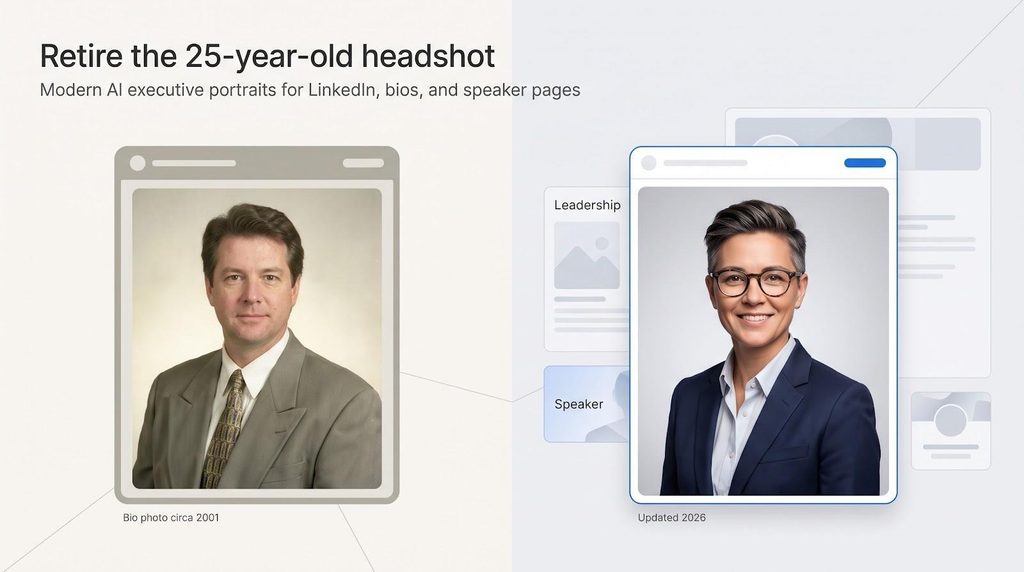
Your LinkedIn photo creates a first impression even before someone meets you in person. LinkedIn itself says that a profile photo helps people recognize you, but most résumé advice in the U.S. still suggests leaving photos off your résumé.
This can be confusing for many executives. You need a recent, professional photo for LinkedIn, company profiles, speaker pages, and press kits, but not for your résumé. To make things easier, this guide looks at 14 AI headshot generators that can give your old, outdated photo a fresh look without the need to book a professional photo shoot.
Only have five minutes? Start here. Prices and policies were checked in November 2026.
| Tool | Best when you need | Starting price* | Delivery time | Max native resolution | Look out for | |
| Magic Studio | To preview every headshot before paying | $59 one-time | ~15 min | 1 024 px, paid upscale for print | Add the paid upscale for large print | |
| HeadshotPro | SOC 2 paperwork, SSO, and admin controls | $29 | 2 h (Basic) | 4 K on Executive tier | Slowest turnaround on the lowest plan | |
| Aragon AI | A dozen high-res shots today | $35 | 15 to 45 min | 1 792 × 2 176 px (Exec) | Basic and Standard drop to 896 × 1 088 | |
| BetterPic | True 4 K plus optional human retouch | $35 | ~2 h | 4 K on all tiers | Terms allow storage up to three years | |
| Headshots.com | One-photo, pay-per-keeper simplicity | $15 per image | Seconds | Not published | Cost rises if you need many files | |
| Profile Bakery | GDPR-first team rollout | $24.90 | 5 to 15 min | Not published | Lower Trustpilot score (3.2/5) |
*Prices in US dollars unless noted; regional promotions may vary.
No single tool wins all the categories. Need a fast batch for tomorrow’s board deck? Aragon’s Executive tier delivers. Tight security checklist? HeadshotPro offers a SOC 2 Type II report, SSO, and Enterprise audit logs. Prefer to judge quality before spending? Magic Studio lets you preview, pick, and then pay.
The next section breaks down our scoring system, so you can compare privacy, resolution, and budget with confidence.
The Executive Bio Readiness Index distills everything an executive photo definitely does: look like you today, respect brand rules, and satisfy security teams, all in one transparent score. We weight each factor by how much pain it clears for communications and HR.
| Criterion | Weight | What it covers |
| Identity fidelity | 30 percent | Likeness, skin tone, age accuracy, zero anatomy problems |
| Privacy & security | 20 percent | Retention window, no-training, pledge, SOC 2/ISO proof |
| Enterprise governance | 15 percent | Admin dashboard, locked features, SSO/SCIM, audit logs |
| Output flexibility | 10 percent | Native resolution, crop options, print viability |
| Speed & purchase risk | 10 percent | Stated turnaround, preview-before-pay, refund clarity |
| Value | 10 percent | Cost per usable keeper, not headline image count |
| Independent social proof | 5 percent | Volume-weighted Trustpilot or G2 reviews within 12 months |
Scores are based on each vendor’s published pricing, terms, and privacy pages, checked in November 2026. These seven levers provide you a solid yardstick to compare tools that promise studio magic but differ widely once you study the fine print.
Below you’ll find one concise review for each platform, ordered by our Executive Bio Readiness Index score (highest to lowest). Each mini-profile opens with the tool’s standout strength, then flags any policy or workflow caveats so you can decide in seconds whether it belongs on your shortlist.
Look for the ★ symbol to spot a tool’s standout strength.
How to read the badges
| Badge | What it means |
| ★ Preview | See your headshots before you pay |
| ★ Privacy | 30-day (or shorter) deletion and no-training pledge |
| ★ Governance | SSO or SCIM plus locked brand styles |
| ★ 4 K | Native output ≥ 3 840 px |
| ★ Speed | Headshots ready in under 30 min |
Magic Studio lets you see your completed headshots before you pull out a credit card. Plans start at $59 for 50 headshots in 5 looks, and you pay only if you love the outcome and want to keep them. Seeing every frame first eases the “does it look like me?” worry that keeps many executives on the line. Magic Studio says headshots are all set in about 15 minutes, depending on the package.
You upload 10 photos with different angles, lighting, and clear views of your face, and the AI builds a personal model of your features. Files arrive at 1 024 × 1 024 px, sharp for LinkedIn, websites, and business cards, and Magic Studio can upscale them for large-format print for a small fee.
Rights stay simple: you get full commercial rights to your headshots, for individual or business use. Privacy is just as simple. Magic Studio trains a separate AI model for each photoshoot, never uses your pictures for any other training, never sells or distributes them, and deletes your data automatically 30 days after your headshots are made, or earlier whenever you choose.
For leadership teams, an admin sets the backdrops and outfits once, finds who has finished, and downloads everyone’s primary headshot in one tap. Team pricing drops per person as you add seats, up to 30% off, and team data stays on servers in mainland USA.
Preview your full set of headshots, then pay only if you want to keep them. Finance likes that sequence.
HeadshotPro covers most of a corporate IT checklist: a SOC 2 Type II report on request via its Trust Center, a data-processing agreement for every customer, SSO as a paid add-on for teams, and SCIM and audit logs on the Enterprise plan.
Plans start at $29 for 30 headshots in about 2 hours. The $39 plan gives 50 headshots in about 30 minutes, and the $59 Executive plan gives 70 headshots in about 15 minutes with 4K downloads in portrait and landscape formats, handy when you want both a LinkedIn square and a press-ready image.
Rights are broad: you own the headshots and can use them publicly; uploaded photos are in the bin 30 days after generation, and the terms state that neither your photos nor your results are used to train AI models.
Know before you buy
If vendor approval lives with legal, HeadshotPro’s up-front certifications shorten the review cycle. Upload, select a neutral backdrop, and your compliance team can rest well.
Speed is Aragon AI’s calling card. The Executive plan promises 100 headshots in about 15 minutes, the Standard plan 60 in about 30 minutes, and the Basic plan 40 in about 45 minutes, still quicker than some rivals’ top tiers.
Privacy and security keep fast. Aragon deletes face data within 30 days of delivering your photos, contractually bars its AI suppliers from using face data to train general models, and says it is SOC 2 Type II compliant after an independent audit.
Resolution by tier:
Pricing in November 2026: $35 Basic, $45 Standard, and $75 Executive, given as a limited-time 20% discount. A full refund is applied only if you have not downloaded the pictures, so review previews first.
Know before you start
Need dozens of fresh portraits before the workday ends, with policies your security lead will make sure? Aragon AI fits that brief.
BetterPic delivers 4K headshots on every paid tier, also adding the $35 Basic plan, so your annual report should need no extra upscaling.
Pick BetterPic when print fidelity and subtle human polish matter more than ten-minute delivery, and set a reminder to request data deletion once your campaign completes.
Skip the bulk bundles. With Headshots.com, you post one selfie and, seconds later, see AI-enhanced previews. You need no credit card to begin, and you pay only for the files you download. Each keeper costs $15.
When a single perfect shot is all you require (a press release, speaker badge, or updated Slack avatar), à-la-carte pricing beats a 50-image pack. For a full leadership team, though, costs climb quickly.
Privacy stays tight. The company cancels uploads and generated files 31 days after delivery and tells customers images never train future models.
Know before you buy
If you have one good selfie on your phone and need a polished headshot today, Headshots.com is the quickest card-free option.
StudioShot blends portrait craft with AI speed. The company says professional photographers built the service from the ground up, so lighting and color feel curated, not random.
Privacy check
StudioShot keeps personal data for as long as you use the service unless you request deletion, which it fulfills within 45 days. Its privacy policy mentions no SOC 2 report or training pledge, and the open-ended retention can raise flags in regulated industries.
Pricing (November 2026): $29.25, $36.86, and $43.88 at sale prices, with more images, styles, and retouches at each step.
If consistent brand color and built-in human touch-ups matter more than same-hour delivery, StudioShot offers a solid middle ground: upload once, let the AI shoot, then let real artists refine the results.
Profile Bakery is a Swiss company that follows both Swiss data law and the GDPR, so its business features read like a European works-council checklist.
Trade-offs to weigh
Headquartered in Europe or navigating strict cross-border rules? Profile Bakery’s business variant keeps employee photos in the EU/EEA or Switzerland under a signed DPA.
Need a headshot but have only one good selfie? Upload it, and Dreamwave returns a gallery across its professional styles in about two hours, with no 20-image shoot required.
Privacy is the headline. Files live on U.S. servers, delete automatically after 30 days of inactivity, and the company says it never trains or sells customer photos.
When a single selfie and a short retention clock matter more than deep controls or extensive social proof, Dreamwave keeps both workflow and risk simple.
For $29.99 you receive 100-plus headshots plus 20 custom edits that let you change an outfit, background, or lighting with plain-English prompts, handy when brand colours shift between the board deck and the annual report.
Startups that care about variety and easy re-styling more than 4 K precision will like the price. Just confirm resolution before you promise a magazine spread, and set a calendar reminder for data deletion.
PFPMaker keeps budgets lean. Packs start at $9 for about 100 headshots in four preset ratios (square, portrait, story, and landscape), so you skip manual cropping when channels change their specs.
When price outweighs 4 K vanity, PFPMaker turns a tiny photo folder into channel-specific portraits in seconds. Just review each file before you send it to print.
Secta produces hundreds of portraits across 90-plus themed styles, from a plain gray wall to a rooftop garden. Its in-app edit tools let designers change clothing, expression, background, or hair on a finished photo without generating a new batch.
Read the fine print
The terms say otherwise: after generation, Secta keeps a copy of your personal model and uploaded images “for internal use purposes” to improve its product, until you delete the content or your account. Risk teams should file a written deletion request and save confirmation.
Pick Secta for massive style variety and quick on-the-fly edits, but make sure legal signs off on the retention clause and that your final resolution meets print needs.
Need a headshot in minutes? Try It On AI says one selfie can produce hundreds of headshots in under 2 minutes, though its Express product card promises 200-plus images in under 2 hours. Premium plans add human editors for final fixes.
If speed matters more than polished policy language and you can accept mixed pricing pages, Try It On AI is built for a fast first portrait. Just read every line of the terms first.
Need lots of options? ProPhotos’ Basic plan delivers 40 images for $39 (90-minute turnaround), while the Professional tier pushes out 200 images for $59 in about 30 minutes. Designers juggling Slack squares, webinar banners, and monochrome annual-report headshots will appreciate the surplus frames.
Low per-image pricing suits teams that value sheer volume over strict privacy language. Just send legal that marketing-use clause before you upload, and verify resolution if glossy print is in scope.
Photo AI works like a portrait subscription. Starter costs $19 per month ($9 per month billed yearly). Each AI model you create comes with 48 free photos, and monthly credits pay for extra studio, lifestyle, or social variants: 50 credits on Starter, 1,000 on Pro.
Choose Photo AI when you need a steady stream of fresh portraits for newsletters or social posts, and you can live with broader data rights. For a one-time board photo, or strict compliance rules, look elsewhere.
Short answer: they’re brilliant for single-image tweaks, but they stumble on batch consistency, team governance, and airtight privacy. Here’s how the four most popular options measure up.
Canva’s ProfilePhoto app, built by third-party developer Imagineers Studio, is free with any Canva plan: upload a selfie, pick one of its studio styles, and export. Because it enhances one image at a time, you don’t have a 40-shot buffer if the lone render over-smooths skin, and using it means accepting the developer’s own terms and privacy policy as well as Canva’s. It suits a quick LinkedIn refresh, not a full board rollout.
Paste a selfie, type “business-casual lighting on soft gray,” and ChatGPT returns a single portrait. On Free, Plus, and Pro accounts, chats can train OpenAI models by default until you turn off “Improve the model for everyone”; Business and Enterprise workspaces are excluded by default. Great for swapping a messy background, but you’ll need dozens of prompts to match Magic Studio’s keeper count.
Midjourney’s current model delivers 2 048 × 2 048 px HD files at the default square ratio (≈ 6.8 in at 300 DPI) with striking chiaroscuro, but everything is public unless you pay for the $60/month Pro plan, which includes Stealth. The service holds a perpetual license to inputs and outputs, companies with over $1 million in yearly revenue need Pro or Mega to own their images, and there’s no batch upload, facial-consistency guardrail, or enterprise dashboard.
Firefly can generate a new background behind a portrait, and Adobe backs Content Credentials, the provenance labels from its Content Authenticity Initiative. Adobe says it has never trained Firefly on customer content. The free plan gives limited daily generations; paid plans start at US$9.99/month for 2,000 generative credits. Like Canva and ChatGPT, Firefly works one image at a time and lacks team-style locks, so large cohorts will still save hours with Aragon or HeadshotPro.
Bottom line: General editors excel at one-off fixes or creative experiments, but when you need 40 matching executive portraits with clear deletion timelines and SOC 2 paperwork, choose a dedicated generator.
Viewers form trait impressions from a face in as little as 100 milliseconds, judging competence and trustworthiness as well as attractiveness. An executive portrait must project credibility without stiffness, and approachability without slipping into casual.
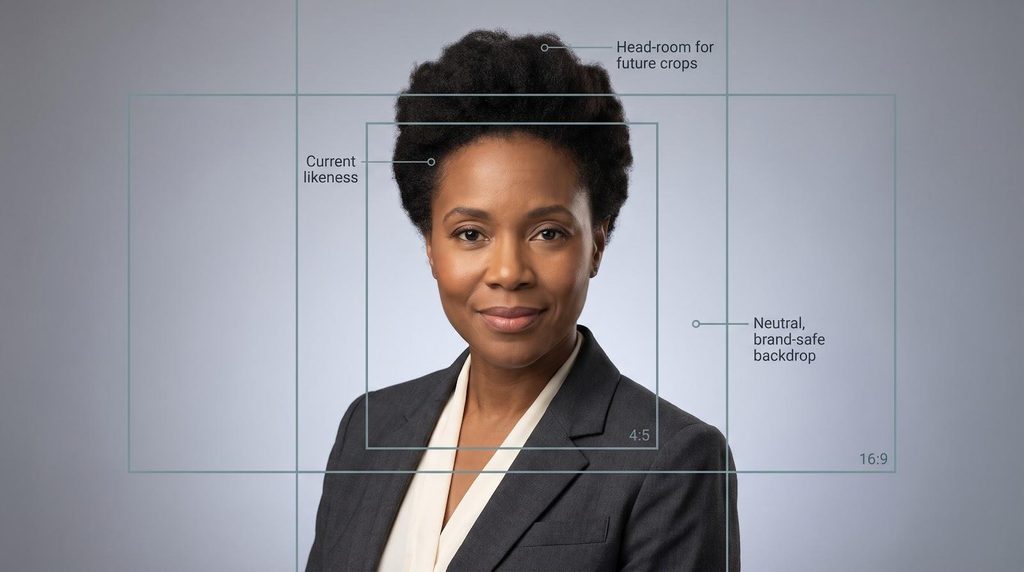
1. Current likeness first
Subtle markers such as hair colour, glasses style, and natural smile lines signal authenticity. When they don’t match reality, audiences wonder what else is dated.
2. Composition with future crops in mind
Leave head-room and shoulder-space so designers can pull a 1 : 1 Slack avatar, a 4 : 5 website portrait, and a 16 : 9 press banner from one master file.
3. Lighting and background as brand voice
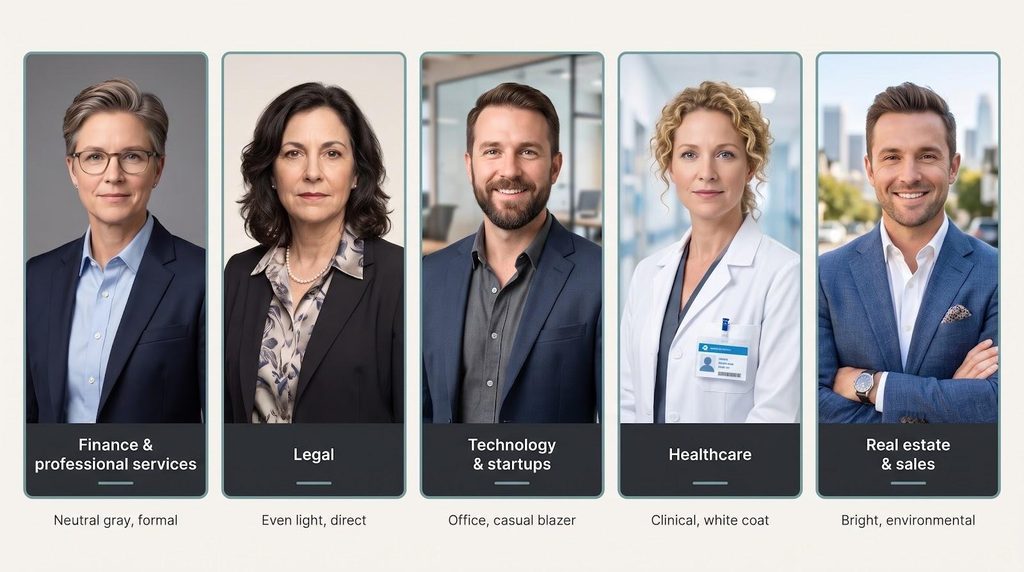
Neutral grey suggests stability for a fintech CFO; a warm, softly blurred clinic setting supports a healthcare CEO’s empathy. Heavy filters or surreal bokeh undercut trust.
4. File specs that travel
Aim for 4 096 px on the long edge (≈ 13.6 in at 300 DPI), sRGB colour, and an unambiguous commercial-use licence so marketing can publish worldwide without legal footnotes.
Bottom line: a true executive headshot is less about perfection and more about recognisable leadership, versatile framing, and rock-solid usage rights.
One image rarely fits every outlet. LinkedIn compresses, brochures print at 300 DPI, and conference apps crop to widescreen. Build a disciplined asset pack once, and hand the bundle to designers, recruiters, and PR teams alike.
Start with a master portrait: at least 4 096 px on the long edge (≈ 13.6 in at 300 DPI), extra head-room, and the sRGB colour profile. From that file export four tactical crops:
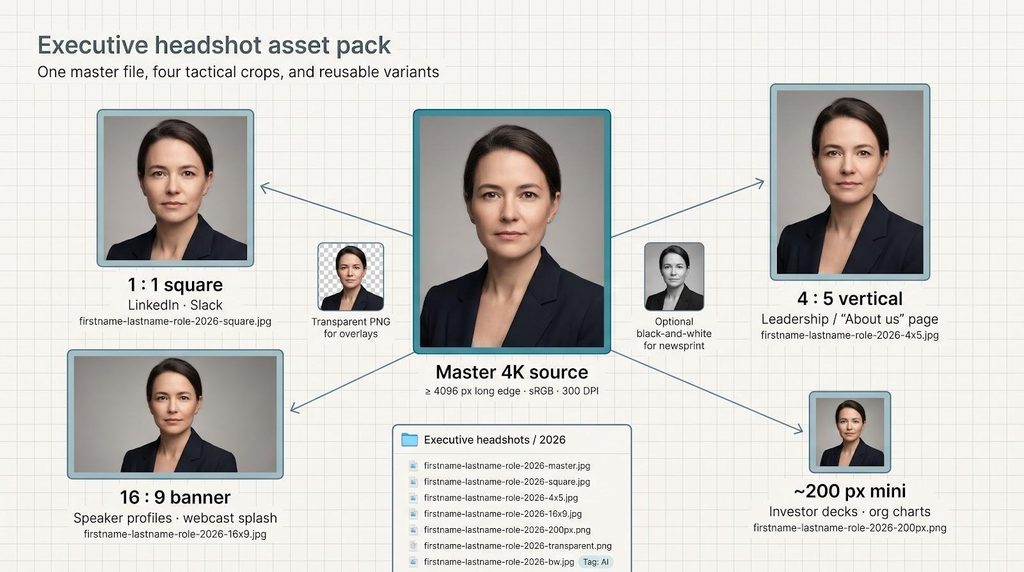
Add a transparent-background PNG for gradient overlays and, if your brand still prints on newsprint, an optional black-and-white version.
Name files clearly (for example, firstname-lastname-role-2026-square.jpg beats IMG_7431_final2_FINAL.jpg), and store the source, crops, licence proof, and generation date in one cloud folder. Tag it “AI” or “Studio” for provenance, and set a calendar reminder to review the set next year when hairstyles, roles, or regulations change.
Takeaway: one well-organised package prevents last-minute scrambles and keeps every channel on-brand.
Before you upload a single selfie, run this checklist; every answer should live on the vendor’s public terms page, not in an email.
1. Data retention
2. Model training & reuse
3. Data residency & transfer
4. Independent assurance
5. Access controls
6. Disclosure & provenance
7. Usage rights
Bottom line: Choose vendors that publish short retention windows, a no-training pledge, audited security controls, and an easy delete button. Anything less risks both brand trust and compliance fines.
AI can polish a portrait, but it can’t invent your face. Feed the model clear, current images, and you’ll get sharper, more authentic headshots.
Aim for 10 to 20 recent photos that show:
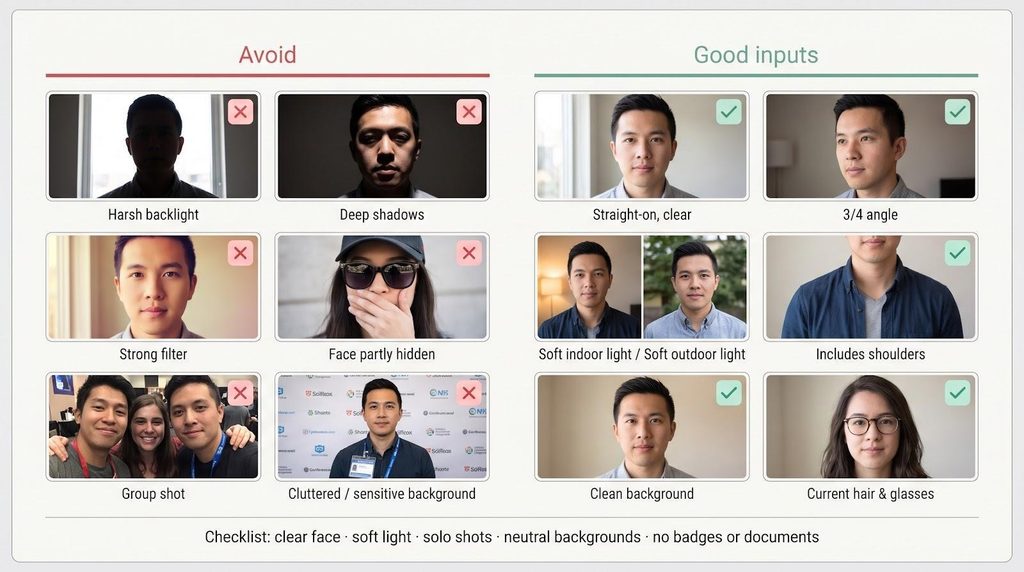
Shoot for quality over quantity
Keep backgrounds clean
Respect privacy
Quick checklist: 15 clear, well-lit selfies → consistent hair/eyewear → neutral backgrounds → no sensitive info. Follow that recipe, and the model does its best work the first time.
Follow this five-step triage, and the best platform will surface before you upload a single selfie.
1. Match resolution to the final channel
2. Price by usable keepers, not headline images
If a $59 pack delivers 10 board-ready shots, your real cost is $5.90 per keeper, often better than a $29 pack that yields only two.
3. Read legal pages before price grids
Look for a clear deletion window (30 days or less), a no-training pledge, and named subprocessors. Any blank field usually means “no.”
4. Check team-scale controls
Need more than 10 seats? Insist on SSO, role-based downloads, and locked brand backgrounds; otherwise, styles drift every time a new VP signs up.
5. Test support upfront
Email one question such as “How long do you store face models?” and note both clarity and response time. Vague answers now lead to stress on press day.
Bottom line: Channel fit, keeper economics, and published privacy controls matter more than any marketing claim of “200 images.”
Skip the arbitrary calendar and watch for clear triggers:
Best practice: run a 15-minute annual audit. Scroll LinkedIn, the company site, and event pages; replace any image that no longer matches the leader who walks into the room today.
Takeaway: update whenever a visible change could confuse investors, reporters, or employees, usually every two to three years and sooner in fast-moving industries.
Match today’s need to the tool below:
| Scenario | Recommended pick | Why |
| LinkedIn-ready image before lunch and preview before paying | Magic Studio | See your headshots in about 15 min; pay only if you keep them |
| 300-person rollout under SOC 2, SSO rules | HeadshotPro | SOC 2 Type II report on request, SSO add-on, 4K on the Executive plan |
| Same-day press deadline, need 100 options | Aragon AI Executive | ≈ 100 images in ~15 min; 1 792 × 2 176 px |
| Board deck that prints at 300 DPI | BetterPic | 4K on every tier plus optional human retouch |
| Only one selfie available, no 20-photo upload | Headshots.com or Dreamwave | Pay-per-keeper (Headshots.com) or privacy-first one-selfie workflow (Dreamwave) |
| Cash-strapped startup | The Multiverse AI or PFPMaker | About 100 or more images for $9 to $30; verify resolution before print |
| Ongoing personal-brand newsletter | Photo AI (Pro) | 1,000 monthly credits on Pro once the model is trained |
| National-press magazine cover | Hire a photographer | Human direction and 300-DPI authenticity still win here |
Takeaway: choose by scenario (speed, security, print fidelity, or budget), not by headline image count.
When to book a photographer
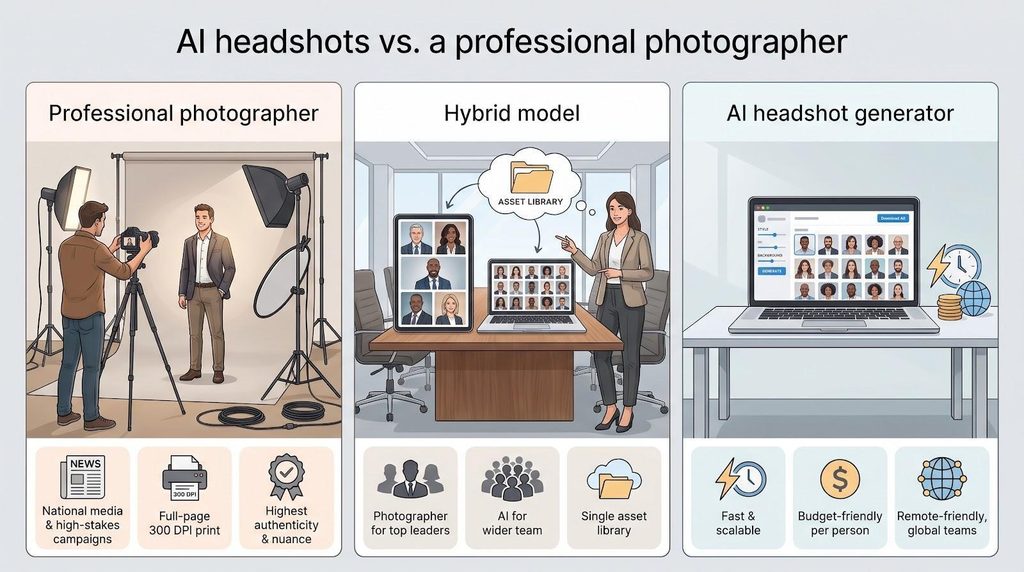
Typical cost: Thumbtack puts the U.S. national average for professional headshots at $304, with typical prices from $216 to $427; wardrobe changes, session length, extra downloads, and a makeup artist all push the price up.
When AI makes more sense
Best of both worlds: the hybrid model
Takeaway: book a human lens when authenticity and print fidelity are non-negotiable, and deploy AI for scale, speed, and cost-control everywhere else.
An executive headshot is more than a photo; it is a credibility signal for investors, recruits, and reporters. AI can create that asset in minutes, but only if you:
Spend one focused hour: collect 15 clear selfies, generate, zoom-check for artefacts, and file the assets. That discipline pays off every time someone asks, “Can you send a press-ready headshot?”
Faces change, roles shift, and palettes evolve, so schedule an annual 15-minute audit and refresh whenever any of those markers move.
Choose the tool that matches your compliance bar, disclose AI use where required, and your next bio will show a leader who looks exactly like the person who walks into the room today.
Q1. Is an AI headshot allowed on LinkedIn?
Ans: Yes. LinkedIn’s photo guidelines say your profile photo must reflect your likeness and even allow an artistic rendering of yourself, so an accurate AI headshot fits, while stock images and other people’s likenesses can be removed.
Q2. Do I have to disclose an AI-generated photo?
Ans:
Q3. Should I put a headshot on a U.S. résumé?
Ans: Still no. Most U.S. career advisers recommend leaving photos off résumés to reduce bias, so use the image on LinkedIn, company bios, and speaker pages instead.
Q4. Who owns an AI headshot?
Ans: Ownership is licence-based. Most paid plans grant commercial rights (Photo AI reserves them for Pro and above), but purely AI-generated work is not copyrightable in the United States, so watermark high-stakes material with your brand.
Q5. How many photos should I upload?
Ans: Multi-image tools usually ask for several varied selfies (Magic Studio asks for 10); one-selfie services trade volume for speed.
Q6. What counts as print-ready resolution?
Ans: Aim for 300 DPI at 5 × 7 in (≈ 2 100 × 3 000 px). HeadshotPro Executive and BetterPic list 4K files, and Magic Studio offers a paid upscale for print.
Q7. Do services keep my images forever?
Ans: Retention ranges from 48 hours on some business plans to the life of the account. Delete your files after you download the finals, in the app or through support.
Q8. Will my face train the next model?
Ans: Magic Studio, HeadshotPro, Dreamwave, Profile Bakery, and The Multiverse AI say no, and Aragon bars its AI providers from training on face data. Others, such as Secta, keep uploads to improve the product until you delete them.
Q9. Can I edit the file later?
Ans: Yes. JPEG or PNG files open in Photoshop, Canva, and similar editors. Magic Studio and Secta also let you change backgrounds or outfits in-app.
Q10. What if none of the images look like me?
Ans: Pick a preview-before-pay tool. Magic Studio charges only if you love your headshots and backs them with a satisfaction guarantee, and HeadshotPro gives one free redo plus a 30-day money-back guarantee.
Q11. Which tool offers 4 K on the cheapest tier?
Ans: BetterPic lists 4K output on every paid plan, from $35; HeadshotPro keeps 4K for its $59 Executive plan, and most others require upscaling or do not publish pixel sizes.
Q12. How long does generation take?
Ans: Fastest: Headshots.com (seconds) and Try It On AI (minutes). Magic Studio and Aragon Executive: about 15 minutes. Large style libraries like Secta can take up to 2 hours.
Q13. When should I hire a photographer instead?
Ans: For national media, investor roadshows, or glossy print campaigns where authenticity must be unquestioned.
Q14. Biggest mistake teams make?
Ans: Mixing old studio shots with new AI portraits on one leadership page. Refresh everyone at once, and lock the style.
