
Many of the AI notetakers are designed around a scheduled video meeting with a calendar invite, a handful of attendees, and a bot that joins as an extra participant. That design was good for sales calls and internal stand-ups but worse for the place where an IT service team really spends its talk time, i.e., the phone queue.
Fifteen or twenty short calls of a help desk technician were never designed to be listed on a calendar. Most of them arrive through a VoIP system instead of Zoom or Meet. The output that matters is the accurate note on the right ticket with the right amount of time logged against it, inside the professional services automation.
That reveals why so many IT teams try a general-purpose AI notetaker, like transcripts and search listening vs. social listening, and still end up with techs retrying calls into tickets at the end of the day.
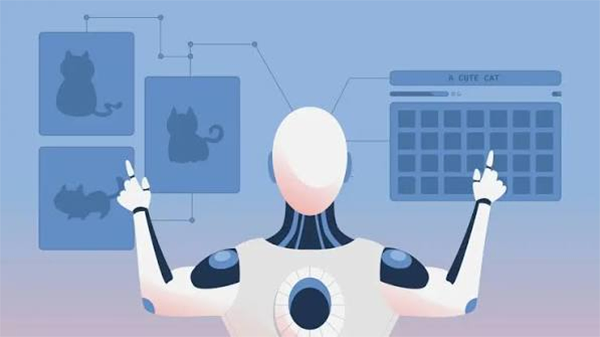
Peel away the branding and every AI notetaker performs the same four steps. It captures audio, converts speech to text, uses a language model to condense that text into a summary and action items, and then delivers the outcome somewhere.
The first three steps have become fairly commoditized. Transcription accuracy on clear audio is better across the major tools, and summarization quality depends more on the underlying model and the prompt than on the vendor’s logo. The fourth step, delivery, is where products diverge sharply, and it is the step most reviews overlook. A summary that lives in the notetaker’s own web app is useful to the person who attended. A summary that is written into the system of record is helpful to the whole team, to the client, and to whoever has to bill for the work.
For a meeting-centric team, “delivery” generally means an email recap, a shared notes page, or a sync to a CRM such as Salesforce or HubSpot. For an IT service team, it has to mean the ticket.
There are three structural mismatches, and they compound.
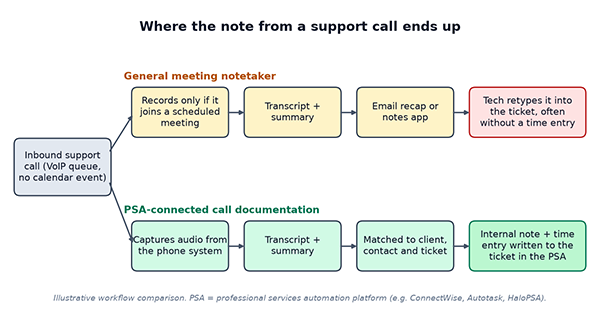
If most of your talk time is spent on support calls, the feature list on a notetaker’s pricing page is less useful than a short set of questions about how it fits your workflow.
Ask specifically which phone systems it combines with and how. Some tools record through a softphone or desktop app, some connect to the phone platform’s call-recording API, and some only work within meeting apps. If your techs answer calls from desk phones, a desktop app that relies on the local microphone will miss half of the conversation.
“Integrates with ConnectWise” may mean anything from a link back to the notetaker to a fully written internal note on the correct ticket. Test it. Make a call, then look at the ticket. Check whether the note is public or internal, whether it is attached to the accurate company and contact, and whether a time entry exists with a sensible duration and work type.
Automatic matching is convenient but can be wrong when a client has many open tickets. The better tools either match on caller ID plus ticket context or give the tech a quick confirm-or-change step. An unidentical note on the wrong ticket is worse than no note, because it erodes trust in the whole history.
Recordings of support calls can save passwords read aloud, personal data, and details of security incidents. Find out where audio is stored, for how long, who can access it, and whether retention can be configured per client. If you serve regulated clients, these answers matter more than conclusion quality.
One of the most common questions users search about AI notetakers is whether they are legal. For phone calls, the answer depends on recording consent law, not on the AI.
In the United States, the federal Wiretap Act permits recording when one party to the conversation consents (18 U.S.C. § 2511(2)(d)). Many states go further and require every party to consent, California being the most cited example under California Penal Code § 632. Because a support desk usually takes calls from clients in multiple states, the practical approach most teams take is to play a short notice at the start of every call that it may be recorded and transcribed. That manages the AI notetaker question as a side effect. It is worth confirming the wording with counsel, particularly if you also serve clients outside the US.
Not every IT team requires a support-specific tool. If your calls are mainly scheduled project meetings, quarterly business reviews, or internal planning sessions on Teams or Zoom, a mainstream meeting notetaker will serve you well and may already be available through licenses you hold, such as Zoom AI Companion on paid Zoom plans or intelligent recap in Teams with Teams Premium or Microsoft 365 Copilot. Adding an additional tool for the same meetings rarely pays off.
The case for a service-desk-specific approach gets more useful as the share of unscheduled phone work rises. A two-person shop that takes a handful of calls a day can afford to type notes by hand. A twenty-person service desk managing hundreds of calls a week cannot do that consistently, and the missing notes show up later as disputed invoices, repeat questions from clients, and escalations where nobody can reconsider what was promised.
This is the niche that PSA-native tools target. Vight, for example, transcribes service calls and writes the summary, ticket note, and time entry straight to the PSA, including ConnectWise, Autotask, and HaloPSA, so the tech closes the call and the documentation is already on the ticket. Teams seeking that category should look at AI call documentation (https://vight.ai/call-intelligence) built specifically around the ticket, and then run the same test defined above on their own calls.
Select one queue and one week. Turn on the tool for a subset of techs and leave the rest working as usual. At the end of the week, pull a sample of tickets from both groups and compare three things: how many calls have a note at all, how specific those notes are when a second tech reads them cold, and how much logged time each group recorded against the number of calls they handled.
That last comparison is generally the most revealing. If the AI-assisted group logs noticeably more time for a similar call volume, the tool is recovering billable minutes that were previously lost. If the notes are correct but time entries are still missing, the integration is not finished, whatever the marketing page says. Knowing what managed IT consulting is will help to understand such concepts properly.
An AI notetaker earns its place in an IT service team when the person picking up the next ticket can understand what happened on the last call without asking anybody. The rest is a transcript.
Ans: AI notetakers capture support calls, convert conversations into text, summarize key details, and document the outcome. Tools designed for IT service teams can also add notes to the correct details and create time entries in a PSA system.
Ans: IT teams should check whether the tool captures calls from their phone systems, connects with their PSA platform, matches calls to the correct tickets, and provides suitable controls for storing and accessing recordings.
Ans:Recording consent requirments depend on the applicable laws. In the United States, federal law generally permits recording when one party consents, while some states require consent from every party.
