
Training budgets are not that fascinating; still, skill gaps keep draining revenue. This creates pressure on companies to adopt cloud-based enterprise learning-management systems (LMS). Market analysts value the global LMS market at $24 billion–$29 billion for 2025, with cloud deployments surging the fastest, according to Fortune Business Insights and Grand View Research.
A cloud LMS can have influence as it scales on demand, converts capital outlays into operating expenses, and lightens IT workloads. This blog will explore nine proven advantages of cloud-based enterprise LMS platforms—and highlight the caveats every buyer should check before signing.
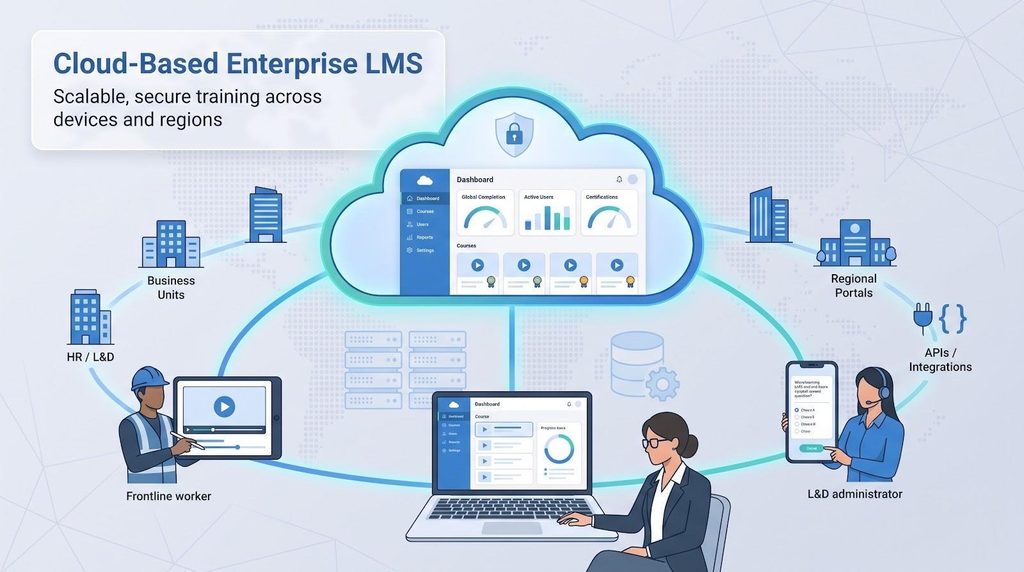
A cloud-based enterprise learning-management system (LMS) is software you get through a browser or mobile app, while the vendor accesses the servers, databases, updates, and backups off-site. You handle learning content and outcomes; the provider looks after the infrastructure.
“Enterprise” signals scale: picture more than 10,000 users across various business units, regional portals, delegated administrators, deep API hooks, and audit-ready reports under one contract.
Common terms you’ll hear:
| Key point | Cloud LMS | On-premise LMS |
| Deployment | Live in days; no hardware to install | Weeks or months; procure and configure servers |
| Maintenance | Vendor patches and upgrades | Your IT team owns every update |
| Scaling | Add users contractually (no hardware orders) | Buy and tune more hardware |
| Access | Browser and mobile anywhere | Often VPN or custom apps |
This comparison sets up the nine advantages you’ll see next.
People usually treat these terms as interchangeable, but they aren’t.
| Criterion | Cloud enterprise LMS | On-premise LMS |
| Cost model | Subscription (OpEx). Case studies show cloud platforms can cut the overall cost of learning by up to 40 percent. | Capital outlay for servers, licences, and ongoing upgrade projects. |
| Deployment speed | Tenant live in days; full rollout depends on data migration. | Hardware procurement and security testing usually stretch to 3–6 months. |
| Maintenance | Vendor manages patches, backups, and feature releases. | Internal IT owns every update and weekend outage window. |
| Scaling | Add users, portals, or storage contractually (no hardware orders). | Buy, rack, and configure extra servers before peak demand. |
| Access | Browser or mobile anywhere; offline sync on supported apps. | May need corporate network or VPN when outside the office. |
| Integrations | Real-time APIs, webhooks, and pre-built connectors are common. | Custom scripts; upgrades can break brittle point-to-point links. |
| Resilience & security | Shared model: vendor supplies 99.9 percent+ SLA, encryption, and multi-region failover. | Uptime and disaster recovery limited by in-house budget and skills. |
| Portability | Contractual export formats; the EU Data Act mandates machine-readable switching support for covered SaaS (effective 2027). | Direct database access but often proprietary schemas and custom code. |
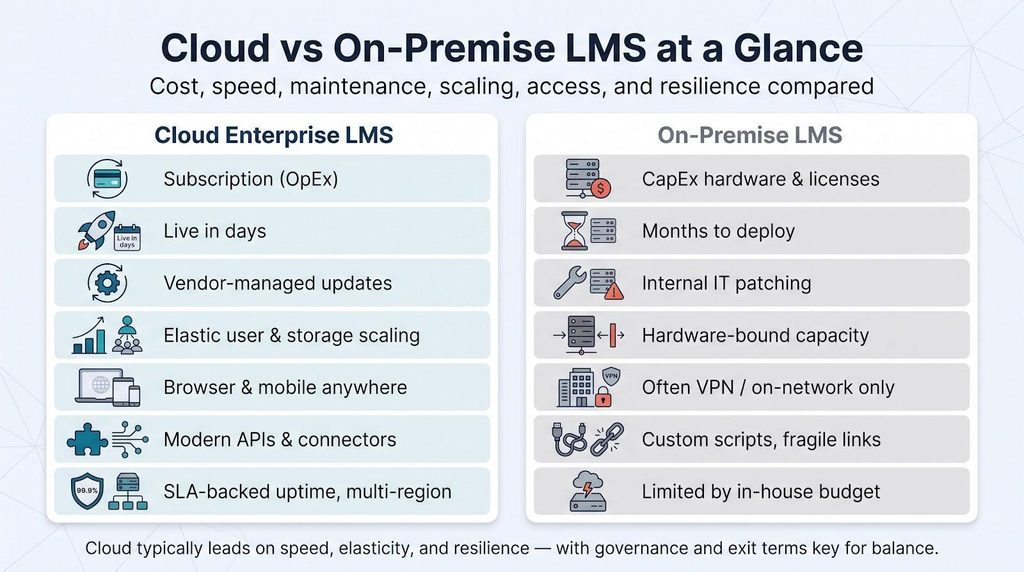
Keep these contrasts in mind as we rank the nine advantages; they describe why cloud usually wins on speed, elasticity, and resilience, while governance and exit terms are non-negotiable.
Here is our data-driven shortlist of the nine leading advantages of cloud-based enterprise LMS platforms. Each one scored highest on three weighted factors: (1) how sharply it solves documented buyer pain points, (2) demonstrable ROI potential, and (3) the depth of third-party evidence backing the claim. The scorecard that follows shows how those factors stack, then we dive into Advantage 1.
On-premise stacks hide charges in servers, database licences, weekend patch marathons, and surprise upgrade projects. A cloud LMS rolls those outlays into one subscription that includes infrastructure, routine maintenance, and continuous feature releases.
The savings are real. Research published in IEEE Xplore determined cost reductions of 25 to 35 percent when organisations retire on-premise systems and shift to the cloud. Vendor case studies echo the pattern: Bally’s trimmed its overall cost of learning by 40 percent after migrating.
Predictability improves, too. Cloud quotes lay out active-user tiers, storage, support, and premium modules up front, letting finance teams model a three-year TCO rather than guessing at future hardware refreshes.
Cloud isn’t automatically cheaper. Implementation, AI add-ons, or external-learner fees can remove the edge. Ask for a fully loaded quote that includes migration, regional hosting, integrations, and exit exports, then compare it with the hardware, energy, and staff hours an on-premises stack would demand. In most side-by-side models, the cloud subscription still lands well under the combined capital and labour cost of running servers yourself.
Cloud implementations begin with data mapping, not server procurement. Most vendors can spin up a sandbox tenant in days rather than the 3–6 months typical of on-premises roll-outs, according to Gartner short-list guidance. GoSkills’s onboarding guide for its cloud based LMS shows an even faster benchmark: organizations can make an account, brand their portal, and assign a custom mini-course in under ten minutes, while learners log in from any device and location, so most teams finish full LMS setup within about fifteen minutes. That hands-on speed turns deployment into a same-day project rather than a multi-week workstream and illustrates why cloud cuts IT time to near zero. Once live, updates flow automatically: new features appear in a test environment overnight and shift to production only after you approve them.
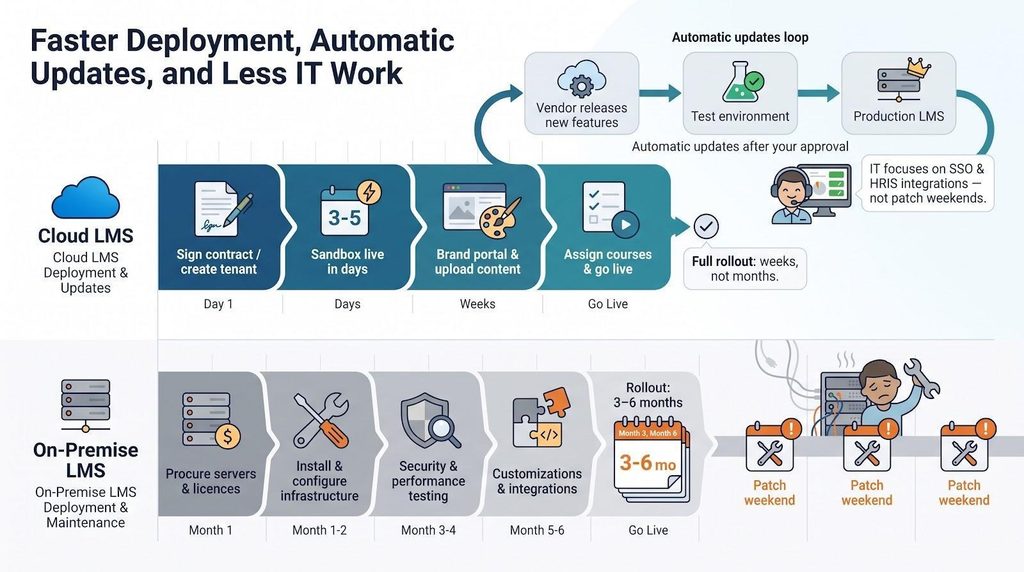
The time savings compound:
Automatic updates can backfire when change management lags. Minimize the risk by choosing vendors that supply advance release notes, opt-in feature toggles, and rollback plans.
Bottom line: a cloud LMS moves weeks of provisioning and every future upgrade off your backlog, letting IT focus on what is important next.
Headcount hardly stays put. Seasonal hiring, acquisitions, or contractor surges can double learner traffic overnight, events that cripple on-premises capacity planning. Cloud infrastructure works behind the scenes, so adding ten or 10,000 learners is a licensing change, not a hardware project.
Buyers know that headroom. Cloud deployments captured 88.24 percent of global LMS revenue in 2025, according to Mordor Intelligence.
Scale is multidimensional:
Finance teams prefer usage-based pricing: pay for active users now, taper after the holiday rush or post-merger cleanup. The catch is per-user fees that increase when growth outpaces your contract. Negotiate tiered thresholds, alumni or external-learner discounts, and seasonal ramps up front so you scale programs, not costs.
An LMS proves its worth when training data flows cleanly into the systems you already operate. Modern cloud platforms ship with REST APIs, webhooks, and ready-made connectors for HRIS, SSO, Microsoft Teams, Slack, webinar tools, and CRM. Rather than nightly CSV shuffles, a new hire created in Workday appears in the LMS within minutes, gets an onboarding plan, and is de-provisioned automatically when HR closes the exit ticket.
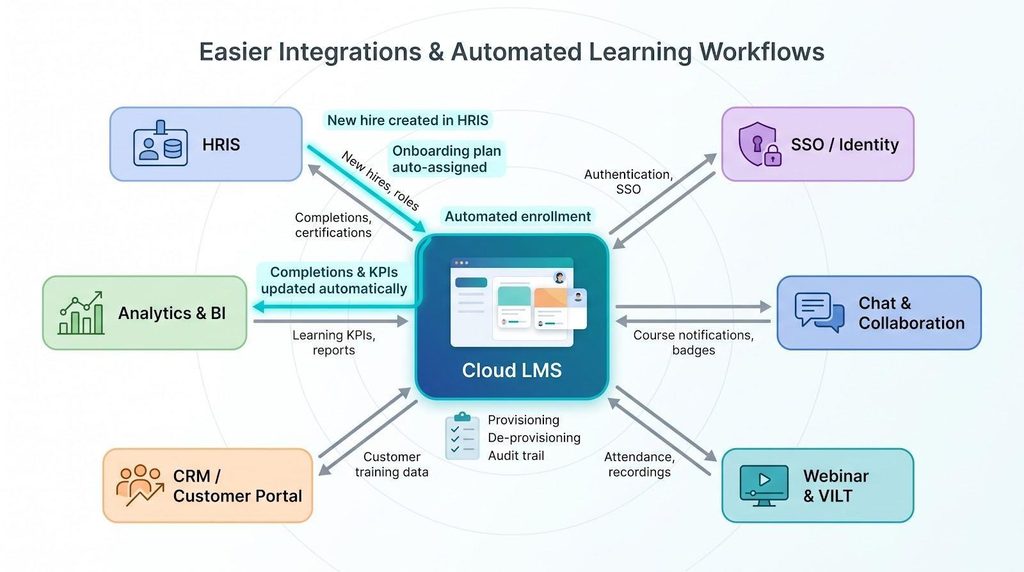
Depth is important. One-way feeds that load names but never return completions leave payroll, safety, or bonus dashboards blind. True bidirectional integrations block that loop, cut manual tracking, and tighten audit trails.
Yet integration maturity is hard to find: only 15 percent of organizations report that their learning tech is well integrated with the wider stack, according to the Josh Bersin Company’s 2025 survey. That gap is your opportunity. When the LMS can post badges in Slack, trigger skill endorsements in the HR suite, and refresh a manager’s Power BI report before the weekly stand-up, learning stops feeling like an island and starts powering decisions.
Mind the fine print. Some vendors label “connector” as paid middleware or metered API calls. Run a proof of concept with live data, measuring latency, error management, and automatic de-provisioning. A few hours of testing can turn integrations from a budget-draining headache into a hidden accelerator that pumps verified learning signals into every corner of the business.
Frontline workers—retail associates, drivers, nurses, technicians—hardly sit at a desk. A cloud LMS reaches them where the work happens through responsive portals and native apps.
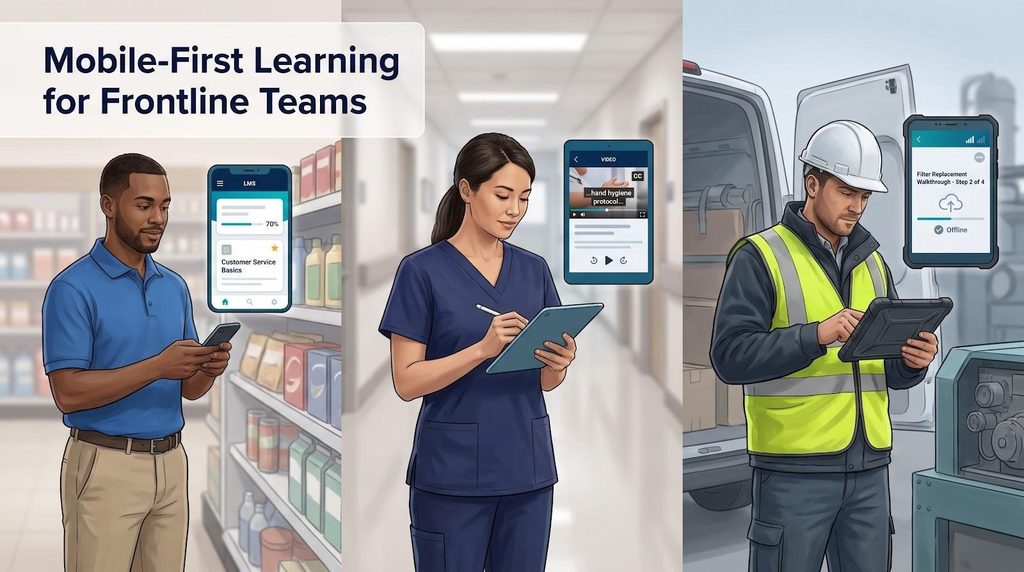
Gartner’s 2025 Corporate Learning Technologies guide mentioned mobile learning as a mandatory capability for enterprise platforms. Real-world proof follows: energy company Suncor reported a 300 percent rise in course completions after delivering gamified, mobile-friendly courses to more than 11,000 staff (Absorb LMS case study).
Mobile readiness is more than screen fit. Test:
When these boxes are ticked, the LMS transform idle minutes—waiting for a delivery, changing a filter—into measurable upskilling rather than wasted time.
Logins and completions no longer satisfy executives; they want proof that learning moves revenue, safety, or retention KPIs. A cloud LMS stores every learner note in a single, always-on database and streams it to BI tools in near actual time.
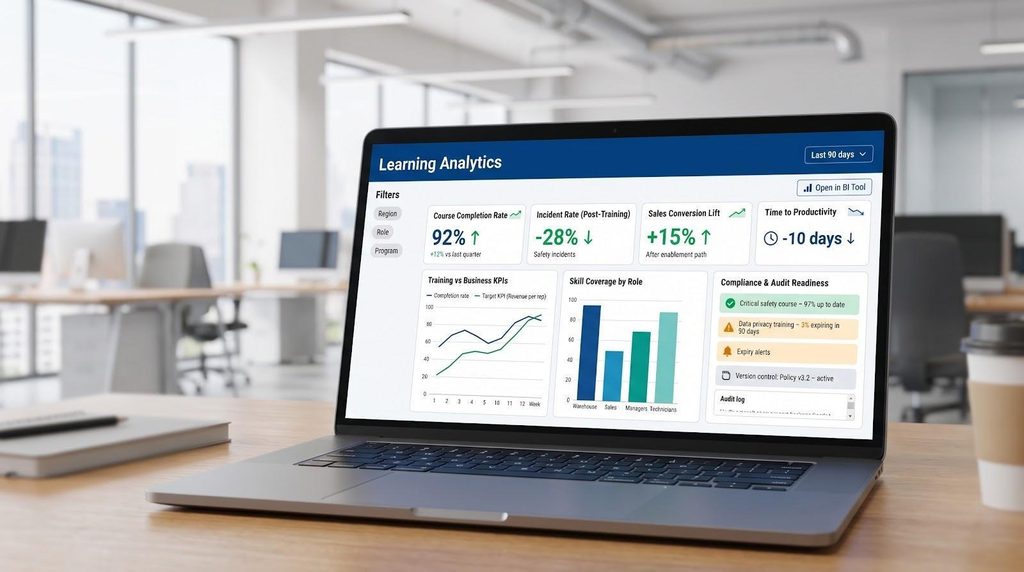
That immediacy matters. Fosway’s 2025 Digital Learning Realities survey found only 29 percent of L&D teams consistently track business KPIs and just 11 percent measure skills growth. When dashboards switch from static PDFs to live widgets your CFO can click through before the steering-committee meeting, those gaps close fast.
Compliance teams benefit, as well. Automated expiry alerts, version control, and tamper-proof audit logs replaced spreadsheet chases for Dudley Council, saving 880 administrator hours a year (vendor case study, 2026).
Layer xAPI statements, skills tags, and role data on top, and patterns emerge: warehouse staff who complete a three-module microlearning path hit quota two weeks sooner than peers.
Guardrails: agree on which KPI each report targets and how it’s calculated before the first chart goes live. Centralization is powerful, but only when every metric maps to a business decision, not a slide deck.
Security now means proving uptime, encryption, and audit readiness to customers and regulators. Mature cloud LMS vendors run multi-region data centers, 99.9 percent+ uptime SLAs, automated backups, and 24/7 monitoring—capabilities most internal teams struggle to fund.
The difference reveals itself during an incident: documented failover between regions, RTOs under four hours, and RPOs measured in minutes turn a potential outage into a brief login hiccup. On-premises stacks hardly match that without a second data center.
Responsibility is shared. The provider ensures the infrastructure; you govern identity, permissions, retention, and integration hygiene. Single sign-on, MFA, and SCIM provisioning plug into your existing identity stack so user governance stays under your roof.
Highly regulated sectors still verify the evidence. Ask for:
Good vendors supply that documentation in a secure portal within a day—proof that security is a service, not an endless DIY project. With those assurances in place, your experts can pay attention to policy and risk strategy rather than daily patch cadence.
Generative AI’s first proven win is speed. Cloud LMS vendors now bundle tools that turn a policy PDF into a draft course, generate quiz questions, suggest visuals, and deliver a quick Spanish version—all before a human editor fine-tunes tone and accuracy.
Adoption is actually real. Fosway’s Digital Learning Realities survey found 14 percent of enterprises already use an AI-enabled LMS or LXP, and 16 percent use generative AI for content authoring. Yet only 8 percent report live adaptive learning, showing where reality meets hype.
Speed fuels consistency: subject-matter experts click “Draft lesson,” reviewers polish language, and the same engine tags skills for analytics. Search chatbots show policy snippets, recommendation engines queue next-best lessons, and adaptive quizzes raise or lower difficulty on the fly.
Governance keeps value real. Ask vendors:
Managed well, AI turns course production from a monthly sprint into a daily habit and lets designers focus on nuance, not layout.
Business strategies pivot, vendors merge, and regulations tighten. A cloud LMS anchored in open standards keeps you flexible rather than trapped.
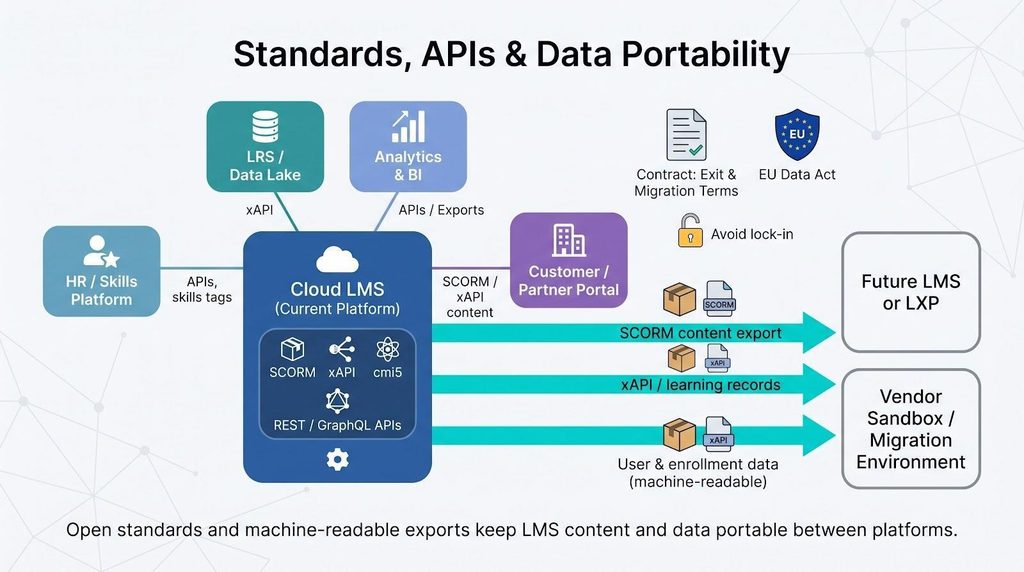
Portability is insurance, not a luxury. The EU Data Act (applicable September 12, 2025) requires covered SaaS providers to supply machine-readable exports and transparent switching terms. Smart buyers go further, contracting for annual test exports, sandbox migrations, and deletion certificates so a future switch takes only days, not quarters.
Standards fend off feature-level lock-in, as well. When skills tags, quiz results, or VR simulations use published schemas, you avoid rebuilding assets every time the market changes, protecting both R&D spend and sanity.
Takeaway: pick platforms that speak open languages, publish their data models, and treat exit support as a first-class service. Adaptability today saves headaches tomorrow.
Cloud covers most enterprise requirements, but certain constraints can tip the scales toward on-premises or private-cloud models.
Hybrid and private-cloud deployments can reduce some gaps, but not all. Map regulatory, connectivity, customisation, and funding constraints early so the business isn’t tied into a model that clashes with reality.
Glossy demos fade; contract clauses live forever. Use this cheat sheet to turn every promise into a compulsory term.
Commercial questions
Technical questions
Security and legal questions
Experience and accessibility questions
Check these boxes now, and you’ll thank yourself at renewal time. A thorough checklist keeps vendor promises in place and gives your project the runway it deserves.
A cloud-based enterprise LMS can eliminate total cost of ownership, launch in weeks, scale on demand, integrate across the stack, reach mobile frontline teams, surface real-time analytics, ensure strict resilience, speed AI-assisted authoring, and keep data portable.
Those wins show up only when pricing is transparent, integrations function both ways, security roles are formalized, and exit paths are written into the contract.
Next steps:
Do that and your LMS shifts from forgotten portal to skill engine, driving measurable impact by the next quarter.
Ans: Not automatically. Research published in IEEE Xplore shows potential 25 to 35 percent lower total cost of ownership when infrastructure and labor savings outweigh subscription fees. Price a three-year TCO that includes migration, integrations, AI usage, storage, and exit costs before declaring a winner.
Ans: It can be more secure and more resilient, but only within a shared-responsibility model. Expect 99.9 percent-plus uptime SLAs, encrypted data at rest and in transit, and 24/7 monitoring from the vendor. You still own SSO, permissions, retention, and user behavior policies.
Ans: Infrastructure is live in days. Full roll-outs—including data migration, integrations, and change management—typically run 4–8 weeks for mid-sized firms and 3–6 months for global enterprises, according to Gartner short-list guidance.
Ans: Write portability into the contract: SCORM/xAPI support, open APIs, annual test exports, a migration sandbox, and termination assistance. The EU Data Act (applicable September 12, 2025) requires machine-readable exports and transparent switching terms, but a signed clause still beats a promise.
