

“A word after a word after a word is power.” — Margaret Atwood (Novelist & Poet)
Those words are not just creative output. They must survive edits, handoffs, interruptions, and sometimes a lost internet connection.
That is why testing collaborative screenwriting software requires breaking the connection on purpose. A live cursor can show that another writer is online and typing, but it cannot prove that the screenplay will survive a train tunnel, a sleeping laptop, or two writers editing the same scene before either device reconnects.
Compare AI Screenwriting Software with a disconnect-and-recovery drill. Laper represents the project as a collaborative document and uses Loro CRDT state to reconcile edits. Its technical guidance also distinguishes presence from document health and prioritizes server state during initial synchronization. Those claims can be tested with ordinary writing actions rather than a feature tour.
Construct three scenes, two characters, and one prop that appears in the second scene. Save a named baseline and export or copy the key paragraph so the starting state is unambiguous. Invite a second editor with the role the real team will use.
Do not test on a critical live draft. The purpose is to observe recovery, not prove bravery. Use invented lines and a disposable project that still contains the structure your workflow depends on.
Win is more than both writers seeing a page. The final script must contain both non-conflicting changes, expose any true conflict, preserve scene order, and keep character or prop records attached correctly. No edit should vanish silently, duplicate, or reposition to the wrong scene.
Add a time boundary to the test without pretending speed is the only measure. A slow reconciliation that clearly reports its state may be safer than an instant-looking merge that shows stale material on one device. Record when the interface first appears usable and when repeated reloads produce the same state.
If instead of writing you want better collaboration in coding, follow these best practices.
The disconnection test has just five steps:
Document the exact actions and times. “It synced eventually” is too vague to reproduce. A simple log shows whether the delay happened before reconnection, during merge, or while another device loaded stale local state.
Non-conflicting modifications are the easy case. Change the same sentence differently on both devices while one is offline. The system may merge at a smaller unit than the user expects, so inspect the meaning rather than assuming a clean-looking sentence is correct. A technically correct merge can still create broken dialogue.
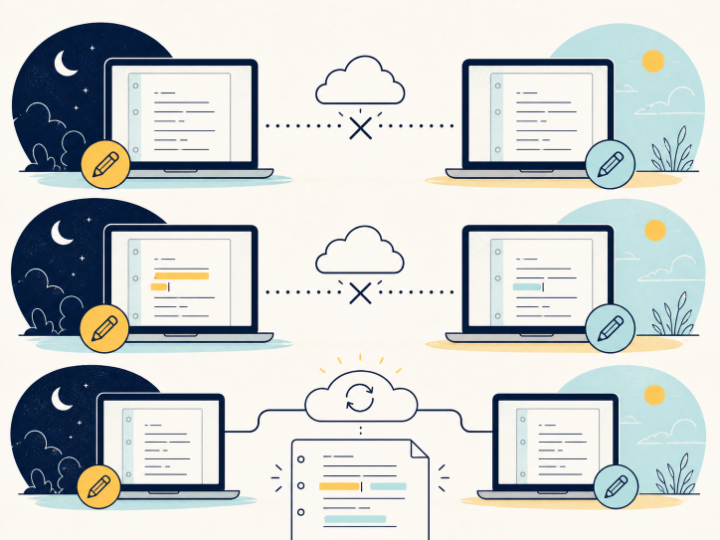
Use changes that can be recognized without ambiguity. Device A changes the destination from the station to the clinic; device B changes the departure time from noon to midnight. After the merge, review whether both facts survive and whether their combination remains plausible. Then repeat with genuinely incompatible alternatives to see how the product exposes the editorial conflict.
During reconnection, a collaborator may appear online before all content has harmonized. Verify the screenplay, outline, and entity views separately. Laper’s engineering guidance treats presence as a distinct channel from the durable project document, which is the right way to think while testing any collaborative editor.
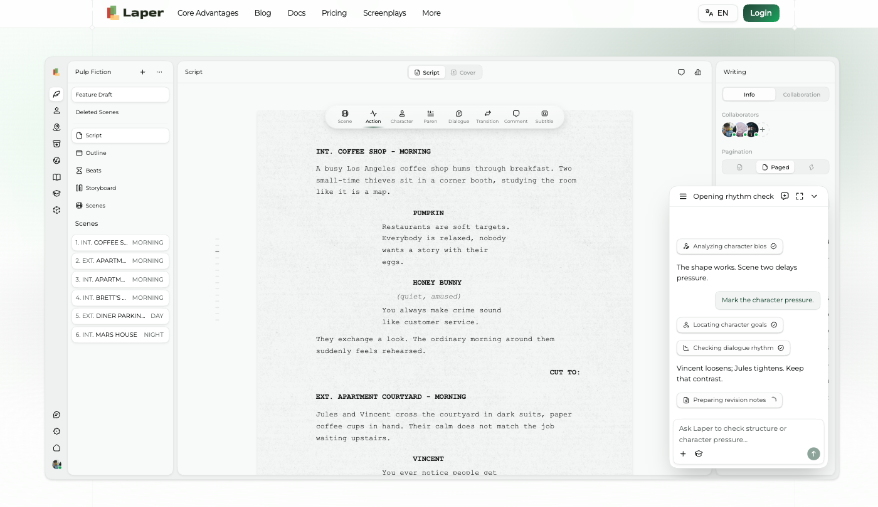
An AI script writing software review should also check what the assistant reads immediately after recovery. Ask it to summarize only the changed scene. If the summary recollects one device’s stale version, the visible editor and AI context may not yet agree.
The most revealing case is often a laptop reopened after days away. A safe initial sync should not allow an old local snapshot to overwrite newer server work. Reopen device B after device A has made another confirmed change, then watch which state appears first and what remains after the project settles.
While the old device loads, do not push a new edit until the state indicator is understood. Note whether the interface explains that synchronization is in progress or simply shows an editable page. A team needs a reliable behavioural rule for this moment, especially when an author opens the project minutes before a live review.
DURABILITY STANDARD
Google says the 11 Nines (99.999999999%) durability standard metric means a platform ensures a non-live document state remains safely stored.
A screenplay can read correctly while its derived structure is damaged. Confirm that scene titles still produce the expected scenes and locations, character cues still map to the right shared entities, and ordered items remain in order. Move between the script and supporting views rather than judging the text surface alone.
For the sample prop, ensure that it remains associated with the intended scene after the beat reorder. If an entity duplicates, record the sequence that produced it and avoid manual cleanup until the test evidence is captured.
History should provide the team a usable recovery point, but it may group operations differently from human writing sessions. Compare it with the test log. Can an editor identify the last known-good state without guessing? Can a mistaken merge be isolated from the valid offline revision?
Airplane mode creates a clean break. Real connections flicker. Repeat a shorter drill while changing between Wi-Fi and a mobile hotspot or briefly suspending the laptop. Watch for duplicated notifications, repeated AI requests, and controls that remain enabled while the document is uncertain.
Conduct the drill again after a significant product update or before a remote writers’ room begins. Collaboration reliability is a property of a specific version, device mix, and workflow, not a permanent badge.
Do not simulate failure by slaying unknown processes or corrupting local storage. Network disconnection and controlled device sleep are enough for an acceptance check. Deeper fault injection belongs to the product’s engineering team.
Laper presents a collaborative project model, version history, and typed screenplay entities. It cannot prevent two writers from making a dramatically incoherent combination of valid edits. Technical convergence and editorial coherence are separate concerns.
Create a small results sheet: changes recovered, collisions needing review, structural errors, time to stable state, and clarity of recovery. Compare tools using the same project and steps. A feature tour cannot provide that evidence.
Have the second writer repeat the checklist independently. If only the person who designed the test can explain which version is current, the recovery experience is too opaque for daily use. The result should be understandable from the project, history, and documented workflow rather than oral memory.
The reasonable collaboration question begins after a cursor disappears. Can each writer continue, reconnect, and understand exactly what happened to the work? A planned drill turns an abstract promise into a repeatable answer.
When the text, structure, history, and assistant context all reflect the same recovered state, the tool has passed the practical test. The writers can return to the harder problem: deciding whether the scene is good.
Ans: Create a small test project, establish a known baseline, disconnect one device, make offline edits on both devices, reconnect, and inspect the recovered document. Test both non-conflicting edits and deliberate conflicts, then verify the text, screenplay structure, history, and AI context.
Ans: A live cursor or online avatar only shows that a collaborator is connected to the application. It does not prove that all document changes have been synchronized or that the current screen reflects the latest durable project state.
Ans: Check whether every intended change survived, conflicts were exposed clearly, scene order remained intact, and characters, props, and other screenplay entities stayed correctly associated.
