
As a developer, I often rely on SaaS applications for a simplified workflow, while ensuring better accessibility and quicker deployment.
However, if you are wondering what is SaaS, it is a on-demand, cloud-native application delivery framework that allows users to utilise the applications through a web browser.
With SaaS Integration, businesses can have globally accessible solutions while eliminating the need for complex installations, hardware investments, and ongoing manual upgrades.
For deeper insights into its benefits, characteristics, limitations, and implementation, read our comprehensive article below.
Software as a Service (SaaS) is a cloud-enabled service delivery model or framework that eliminates the need for manual installation of applications on an organisation’s IT infrastructure or on an individual’s device.
It rather works by hosting apps on web browsers and building custom software development by allowing access to the enterprise to use them without the need for downloads.
However, while analysing what is SaaS, it is crucial to understand that it is different from traditional software systems that require complete installation before usage.
As they provide licensed access on a monthly or yearly basis after subscriptions and operate through cloud-hosted systems, firms can save significant upfront expenses. It also delivers a multi-tenant and scalable architecture for catering to multiple customers.
Also Read: What is the Reliability Test System? Role, Advantages and Challenges
From a usage-based subscription model to an adaptable user interface and multi-tenant infrastructure, here are the primary characteristics and features of Software as a Service.
Software as a Service also allows seamless API integrations with the relevant tools for improving workflow.
As these apps are cloud-hosted, they offer better connectivity and flexibility while enhancing the efficiency of remote operations.
Users can simply access these solutions with the help of an active internet connection through web browsers, delivering cross-device mobility.
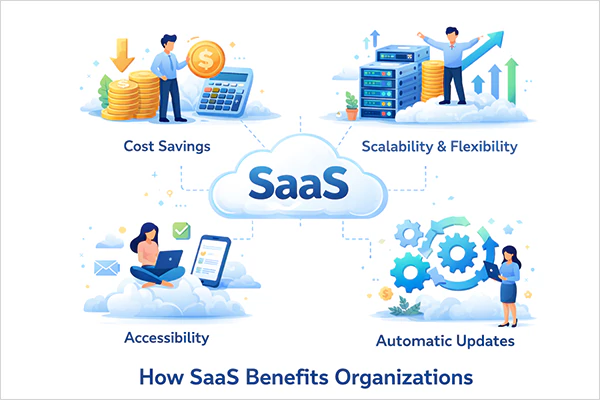
As firms have to build advanced proprietary software, open-source, and commercial apps, Software as a Service significantly helps them with optimal data management and automated data management. Beyond these, they offer several prominent benefits, including:
Also Read: What is a Software Egg and Why is it Important for Efficient Software Development
Complexities while switching to a different cloud service provider, loss of access, and lack of control, along with lag and latency issues, are among the most frequently encountered issues with SaaS applications. Read about them in detail below.
Beyond this, if the service provider is facing downtime concerns, your business might lose critical and sensitive data or experience slower performance.
Also, the operational efficiency depends on network speed, as a weak internet connection will disrupt usability.
While analysing what is software and how SaaS applications work, have a look at how it differs from other cloud computing service models.
| Attributes | SaaS | IaaS | PaaS |
| Definition | Software-as-a-Service (SaaS) acts as a cloud provider that delivers browser-based access to completely functional applications. | Infrastructure as a Service (IaaS) serves as a cloud computing model where firms rent efficient IT infrastructure like servers and storage over the internet. | Platform as a Service (PaaS) is a cloud-enabled environment that offers a pre-configured and ready-to-use platform to build, deploy, run, and manage apps. |
| Common Examples | Some common SaaS examples include Salesforce Inc, Microsoft 365, Zoom, and Google Workspace. | You can understand IaaS with its popular examples, such as Amazon Web Services, Heroku, and Apache Stratos. | A few PaaS examples include Microsoft Azure, Digital Ocean, Rackspace, and Google Cloud Platform. |
| Accessibility and Control Features | SaaS applications provide maximum convenience and ease of access, but lack better control. | The IaaS model offers maximum control but requires a learning curve to operate with effort. | As a PaaS environment delivers shared responsibility, it offers balanced control and accessibility. |
| Suitable For | It is designed for the end users and serves as an ideal solution for non-technical users and firms requiring pre-built, fully operational apps. | IaaS is best suited for IT professionals and enterprises demanding complete control over the systems and cloud infrastructure. | It is ideal for developers, startups, and mid-sized firms that need better mobile applications and balanced control over development. |
Software as a Service significantly reduces overall costs while offering scalability, improved security, and automated updates, making it a preferred choice for startups, mid-sized, and large-scale organisations.
However, you can take your SaaS performance and security to the next level with these strategic measures and best practices.
Also Read: 15 Best ESG Software That Turns Sustainability Into Strategy in 2026
As you explore what is SaaS, analyse the SaaS meaning in simple terms as a method of using applications over the internet instead of manually installing them on your device and buying licenses.
While it significantly contributes toward accelerated time-to-market and reduced costs, you can have a scalable infrastructure and a customisable layout that adapts to user demands.
Ans: You can simply understand Software as a Service or SaaS as a cloud-hosted service delivery model that delivers seamless access to applications over the internet through web browsers. SaaS applications remove the need for downloading and installing the software on the device.
Ans: Microsoft Corporation, Amazon Web Services (AWS), Salesforce Inc., Oracle Corporation, and Adobe Inc. are the leading SaaS examples.
Ans: MaaS offers pre-configured cloud-enabled Machine Learning and AI models to enterprises or individual users through API integrations. However, SaaS delivers a fully operational application over the internet on a subscription basis.
Ans: It is a popular guideline that several firms follow, which suggests that your organisation must aim for 3 months of sustainable cash flow, 3 months of user retention, and 2 months of sales growth. In addition, aim for 2 months of consistent gains and 2 months of net revenue expansion.
Sources:
