

Working with Amazon S3 on a Mac sounds simple at first because the storage model feels familiar enough. The real question arises sometime later, once S3 becomes part of regular work rather than a one-time task.
Moreover, many casual users do not struggle with the concept of S3. They struggle with the daily handling of it because when the process is repeated enough, the workflow starts to feel slower than it should. That is when a better file manager starts feeling practical.
Let’s understand how they make sense when an individual uses S3 on a daily basis, and what matters most while choosing a reliable file manager.
Key Takeaways
- Casual users may still find the browser enough for their tasks, but regular operations require a platform that makes working with various assets much easier
- The Commander One file manager provides a dual-pane layout, giving a clear view of what sits in the bucket and what files are found locally
- It isn’t about how many features the manager provides; it’s more about how it makes daily handling of tasks easier for everyone
- Efficiency and productivity are the major factors to be accounted for when looking for the best file manager for daily uses
For someone who touches S3 occasionally, the browser may be enough. For someone who works with assets, backups, website files, reports, or shared project storage regularly, it usually stops being enough pretty quickly.
That is where a stronger s3 client for mac becomes useful as an actual file-management option rather than just another cloud tool.
The added value here is practical. Buckets are easier to explore, files are quicker to compare, and the local side of the work no longer feels disconnected from the remote side.
Once that happens, the process starts feeling closer to ordinary file handling and much less like switching between separate systems every few minutes.
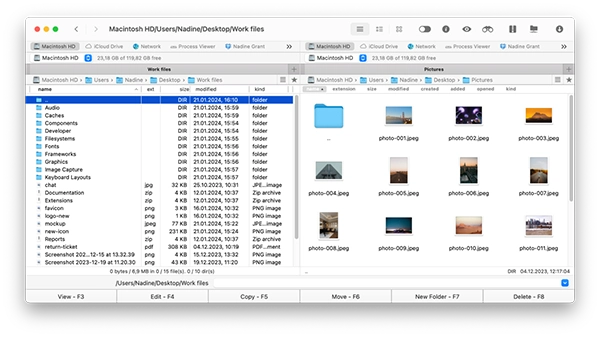
A useful S3 tool on Mac should make the structure easy to follow and the movement between local and remote files easy to manage.
That is why many users first check the App Store to see whether a file manager like Commander One fits the kind of work they do with Amazon S3.
The advantage is simple. A dual-pane layout gives a clearer view of what sits in the bucket and what sits locally, which makes uploads, downloads, folder checks, and quick comparisons much less awkward.
It is especially helpful for repeated work where users need to move through several directories without losing track of where things belong. In that sense, Commander One is less about cloud hype and more about keeping S3 file handling readable.
Cyberduck is a common option because it supports a wide range of remote storage services and feels familiar to many users who already work with FTP or cloud storage.
Transmit is also widely popular amongst people who require a polished Mac-native tool for remote file work. Both are valid alternatives and are capable of handling the processes of Amazon S3. The real difference usually boils down to how each person prefers to work.
Some want a dedicated transfer tool. Others prefer a file manager that keeps local and remote content in the same broader workspace.
Fun Fact
You can create policies where not even the root user or AWS staff can delete or change, making it especially useful for strict compliance.
The question is not how many extra features the app provides. The main concern is whether it makes S3 file handling easier during ordinary usage. Good bucket navigation matters. Clear uploads and downloads matter.
Easy comparison between local and remote directories matters. It also helps when the tool feels stable enough that users trust it for repeated work instead of treating it like a temporary workaround.
Mac users usually notice that difference quickly. If the structure feels awkward, the tool gets dropped. If the workflow feels natural, it stays in the routine.
Most people do not lose an entire afternoon to S3 management in one dramatic moment. Time disappears in smaller ways. Open the same bucket again. Check whether the file was uploaded to the right path. Compare folders manually. Reopen another tab. Confirm the object name.
Those little delays are exactly what a better tool helps reduce. That is why S3 file management deserves a more focused article than a broad discussion about cloud productivity.
The value is specific. It sits in clearer navigation, smoother movement, and less repeated friction during ordinary work.

For Mac users, the most useful S3 file manager isn’t the one that sounds the most technologically advanced. It is the one that allows processes to remain readable and dependable at all times.
If local files and remote storage can be handled in one go, the job gets much easier. That is usually enough. It’s just a better way to work with S3 without turning it into a complex little project every time.
