
“Music can change the world because it can change people.”
— Bono (Singer-Songwriter)
In filmmaking, music often does more than dialogue. A few notes can create tension before danger arrives, turn silence into heartbreak, or make a simple montage unforgettable. Yet for most film students and first-time creators, music is usually the first thing sacrificed when the budget starts disappearing.
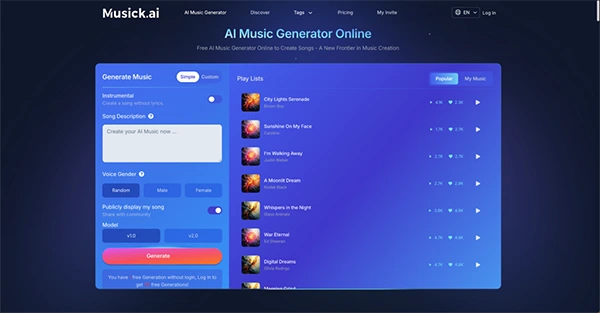
After props, equipment rentals, travel, and feeding the crew, there’s often little left for a soundtrack. Licensing even a short stock track can cost more than the production itself. That’s where Musick AI changes the equation. As a free AI Music Generator built for creators, it helps filmmakers produce original, royalty-free tracks without studio costs.
AI audio generation is also cutting costs by up to 90% and reducing production times from months to days.
This guide walks through a complete zero-budget audio workflow, from script planning to final sound mixing, so creators can stop hunting for random free tracks and start building songs that actually serve the story.
KEY TAKEAWAYS
- Plan music during pre-production instead of treating it as an editing afterthought.
- Generate sound effects and ambience layers before adding background music.
- Scene-specific AI prompts create stronger results than generic genre requests.
- Small mixing decisions often have a bigger impact than expensive production tools.
Most beginner filmmakers treat songs like a last-minute editing decision. That approach usually creates rushed choices and mismatched emotional moments.
Knowing the emotional arc of the soundtrack before the first shot makes the entire editing process faster and more intentional.
Start by breaking the script into emotional beats. A short drama might open with tension, move through sadness, and land on quiet resolution. Each beat needs a different musical tone, and knowing that upfront tells the director how long each scene should breathe. A suspense sequence that will carry a low, pulsing instrumental needs longer takes. A montage underscored by something upbeat can cut faster.
Write a simple cue sheet alongside the script: scene number, duration, mood, and whether the track needs to be instrumental or carry vocals. This becomes the briefing document for every AI generation session.
You no longer have to worry about a writer being a film student or solo filmmaker. Tools like ChatGPT and Gemini can quickly turn your rough idea into a workable screenplay.
Feed the AI a premise, a genre, and a target runtime — it will return a structured scene-by-scene outline that can be refined from there.
This step matters for the audio workflow because a well-structured script makes the cue sheet much easier to build. Scenes with clear emotional intentions in their dialogue and action lines don’t require much effort in music placement; it becomes rather obvious.
Before adding melody, build the world around it. Ambient noise, footsteps, environmental sounds, and Foley elements create the foundation that makes scenes feel believable.
Mixing these elements first also determines how much sonic space the music actually has to fill.
Free SFX libraries like Freesound.org and BBC Sound Effects offer thousands of recorded and curated audio files available for non-commercial and educational use. Zapsplat and Pixabay also carry usable foley assets. Download assets, organize them by scene, and drop them into the editing timeline before any song is added. This ensures those subtle sound effects don’t get overpowered by the background score.
PRO TIP
Instead of abstract prompts like “scary,” provide precise physical descriptions (e.g., “crunching dry leaves,” “heavy metal clashing”) to achieve richer acoustic textures and resonance.
Instead of scrolling endlessly through stock libraries hoping to find a close enough match, filmmakers can generate music tailored to specific emotional moments with this tool.
For a short film, the workflow is straightforward: open the generator, select Instrumental, describe the mood and genre, and generate.
Here are three practical examples based on common short film scenarios:
Musick AI supports a wide range of genres, including EDM, R&B, Jazz, Pop, Classical, Blues, and more — meaning a director can produce every cue in a short film from within a single tool. The Instrumental mode is particularly useful for filmmakers because it strips away vocals that would otherwise compete with on-screen dialogue.
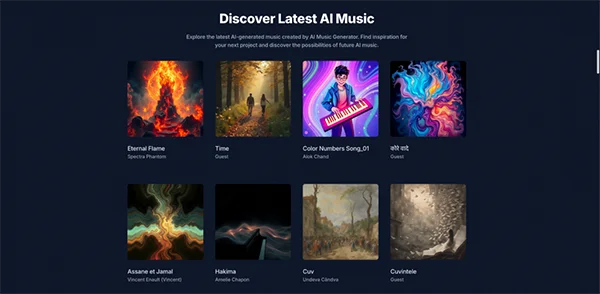
AI-generated tracks from Musick AI typically run between 15 seconds and several minutes. But generating music is only half the job. Knowing how to fit it naturally into a scene separates polished productions from student projects.
Three techniques that work:
Since all music generated by Musick AI is royalty-free, there are no copyright concerns when exporting the final film for YouTube, Instagram, TikTok, or film festival submissions.
Not every track needs to stay instrumental. Opening titles and closing credits are moments where lyrical melodies can create emotional closure.
The integrated AI Song Lyrics Generator produces original lyrics based on genre and theme inputs. Feed them back into the main music generator to create a track with vocals.
For a short film about friendship, loneliness, or coming-of-age — common student film themes — a simple vocal track over the opening or closing frames can elevate the overall feeling significantly. The same workflow: describe mood, generate lyrics and track, preview, download.
The biggest advantage of AI-generated songs is freedom. Filmmakers no longer need to worry about:
For film festival submissions, it’s worth including a simple note in the credits: “Original score generated with AI Music.” This is becoming standard practice as more student films use AI-assisted composition tools. Festival judges increasingly recognize AI music generation as a legitimate production technique rather than a workaround.
The full zero-budget audio stack — large language models for scripting, free SFX libraries for foley, and Musick AI as the AI Music Maker and AI Song Maker for original score — gives a solo filmmaker or two-person student production the same sonic variety that a professional production would pay thousands of dollars to license. The only real investment is time spent writing good prompts.
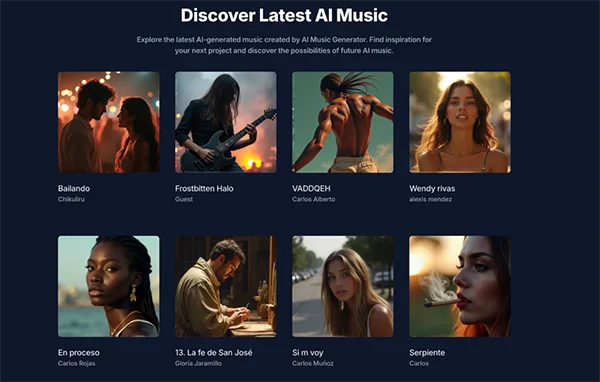
Creating a professional soundtrack on a zero budget no longer means settling for generic stock music or spending weeks searching through free libraries. With a clear cue sheet built during pre-production, free SFX libraries handling the foley layer, and Musick AI generating original instrumentals for every emotional beat — suspense, joy, grief, or anything in between — a one-person production can deliver a soundtrack that feels intentional and professional.
The tools exist. The workflow is repeatable. The only thing left is to start shooting.
