
“Creativity is intelligence having fun.” — Albert Einstein (Scientist)
Filmmaking used to demand gear, people, and patience. Now it often just needs a story and the right AI tools. What once took weeks can now happen in a single afternoon. In this guide, I’ll show how I go from a blank page to a cinematic short film without touching a camera.
KEY TAKEAWAYS
- AI filmmaking removes barriers like budget, equipment, and crew.
- Clear, visual prompts are the backbone of good results.
- Consistency in visuals makes the film feel professional.
- Sound design is just as important as visuals.
An AI-based short film is built from text, images, and prompts instead of physical shooting. Instead of using cameras and actors, AI handles:
In simple terms, I write the story, and artificial intelligence helps me visualize it.
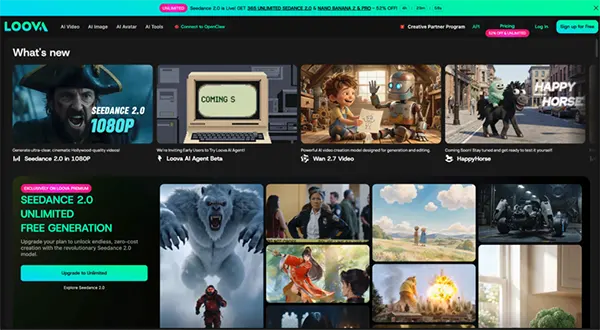
Tools like Loova make this workflow much easier because I can generate both images and video scenes in one place.
I didn’t adopt AI filmmaking out of curiosity. I switched because traditional production slowed everything down.
Here’s what changed for me:
The biggest shift is control. I don’t wait for production anymore. I just build.
Everything starts with the script.
But I don’t write it like a traditional screenplay full of technical formatting. I keep it simple and visual.
A good AI-ready script usually includes:
For example, instead of writing long dialogue, I focus on what the viewer should see.
I usually structure it like this:
That’s enough for AI tools to work with.
The key is clarity. If I can picture it in my head, it can be generated.
This is where writing becomes direction.
For each scene, I define:
For example:
Instead of writing:
“A man walks through a rainy street thinking about his past.”
I turn it into:
“Cinematic rainy street at night, soft neon lights, man walking slowly in the center frame, reflective wet ground, emotional mood, slow camera push-in.”
This becomes the input for both image and video generation later.
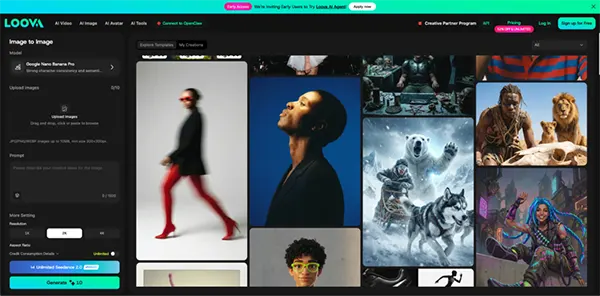
Before I generate a video, I always create key visuals first.
This step is important because it defines the look of the entire film.
I use an AI image generator to create:
If the visuals are consistent, the final film feels more cohesive.
I usually generate multiple versions of each scene so I can pick the strongest one later.
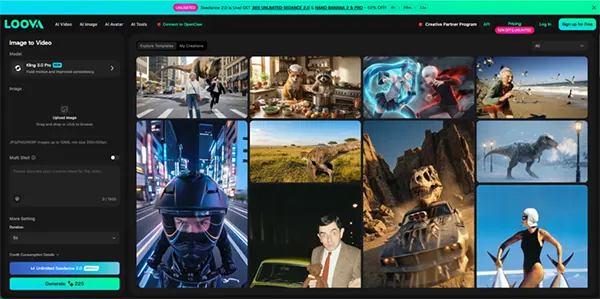
This is where everything starts to feel like a real film.
I take the images I generated and turn them into motion using an AI video generator.
Instead of filming, AI adds:
For example:
I usually keep motion subtle. Too much movement makes it feel artificial. Small cinematic motion works better. This step is where the “film” starts to come alive.
Before jumping into the video, I lock the visual style.
I usually:
A short film doesn’t need complexity. It just needs rhythm.
If Scene 1 feels too fast and Scene 2 feels too slow, I adjust until it feels balanced.
This is where the story starts to feel real.
Sound is what transforms visuals into a film.
So I always add audio in this step.
I usually include:
At this point, I bring everything together.
Final editing usually includes:
Then I export the film in different formats depending on where I’ll use it:
One of the advantages of AI-generated content is how easy it is to create multiple versions of the same film without starting over.
Over time, this stopped feeling like steps and more like a system:
I prefer tools that let me stay inside one system instead of constantly switching.
That’s why I use Loova in my workflow—it combines image generation, video generation, and creative tools in one place.
It keeps everything faster and more connected.
FUN STAT
New Indian films are being made on less than 15% budget of a traditional Indian production, with 95% of the movie generated by AI (BBC).
These aren’t just experiments. They’re practical tools.
When I want to test a story idea quickly, I build a short film version first.
Instead of static ads, I use cinematic AI videos to tell a brand story.
Short narrative clips perform well on platforms like TikTok and YouTube Shorts.
I use AI-generated films to visualize ideas before pitching them to teams or collaborators.
The biggest advantage is speed. I can communicate ideas visually instead of explaining them.
It wasn’t seamless from day one.
Here are a few things I had to figure out:
Artificial intelligence sometimes changes faces or styles between scenes. I solved this by reusing strong reference images.
Some scenes looked great individually, but didn’t fit together. I fixed this by focusing more on pacing.
Simple prompts usually worked better than detailed ones.
Once I adjusted these, the workflow became much smoother.
Here’s how I personally see the difference now:
The biggest difference is flexibility. I can experiment without pressure.
That changes how creative decisions are made.
AI won’t replace creativity; it will accelerate it.
In the future, I think we’ll see:
Instead of replacing filmmakers, AI becomes part of the creative process.
AI filmmaking feels less like using a tool and more like running a compact production studio.
I can go from: script → visuals → full short film → finished output without ever picking up a camera.
The biggest change for me isn’t just speed—it’s freedom. I can explore ideas instantly, build stories quickly, and iterate without limits.
If you want to try this workflow, you can start experimenting with tools like Loova. You don’t need a studio. You don’t need equipment. You just need a story.
