

Whenever I face slow or no internet at home, the first instinct is to always blame the ISP. So, I instantly call him and complain. But most of the time, he tells me that everything is alright at his end. Still, he assures to check the setup at my home and comes promptly. As doubted by him, the issue happens to be at my end only.
It can be anything: poor router placement, outdated hardware, broken wires, or even some physical barriers that don’t let the internet flow at its highest speed. Many a time, the router is overloaded with multiple connected devices. Numerous Wi-Fi routers claim to handle 30 devices, but their actual capacity is well below that number. As they reach their capacity, they freeze and restart, leading to internet problems (Source).
Wouldn’t it be easier and way less stressful if you knew these usual suspects, which are mostly close to home? If the issue required minor troubleshooting, you don’t even need to call for support; just DIY so that you can continue with your work or play, which is dependent on the internet these days.
In this article, I’ll list common issues with your home Wifi setup that are hindering you from connecting to the World Wide Web. The following sections also give you some guidance on troubleshooting each concern.
KEY TAKEAWAYS
- Many of the internet issues you encounter are with your home wifi setup, not at the end of the ISP.
- It can be anything from poor router placement, interference from other digital devices, or too many devices connected to wifi.
- You should consider optimizing network settings and also upgrading outdated hardware.
Home aesthetics are important. This usually leads people to tuck away all the extra, junk-looking things in the corner, where no guest can see them. You hide your wifi router behind a couch or inside a cabinet. You don’t realize it then, but complain to your ISP later that the speeds have dropped. Wi-Fi needs open space to travel, and when furniture blocks it, your connection weakens before it even reaches your devices.
Placement near dense walls or metal objects causes similar frustration. Metal reflects radio waves, while thick walls absorb them, so your signal loses strength almost immediately. You might assume your provider struggles, yet the issue sits right in your living room. Try shifting the router a few feet, and you’ll often notice an immediate improvement.
According to renowned internet providers in Wisconsin, elevation matters more than most people realize. Routers send signals outward and slightly downward, so placing one on the floor limits its reach. A central shelf works far better. In workspaces where echo and interference create distractions, some people even install acoustic panels to soften reflections that could otherwise complicate signal behavior.
Distance creates another silent problem. When high-use devices sit at the far end of the home, they fight for scraps of connectivity. Streaming, gaming, and video calls demand consistency, not leftovers. Position your router closer to where activity happens, and you’ll likely discover your “slow internet” suddenly feels much more reliable.
The world as we know it is essentially working on waves that we can’t even see. The internet we use on our portable devices travels through these waves in space. The router acts as a hub, transmitting and receiving the internet data. But many other devices work through this mechanism. And the issue with these waves and signals is that they can interfere with each other.
Microwaves, for example, emit frequencies close to the 2.4 GHz band. If your connection drops whenever you heat leftovers, the explanation may be simpler than you think. The appliance briefly overwhelms the signal.
Bluetooth devices add another layer of congestion. Wireless headphones, keyboards, and smartwatches constantly exchange small packets of data, and while each seems harmless alone, together they crowd the airwaves. Switching certain devices to the 5 GHz band often reduces this friction and restores the responsiveness you expect.
Baby monitors and smart hubs rarely cross anyone’s mind during troubleshooting. Yet these gadgets broadcast continuously, which means your router must negotiate space for every transmission. You see buffering, assume the provider slipped, and never suspect the nursery gadget sitting quietly on a dresser nearby.
Neighboring networks complicate matters further, especially in apartments. Multiple routers default to identical channels, which creates overlap and confusion. Logging into your router settings and selecting a less crowded channel takes minutes, yet it can dramatically stabilize performance without a single call to customer support.
We all would accept that the pace at which technology is evolving is not the pace at which we humans live our lives. Nobody is buying that shiny iPhone launched this year if they bought the last model just the previous year.
The same is true for other technical hardware. A router from several years ago may technically function, yet it lacks the efficiency of newer standards designed for heavier digital habits. You might pay for impressive speeds, but never experience them because your equipment simply cannot deliver.
Compatibility issues sneak in when newer devices join an older network. Modern phones and laptops expect advanced features that legacy routers struggle to provide. The result feels inconsistent rather than outright broken, which is why people often blame the provider instead of recognizing the bottleneck in their network.
Bandwidth handling separates average routers from capable ones. Entry-level models falter once multiple streams compete for attention. One person starts a video meeting while another launches a download, and suddenly everything slows. Upgrading hardware often resolves these conflicts instantly without changing your internet plan.
Firmware updates rarely excite anyone, yet ignoring them invites trouble. Manufacturers release updates to fix bugs and improve stability, but many routers run untouched for years. Checking for updates takes little effort, and doing so can quietly eliminate glitches that masquerade as mysterious connectivity failures.
The following infographic summarizes the common issues with your setup that are hindering your access to the internet.
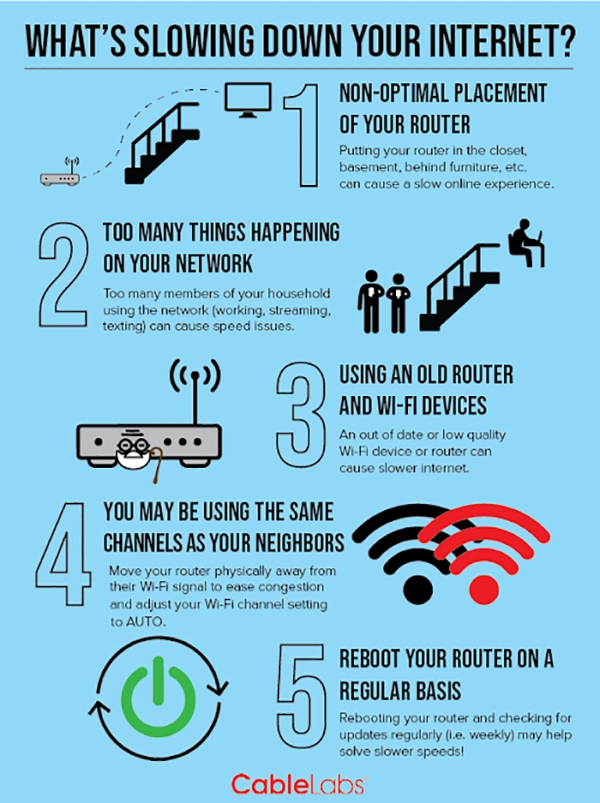
Consumer tech has become fairly democratized. Every member of the family has multiple personal devices. Homes today resemble miniature tech ecosystems. Phones, tablets, TVs, speakers, and thermostats all demand attention from the same router. Even when idle, many devices sync data in the background. You may notice lag during peak hours, not because your plan falls short, but because your network juggles more than it comfortably can.
Automatic updates create hidden traffic spikes. A laptop downloading a large system patch can monopolize bandwidth before you realize what’s happening. Meanwhile, your video call stutters, and you assume the connection dropped. Scheduling updates overnight often restores daytime stability without requiring deeper technical adjustments.
Guests introduce another layer of strain. Once someone connects to your Wi-Fi, their device often remembers the network and rejoins automatically during future visits. Over time, these silent reconnections accumulate. Creating a guest network helps contain that traffic and protects the performance of your primary devices.
Cloud synchronization feels convenient until several platforms attempt it simultaneously. Photo backups, file syncing, and app refreshes quietly consume capacity. Pausing nonessential sync tasks during high-demand moments keeps bandwidth available for what actually matters, whether that’s streaming a film or finishing an important call.
Default settings are, as their name suggests, default. They are not optimized for your particular use case and conditions. For peak performance, you have to tinker with them a little. Routers often select channels automatically, yet those choices don’t always reflect your environment. Spending a few minutes reviewing the configuration can reveal better options and reduce interference that has likely frustrated you for months.
Some households still rely on single-band networks without realizing the limitations. Dual-band setups let you separate lighter browsing from heavier activities, which prevents devices from stepping on each other. You gain flexibility, and your connection feels smoother even though your provider changed nothing.
Quality of Service features sound technical, yet their purpose is simple: prioritize what matters most. Without guidance, your router treats every request equally. Assigning higher priority to video calls or gaming traffic ensures those experiences remain stable, even when other devices compete for bandwidth.
Automatic switching between bands sometimes creates more chaos than convenience. Devices hop back and forth searching for strength, which leads to momentary drops. Splitting the bands into distinct networks may feel old-school, yet it often produces a steadier experience overall.
So, the next time your internet falters, don’t straightaway aim your guns at the ISP. First, try to assess the problem yourself. Minor adjustments, like repositioning a router or updating firmware, often deliver immediate results. You see, reliable Wi-Fi rarely depends on a single factor; it comes from thoughtful optimization. Address these common issues, and you’ll spend less time troubleshooting and more time enjoying a connection that simply works.
Ans: Weak signals, slow speeds, and dropped connections are fairly common Wi-Fi issues that people encounter regularly.
Ans: Mostly dense, metallic, and water-based materials block the WiFi, leading to weak signals and slow speeds.
Ans: If you have been experiencing slow internet speeds for quite some time, try optimizing your network settings and consider upgrading hardware if it’s become considerably outdated.
